
The short answer
For ongoing collaboration on a site, create an authenticated guest and manage them through a group. For a document intended for named people, use a 'Specific people' link. Reserve 'Anyone' links for non-sensitive, temporary content genuinely intended to circulate without authentication. The right choice depends on the expected identity, scope, duration, sensitivity and ability to review access.
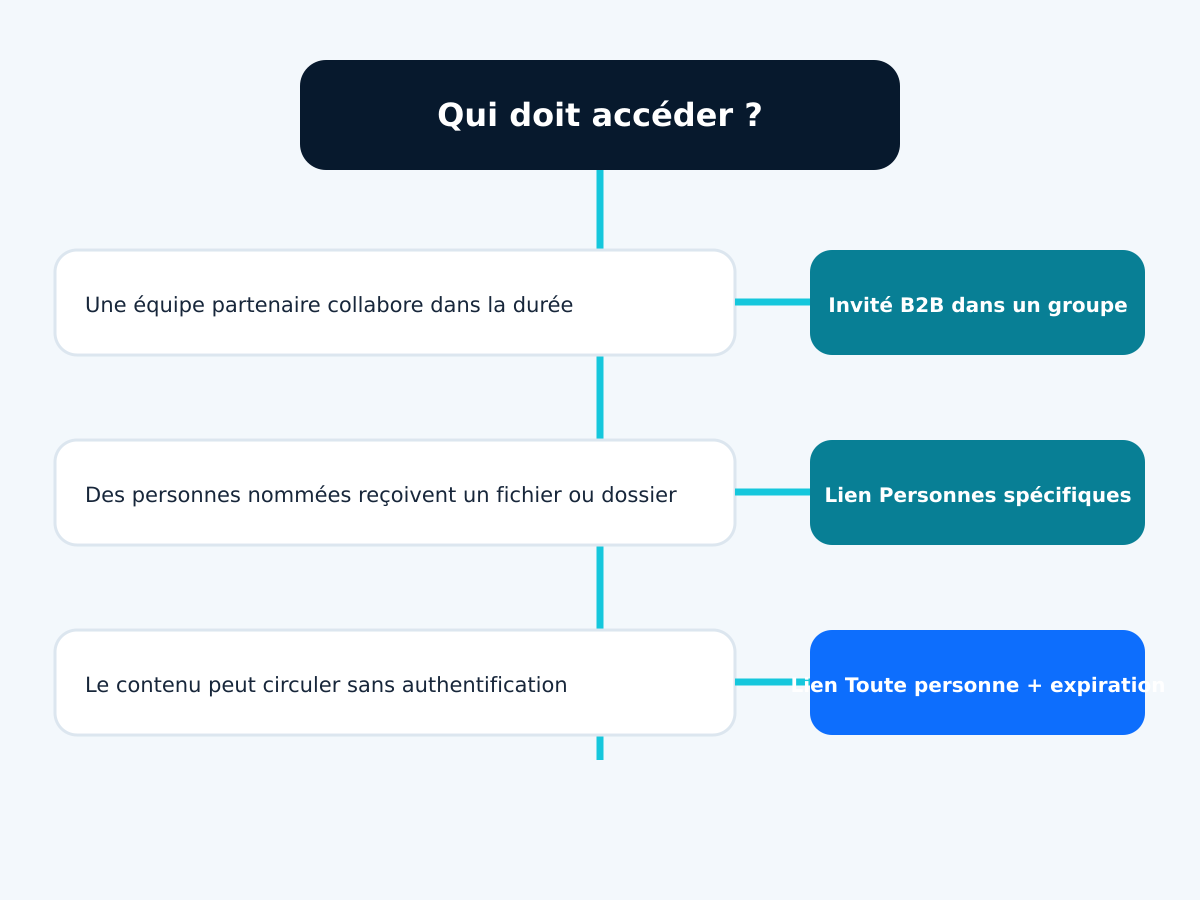
- B2B guest: manageable identity, groups, policies and ongoing collaboration.
- Specific people: access to a file or folder limited to designated addresses.
- Anyone: access without authentication; the link can be forwarded and individual traceability is limited.
- The tenant rule sets the ceiling; each site can be more restrictive, never more permissive.
Which option should you choose in one minute?
Use an authenticated guest when an external person joins a project, accesses several libraries, joins a team or needs ongoing access. Use 'Specific people' for a folder or document sent to known recipients without opening the entire site. An 'Anyone' link is only suitable if the content can circulate beyond the original recipients and the absence of authentication is accepted.
Ask five questions before sharing: who needs access, to what, for how long, with which permission and how will access be removed? If an answer is missing, do not default to the quickest option. Convenience at the time of sending can create forgotten access, an absent owner or a link that cannot be attributed to a person months later.
ArticleMicrosoft SharePoint support from GVISION covers the structure of sites, libraries, permissions and usage. This article focuses on the external sharing decision: it complements the service page without replacing tenant-level scoping.
Which SharePoint mechanisms should you distinguish?
SharePoint combines a tenant sharing level, a per-site level, site permissions and links applied to a file or folder. These layers work together. An option visible in the dialog does not mean it suits the content; a missing option may result from a stricter rule set at a higher level.
Microsoft describes four external sharing levels for a site: only people in the organisation, existing guests, new and existing guests, and anyone. The tenant setting determines the maximum allowed. A site can be more restricted but cannot exceed that ceiling. This relationship is explained in theofficial overview of external sharing in SharePoint and OneDrive, updated on 7 May 2026.
Link types answer a different question. 'People in your organisation' remains internal. 'People with existing access' does not grant a new permission: it provides a link to content already authorised. 'Specific people' ties access to designated addresses. 'Anyone' opens access to whoever has the link, according to the tenant and site settings.
How do you compare a guest, a specific-people link and an anonymous link?
Compare identity control, scope, duration, collaboration and removal. A guest is not inherently secure: they may receive too many permissions and remain active too long. A specific-people link is not automatically temporary. An anonymous link is not always prohibited, but the content must be suitable for circulation without individual attribution.
The table indicates the choice for each need. Check expiry and access reviews.
| Criterion | B2B guest / group | Specific people | Anyone |
|---|---|---|---|
| Identity | Authenticated guest object | Designated addresses | No authentication |
| Scope | Site, group, library or resources | Targeted file or folder | Targeted file or folder |
| Collaboration | Ongoing and structured | One-off or limited | Distribution without identity |
| Benefit | Central management and policies | Forwarding alone is not enough to open it | Very simple access |
| Limitation | Lifecycle to administer | Can remain active too long | Forwardable link and limited attribution |
| Use case | Project, partner, board | Collection from or delivery to known recipients | Public or non-sensitive content |
| Best choice according to need | Ongoing relationship | Named people | Deliberately open circulation |
Why does scope matter more than the button?
Access to a site, library, folder and file does not have the same reach. For ongoing collaboration, a dedicated site or library is often clearer than an accumulation of folder exceptions. For a one-off exchange, a file link may be enough. Avoid sharing the entire site just because several documents are scattered across it.
Breaking permission inheritance can solve an isolated case, but makes governance harder as exceptions multiply. Map the spaces that accommodate external users and separate them from sensitive internal content. A project site with identified owners, simple groups and an end schedule will generally be easier to review than a large intranet containing dozens of unique shares.
The business owner decides who still needs access; IT sets safeguards and provides visibility.
When should you use 'Specific people'?
This link suits a file or folder that needs to be accessible to a known list of people. Even if the message is forwarded, only the people secured for the link should be able to use it. Recipients must prove their identity through their account or the method offered by the tenant. This reduces the risk from simple forwarding without replacing checks on the correct recipient and content.
Use it to deliver documents to a customer, allow a few suppliers to review material or share a short-term working folder that does not require site membership. Grant read access by default; allow editing only when the process requires it. Do not use a specific-people link as a silent substitute for a project space lasting a year.
Set a review date. Reassess access if the recipient changes address or leaves their organisation.
When should you create a Microsoft Entra B2B guest?
A guest suits an ongoing, identifiable relationship: a consultant, board member, project supplier, partner or provider joining a group, site or several resources. Microsoft Entra B2B creates an external user object in the tenant and lets the partner use their own identity. This object can be added to groups, subjected to policies and removed centrally.
The documentation Microsoft Entra B2B, updated on 25 April 2026, explains that the host organisation retains control of its data while the partner uses their own credentials. It distinguishes external collaboration settings, which govern invitations, from cross-tenant settings, which control authentication between organisations.
The GVISION page on identity management with Microsoft Entra provides identity and access context. In SharePoint, add the guest to a group matching their role rather than assigning permissions at random. Designate a sponsor or owner, an end date and a procedure if the relationship changes.
When is an 'Anyone' link acceptable?
An 'Anyone' link requires no authentication. Anyone who obtains it can use it while it remains valid and the policy allows it. It is therefore unsuitable for sensitive personal data, confidential contracts, security plans or information for which every reader needs to be identified.
It can be useful for a public brochure, a large file intended for wide distribution, an already public document or a temporary upload whose disclosure would not cause significant harm. Limit it to reading where possible, require expiry if available and prevent downloading or editing if those restrictions meet the need. Exact option availability varies with configuration.
Document the reasoning: non-sensitive content, expected distribution, short duration, owner and alternative channel. If you need to know who viewed the document, an anonymous link is the wrong mechanism. Prefer identified recipients.
How does the external user authenticate?
A partner with a Microsoft Entra work account generally uses their home identity. A recipient without a compatible method can use a one-time code sent by email when this feature is enabled. Microsoft states that email one-time passcode is enabled by default for new tenants and tenants where it has not been explicitly disabled.
The official one-time passcode documentation states that the code is valid for thirty minutes and the session expires after twenty-four hours. This mechanism is an authentication method for a B2B guest; it does not turn an 'Anyone' link into an identified link. Do not confuse the sign-in experience with the scope of authorisation.
Test the invitation with a real external account, a personal address and a partner managed by another organisation. Also check conditional access rules: an overly strict requirement can block the partner, while an overly broad exception can weaken protection for all resources.
How do you coordinate MFA, conditional access and devices?
Conditional access policies can require multifactor authentication for guests and control sessions. When collaborating with a known Microsoft Entra organisation, cross-tenant settings can determine whether certain claims from the home tenant are trusted. The choice depends on risk, the partner and the resources involved.
Do not assume an external device will be managed by your organisation. For sensitive data, examine session restrictions, web access, downloads and permitted applications. Test the experience on a managed workstation, a personal device and a private browser. A technically correct but incomprehensible rule leads to workarounds through email or personal storage.
Apply the policy to the right scope and test every change with pilot users.
How do you classify documents before sharing them?
The sharing decision should follow from sensitivity. Create understandable categories, such as public, internal, confidential and highly restricted, then associate permitted methods with each one. The name matters less than users' ability to recognise a document and apply the rule without consulting a thirty-page manual.
Personal data remains subject to GDPR principles, including purpose limitation, minimisation, accuracy, storage limitation and security. Sharing with a supplier does not remove the need to identify their role, the need, duration and measures. The official regulation remains the legal source; sensitive cases require the DPO or a qualified adviser.
Avoid relying solely on the file name. The library, site, owners and labels should reflect the same policy. For a mixed set, separate the shareable document from the folder containing internal notes, identity documents or working versions.
Who can share and who should review access?
The tenant defines who can invite external users; the site can further restrict who may share. An organisation can reserve new guest invitations for owners while allowing members to share with existing guests. The right delegation depends on the number of sites, maturity and available support.
Appoint at least two owners per external site. The business owner validates the need and members; IT maintains rules, reports and mechanisms. Plan for replacing an owner who leaves the organisation. Ownerless sites should be suspended, reassigned or archived according to a defined procedure.
Train users to choose the link, permission and duration, then remove access.
How do you organise expiry and review?
Every external access should have an end event: a project date, contract expiry, delivery or periodic review. Technical expiry helps, but cannot know whether the business need continues. A review asks the owner to confirm, remove or extend access with a simple justification.
Segment reviews by site and owner. Start with anonymous links, sites open to new guests, inactive users and ownerless spaces. Do not delete blindly: some folders support an obligation or active relationship. Provide enough context to decide, then log the action.
Measure access removed, extended and left unanswered. Sensitivity, scope and the absence of an owner matter more than the number of links.
How do you test the configuration before wider rollout?
Create a pilot site without real data and test the four sharing levels, different links, reading, editing, expiry, forwarding a message, revocation and change of owner. Use external accounts with several identity types. Check what the recipient sees and what the administrator can find.
Also test errors: an invitation to the wrong address, a partner blocked by policy, a prohibited domain, an existing guest, an expired link, a moved file and an absent owner. Write down the expected result before testing. A screenshot or log demonstrates the behaviour rather than relying on memory.
The visual below shows a minimal decision path. GVISION recommends piloting one site and one business group, then expanding after validating rules, help messages and access removal procedures.

Which Belgian scenarios illustrate the choices?
A professional practice shares a collection folder with an identified client: 'Specific people' and an end date. A school opens a project space to a provider for one term: a B2B guest in a dedicated group. A non-profit association distributes an already public report: a time-limited anonymous link may be acceptable if the organisation wants simple distribution.
A multi-site group exchanges plans with several contractors: a separate external site, groups per work package and internal owners. A healthcare institution sends a document containing personal data: identified recipients, minimal scope and validation of the processing framework. A public administration publishes a blank template: a public channel rather than a collaboration link maintained indefinitely.
Partner status does not justify access to all resources.
Which mistakes should you avoid?
Avoid using 'Anyone' links out of habit, granting edit access without need, adding guests directly to multiple resources, ownerless sites, cascading permission exceptions and sharing without an end date. Do not treat an email address as sufficient proof for every sensitive action.
Do not make the entire tenant permissive to unblock a single site. Do not confuse 'People with existing access' with a new authorisation. Do not share a parent folder when only one file is needed. Do not let an authentication error drive users to personal email.
Finally, do not launch a review without decision-making capacity. Give owners the site name, resource, recipient, link type, latest available activity and the consequence of removing access.
Frequently asked questions
Does a guest need a Microsoft 365 licence?
Not necessarily to access shared content. However, the licences and features required depend on the services, policies and capabilities used.
Can a 'Specific people' link be forwarded?
The message can be forwarded, but only authorised recipients should be able to open the content after verification.
Is an 'Anyone' link always prohibited?
No, but it is unsuitable for content requiring identity, confidentiality or individual traceability. Use it for non-sensitive content with a controlled duration.
What is the difference between a guest and a specific-people link?
A guest is a manageable identity object in Entra and can belong to groups. A specific-people link authorises named people to access a particular resource.
Can MFA be required for guests?
Yes, conditional access policies can target guests. They need to be tested with the partner identities actually used.
What happens when an owner leaves the company?
A second owner must be able to take over the review. Without a replacement, the site must be reassigned, suspended or archived according to the procedure.
How often should access be reviewed?
There is no universal frequency. Use the project deadline and content risk, with more frequent reviews for sensitive spaces.
Conclusion: choose the identity, scope and end date before the Share button
Reliable external sharing is not a blanket ban. It is a series of simple, visible decisions: identified or unidentified recipient, specific resource, necessary permission, duration, owner and removal. A guest, a specific link and an anonymous link can each be appropriate, but serve different needs.
GVISION can map sites, define sharing levels, configure Entra and test the partner journey. To turn this framework into rules for your tenant, you can define your external sharing approach with GVISION.
Official sources
Published on . Updated on .
Let’s talk about your project
Want to apply this advice in your organisation? Let's review your needs and next steps together.
Talk to GVISION