
The short answer
After ransomware, do not start a mass restoration until compromised identities, sessions and workstations are contained. Define an RTO for each business service, choose a recovery point before the intrusion, restore an isolated pilot scope first, then expand in waves. Actual time includes investigation, decision, transfer, business validation and controlled reopening — not just the tool's speed.
- Define RTO and RPO by process, not for 'Microsoft 365' as a whole.
- Contain identities, sessions and devices before reopening.
- Choose and test a point before the first credible indicator.
- Restore in waves with a business owner and progression criteria.
- Measure the whole chain, then correct the runbook.
What does a Microsoft 365 RTO really mean?
The RTO is the maximum accepted time before a usable service returns. It does not measure only the duration of a restoration operation. The clock includes detection, bringing the incident under control, choosing a clean point, starting, checking and making the service available again. A two-hour target for 'Microsoft 365' therefore makes little sense unless someone specifies which users, mailboxes, sites and functions need to return.
Separate RTO from RPO. The RPO expresses the maximum acceptable data loss between the last recoverable point and the incident. A team may tolerate four hours of downtime but only ten minutes of data loss for an operational mailbox. Conversely, an archive library may accept recovery the next day using an older point. Document both values by process, with an owner who accepts the trade-off.
Start by classifying services into three levels: immediate continuity, the day's activities and convenience. This segmentation turns an abstract promise into a work order.
Why must the incident be contained before restoration?
Restoring into an environment that is still compromised can expose data again, trigger further deletion or let an attacker exploit the same accounts. Before each wave, disable or secure suspicious identities, revoke active sessions, check administrative roles, examine forwarding rules and isolate affected devices. Restoration and investigation can proceed in parallel, but reopening must not precede formal clearance.
Create a small decision-making group: incident lead, identity, backup, business owner and communications. It chooses the recovery point, resolves priorities and keeps a timestamped log. The recommendations from CISA for organisations affected by ransomware include triaging affected systems and prioritising their restoration on a clean network.
GVISION connects this work to Microsoft 365 data protection : backup is useful only if administrative permissions, notifications and recovery procedures are also protected and tested.
What inventory should you prepare before an incident?
A recovery inventory connects technical objects to business services. For Exchange, list shared mailboxes, executive mailboxes, order queues and support addresses. For SharePoint, identify sites containing procedures, contracts, customer files or operational documents. For OneDrive, do not automatically classify every account as critical: identify users whose personal space still holds a file essential to the process.
Add the owner, sensitivity, volume, dependencies, RTO, RPO and a validation order. Also note what the chosen solution does not cover: configuration, identities, conversations, integrated applications or data from a third-party tool. 'Microsoft 365' hides different mechanisms; an incomplete inventory creates surprises on recovery day.
Recycle bin, retention, Microsoft 365 Backup or third-party backup?
These mechanisms meet different needs. Versions and recycle bins help with a limited error. Microsoft Purview retention preserves content for compliance and search, but is not designed as a mass restoration engine. Microsoft 365 Backup targets Exchange, SharePoint and OneDrive with recovery points and optimised operations. A third-party solution may add a console, retention or specific workloads, but should be evaluated on evidence.
Microsoft explains in its Microsoft 365 Backup FAQ that legal holds are optimised for export and eDiscovery, not mass restoration. The Purview retention documentation describes how content is preserved in service locations. Do not turn a compliance policy into a recovery promise.
The best choice depends on scope, duration, administrative separation, volume, restoration features and testing. The table provides a framework, not a universal winner.
| Criterion | Versions and recycle bins | Purview retention | Microsoft 365 Backup | Third-party backup |
|---|---|---|---|---|
| Main purpose | Limited error and user recovery | Compliance, retention and eDiscovery | Large-scale restoration of Exchange, SharePoint and OneDrive | Protection according to the provider's scope and features |
| Benefit | Immediate and familiar | Preserves content according to a policy | Frequent points and optimised restoration in Microsoft 365 | May add workloads, a console or separation |
| Limitation | Limited window and volume; depends on the service | Not optimised for mass restoration | Product scope and billing to be checked in the tenant | Variable capabilities, location, security and performance |
| Validation | Restore a file, version and folder | Test search, export and obligations | Test batches, a clean point, permissions and full duration | Require evidence, logs, a measured RTO and data export |
| Best choice according to need | One-off incident of limited scope | Retention obligation and investigation | Native Microsoft 365 recovery and restoration at scale | Additional needs verified through a pilot |
How do you choose a clean recovery point?
The latest available point is not always the right one. The attack may have begun before visible encryption: session theft, a mailbox rule, a consented application, malicious synchronisation or gradual changes. Combine identity logs, security alerts, administrative changes and business accounts to establish a compromise window.
Choose a point before the first credible indicator, then test it on a small scope. Compare representative files, their versions, senders, dates and permissions. Also look for persistence mechanisms: a transport rule, mailbox delegation, guest account, OAuth application or synchronised device. Intact content can be put at risk again by a configuration that remains hostile.
Document the reasoning and uncertainty. If two points are plausible, a pilot on each may be safer than a rushed global restoration. The business owner needs to accept the data loss associated with the chosen point.
In what order should you restore Exchange, SharePoint and OneDrive?
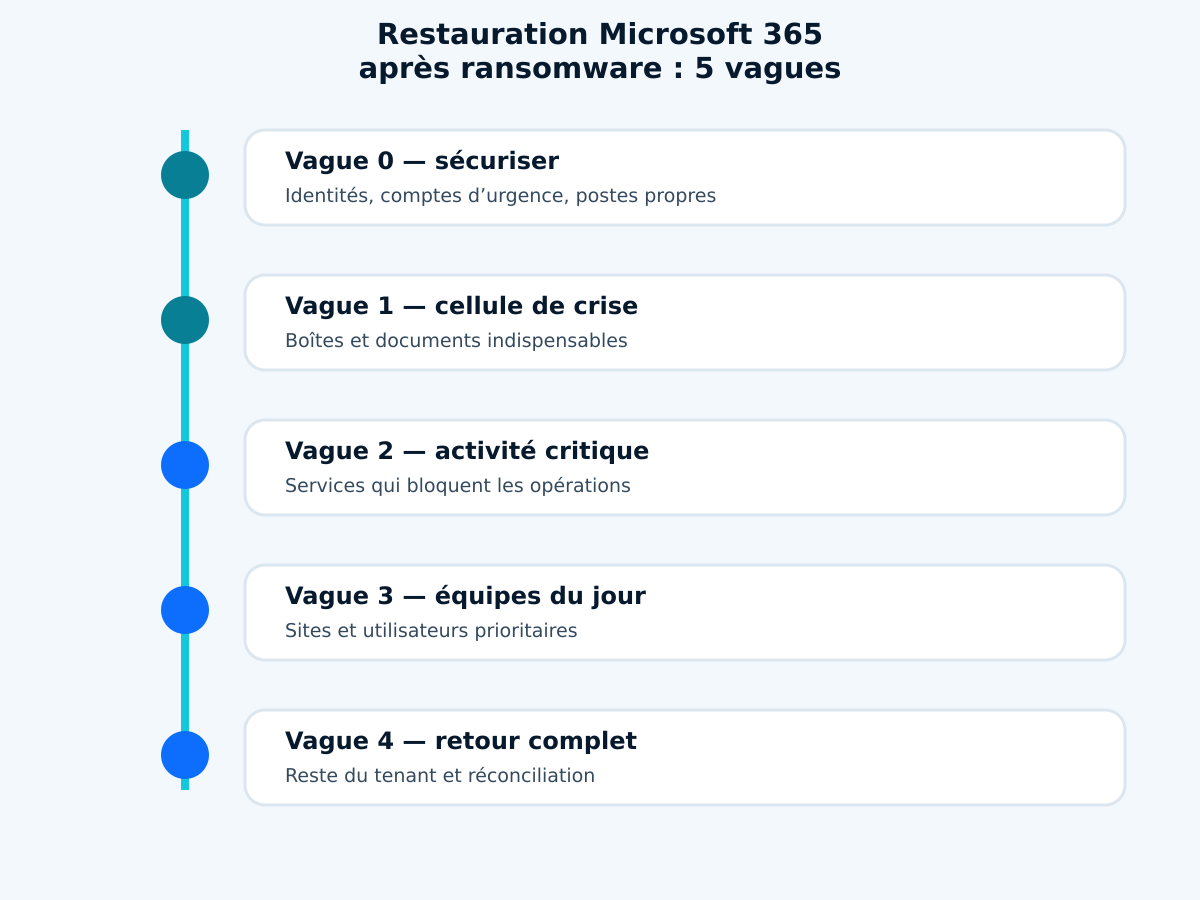
Work in waves rather than by entire product. Wave zero secures administrative accounts, the crisis channel and the workstations used for recovery. The first restores communications and documents essential to the response group. The second targets services directly blocking operations. The third covers the day's teams. The fourth handles the rest and individual requests.
In Exchange, start with operational and shared mailboxes receiving orders, requests or alerts. In SharePoint, prioritise sites linked to those mailboxes. In OneDrive, restore critical people only after confirming their devices and sync clients. Each wave has an owner, a limited batch, entry criteria, a test and a progression decision.
A large restoration is not necessarily faster than a controlled sequence. The first waves should deliver business value while validating the method. The package infographic formalises these five steps.
Which checks are specific to Exchange Online?
A restored mailbox needs checks beyond the message count. Check folders, sent items, calendar, contacts, archives and representative attachments. Verify delegations, mailbox rules, forwarding, connectors and transport rules that may have supported fraud or persistence. For a shared mailbox, have membership and Send As permissions validated.
Define how to handle messages received during the crisis. In-place restoration, restoration to another location and a temporary export do not create the same experience. Plan for duplicates and reconciliation. Finance, legal and support teams need to know which period is reliable and where to place new messages.
Test finding a known message, opening an attachment and sending from an authorised account. Do not automatically reopen all Outlook clients if some devices remain suspicious.
Which checks are specific to SharePoint and OneDrive?
For SharePoint, check the site structure, libraries, metadata, versions, links and permissions. Restoring to the same URL sometimes makes users' return easier, but increases the need to ensure the configuration is clean. Restoring to a new location can preserve the original for investigation and facilitate comparison, at the cost of more organised reintegration.
For OneDrive, monitor synchronisation. A compromised workstation or a client left offline can send unwanted changes back on reconnecting. Validate first with a clean browser and a pilot account. Then reopen sync clients in groups and watch for conflicts, deletions and change volumes.
Microsoft states in its official restoration guide that Microsoft 365 Backup can restore to the original or a new location, with normal or express modes depending on the scenario. The choice should match the validation plan, not just the advertised speed.
What does Microsoft 365 Backup actually promise?
The Microsoft 365 Backup documentation, updated on 18 August 2026, describes protection for Exchange mailboxes, OneDrive accounts and SharePoint sites within service data boundaries. It publishes recovery point frequencies and performance expectations, including express points for certain scenarios. These are vendor specifications, not a contractual RTO for your organisation.
Observed time depends on factors including the number of objects, their size, restoration type, the task queue and validation. A technically completed operation is not yet a restored service: integrity, permissions, applications and the user workstation need to be confirmed. Use theofficial Microsoft 365 Backup overview as a starting point, then measure your tenant.
How do you calculate a realistic RTO?
Break the RTO into six blocks: detection and decision, containment, preparing administrative accounts, point selection, technical restoration, then validation and reopening. For each block, provide a low, typical and adverse estimate. The realistic total is rarely the value shown in the console.
Build targets by tier. For example, the crisis group and critical operational mailboxes might target a few hours; essential sites, the same day; secondary spaces, the next business day. These values illustrate a method, not universal commitments. Volume, available teams, the service contract and regulatory constraints affect the answer.
Include dependencies: DNS, identity, MFA, clean workstations, network, backup provider, Microsoft support and the business decision-maker. If only one person knows the procedure, add mobilisation time and train a replacement.
What should the recovery runbook contain?
The runbook states who declares the incident, who blocks sessions, who accesses the backup, who chooses the recovery point and who validates each service. Add emergency accounts, provider contacts, evidence procedures, out-of-band communication channels and a decision template. Each step should produce an observable result, not simply 'check the backup'.
Prepare reference commands and screenshots without storing secrets in the document. Define batch names, priority order, stop criteria and rollback. Specify where to keep the event log and how to record an exception. The aim is for a second administrator to be able to execute the procedure under pressure.
On IT recovery plan connects this SaaS recovery to other dependencies: identities, workstations, network, applications and communication. GVISION can thus frame the exercise as business continuity rather than a simple console task.
How do you test without disrupting production?
Choose a non-sensitive but representative site, shared mailbox and OneDrive account. Create sample files and messages, modify them, delete some and note the time. Start restoration to an isolated location or a controlled batch. Measure every step from the decision to business validation.
The test should verify content, versions, search, attachments, permissions and a clean user's ability to work. Also simulate a failure: an incorrect point, larger volume, absent owner or unavailable administrator account. The procedure should explain how to stop, escalate and resume.
After the test, record duration by phase, deviations and actions. The editorial photo shows the necessary partnership between administrator and business owner. A 'completed' status in the console is not process validation.

Which Belgian scenarios change the priorities?
An accounting firm can prioritise the document intake mailbox and tax deadline site. A school can restore management communications and spaces needed for the day's lessons first. A multi-site group can restore the service desk, operating procedures and site locations according to their ability to work offline.
A non-profit association needs to protect donor data and restore campaigns without reopening compromised access. A healthcare institution distinguishes clinical information hosted elsewhere from administrative Microsoft 365 documents; it must not confuse document availability with continuity of care. A public administration retains evidence and decision-making obligations during recovery.
Which mistakes make a recovery plan unrealistic?
The first mistake is confusing retention, availability and backup. The second is measuring only data copying. Next come a missing inventory, a point chosen without investigation, a single administrator account, unsanitised devices, global restoration without a pilot and reopening without business validation.
Also avoid identical targets for all data, estimates without volumes and evidence stored only in the affected tenant. Do not test only accidental deletion if ransomware is the priority scenario. Do not promise management a timeframe before measuring containment, decision and verification time.
Frequently asked questions
Does Microsoft 365 automatically back up all data?
Microsoft provides resilience, retention and recovery mechanisms for each service, but this does not guarantee every RPO, retention period or restoration scenario. Map your needs and test the enabled solution.
Does the RTO start when you click Restore?
No. A business RTO includes detection, containment, decision, restoration, validation and reopening. Measuring only the technical task underestimates the time.
Does Purview Retention replace a backup?
No. Retention primarily serves preservation, compliance and eDiscovery. It can help recover content, but Microsoft distinguishes this function from optimised mass restoration.
Should you restore to the same location?
Not always. The same location simplifies habits and links; a new location facilitates isolation, comparison and preservation of the original. Decide according to the investigation and validation plan.
Which service should you restore first?
The service that restores the priority business capability, not necessarily the largest. A shared mailbox and an operational site can come before thousands of secondary accounts.
How do you prove a point is clean?
Cross-check identity logs, alerts, administrative changes and business observations, then restore an isolated sample. No console can fully replace this analysis.
How often should you test?
Test after a major change and at a frequency appropriate to criticality. For essential services, a regular exercise with evidence, timing and corrective actions is more useful than a symbolic annual check.
Conclusion: a credible RTO is proven through testing
A backup is not a timeframe. The RTO becomes credible when the organisation has measured the full chain, corrected bottlenecks and obtained business validation. GVISION can help you prepare a restoration test with GVISION, with a pilot scope, success criteria and an improvement plan.
Official sources
Published on . Updated on .
Let’s talk about your project
Want to apply this advice in your organisation? Let's review your needs and next steps together.
Talk to GVISION