
The short answer
Immutable 3-2-1-1-0 backup: in 2026, a Belgian organisation should retain multiple copies on separate media and locations, including at least one offline, isolated or immutable copy, and regularly verify error-free restoration. Immutability prevents changes or deletion for a defined period; it does not replace access isolation, monitoring or a tested recovery plan.
- 3-2-1 remains a baseline: three copies, two media or platforms, one off-site copy.
- The second “1” adds an offline, isolated or immutable copy; the “0” aims for zero errors found during recovery verification.
- The CCB recommends layered design, isolation, appropriate retention and regular restoration tests.
- Replication, a snapshot or a recycle bin is not always an independent backup.
- The immutability period must follow from risk, detection, RPO, RTO and retention obligations.
Immutable 3-2-1-1-0 backup: definition and principles
An immutable backup is a copy that cannot be changed or deleted for a defined period, even when ordinary administrator accounts are compromised.
Immutability is generally implemented through WORM — Write Once, Read Many — object locking, a hardened file system or physically offline media. Protection must cover restore points and the metadata needed to find them. A file marked “read-only” in Windows does not offer this level: an administrator can often change permissions or delete the volume.
On Centre for Cybersecurity Belgium updated its recommendations on 14 January 2026. It stresses immutability by design, layered protection, environment isolation, sufficiently long retention and practised restorations. These are resilience principles, not validation of a specific product.
Why an attacker targets backups first
Mature ransomware reduces the victim's negotiating power by deleting or disabling recovery paths before encrypting systems.
The CCB technical report on Qilin, published on 17 July 2026, describes deletion of Volume Shadow Copies, disabling restore points and deleting tape backups or scheduled tasks. This shows why a green console indicator is insufficient evidence: the console itself can become a target.
The simplest attack paths are often administrative. A domain account used on the backup server, a secret in the same vault as production, a domain-joined NAS or a bucket accessible with the same cloud identity creates a common dependency. An attacker need not break the backup algorithm; deletion permission is enough.
How to interpret 3-2-1-1-0 without turning it into a slogan
The 3-2-1-1-0 rule is a design aid: it is not Belgian law, a certification or a recovery guarantee.
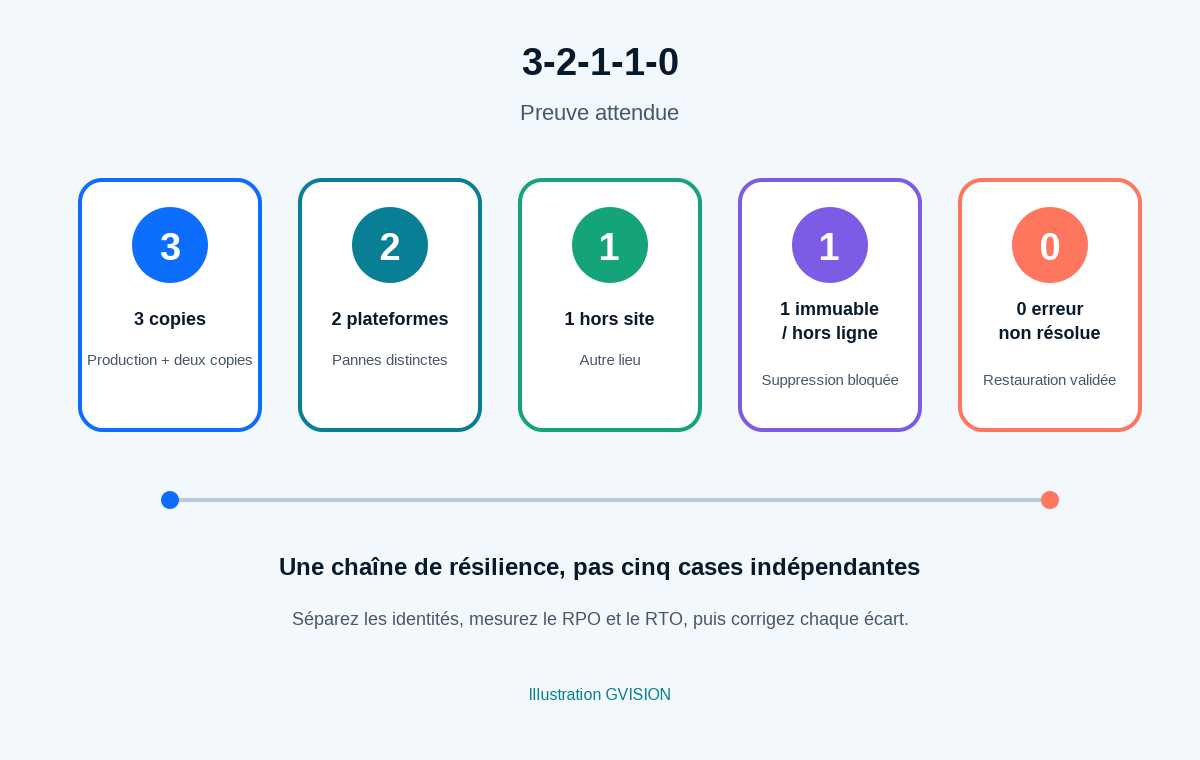
The first “3” counts production data and at least two copies. The “2” requires diversity: two media or platforms with different failure modes. The first “1” places a copy off the main site. The second “1” requires an offline, genuinely isolated or immutable copy. The “0” means integrity checks and restoration tests reveal no unresolved errors.
Veeam popularised this extension of the 3-2-1 rule and explains the second 1 and the 0 in its 3-2-1-1-0 documentation. The principle applies without Veeam. An organisation can combine a local repository, locked object storage and offline media, provided dependencies and evidence are documented.
What should a hybrid organisation protect?
Scope must follow business services and their dependencies, not just the servers visible in the backup tool.
Start with essential records and applications: ERP, business software, shared files, databases, virtual machines, network configurations, specialised workstations and SaaS data. For Microsoft 365, distinguish Exchange, OneDrive, SharePoint, Teams and the identities needed to administer restoration. For a NAS, identify shares, snapshots, internal applications and encryption keys.
Each workload receives an owner, criticality, RPO — maximum data loss the business accepts — and RTO — target restoration time. A shared mailbox may tolerate several hours of loss; a production database may need a tighter target. These values must come from the business, not a software default.
The GVISION page on cloud and local backups presents the available protection components. This guide adds the immutable architecture perspective: it helps decide how to separate copies and prove they remain recoverable.
Hardened repository, object storage or offline media: which should you choose?
No method is superior in every case: the right choice balances deletion resistance, restoration speed, operations and misconfiguration risk.
| Criterion | WORM object storage | Local or remote hardened repository | Offline media |
|---|---|---|---|
| Principle | Object versions locked for a period. | File system and privileges designed to prevent changes to chains. | Media disconnected or physically isolated after writing. |
| Benefits | Off-site, scalable, retention policies and logs. | Fast restoration, infrastructure control, job integration. | Very strong network separation when genuinely removed. |
| Limitations | Cloud permissions, locking mode, egress costs and capacity to control. | Hardening, patches, physical access and console still require governance. | Handling, rotation, physical storage and recovery time. |
| Use case | Secondary off-site copy for servers, SaaS or unstructured data. | Fast operational restoration of VMs and servers. | Last-resort copy or retention of selected critical datasets. |
| Cost | Depends on volume, retention, requests and recovery. | Depends on hardware, operations, site and capacity. | Depends on media, transport, vault and operations. |
| Best choice according to need | Organisation wanting an automated, locked off-site copy. | Organisation needing a short RTO and operational skills. | Organisation seeking strong separation and accepting more handling. |
A realistic architecture for servers, NAS, workstations and Microsoft 365
A workable architecture combines fast local restoration with an isolated secondary copy and an independent recovery procedure.
For servers or virtual machines, a local repository reduces transfer time during routine restoration. A copy job then sends restore points to a hardened repository or off-site immutable object storage. The production server should not have rights to erase this second copy. Backup accounts are not used for daily operations.
For a NAS, local snapshots can speed recovery after deletion, but remain tied to the same equipment. Add a copy to a separate platform with separate identities and retention. For mobile workstations, prioritise genuinely local data and verify that backups can finish despite offline periods.
Retention, privileges and keys: irreversible decisions
The immutability period must exceed the plausible detection delay without unnecessarily locking data beyond the need.
An attack can remain silent before encryption. If immutable retention is shorter than that delay, the last healthy points may expire. Excessive retention increases capacity usage, future transfer cost and exposure of unnecessary personal data. Align operational windows, retention obligations and deletion policy.
In Amazon S3, Object Lock distinguishes Governance and Compliance modes. Governance can be bypassed by identities with special permission; in Compliance, a protected version cannot be overwritten or deleted before expiry, even by the root user. This level requires careful scoping and testing.
Azure Blob offers time-based WORM policies and legal holds. The Microsoft documentation also distinguishes locked and unlocked policies and recommends testing before locking. Keep keys, emergency accounts and procedures in a separate location with controlled and verified access.
How to prove restoration will work
The zero in 3-2-1-1-0 does not mean no overnight alert: it means verified, documented recovery compatible with the business objective.
An integrity check verifies a backup file is not corrupted. Automated startup verifies a machine boots. A functional test confirms the application, database, permissions and dependencies actually allow work. These are different levels. For a critical application, the exercise must reach a transaction or representative user scenario.
Restore in an isolated environment to avoid reintroducing malware or conflicting with production. Measure time from the restoration decision to service availability. Record manual steps, missing credentials, bandwidth, errors and business validation time. Compare the result with the RTO and the restored point with the RPO.
On IT disaster recovery plan links these tests to restart order, roles, communications and dependencies. Successful data restoration is insufficient if DNS, identity, networking, a licence or a critical supplier remains unavailable.

Four Belgian scenarios, four different priorities
Organisation size matters less than interruption impact, data sensitivity and dependency complexity.
A non-profit or school may depend on Microsoft 365, registration software and a few administrative workstations. The plan must cover accounts, shared documents and recovery during enrolment or exams. A managed immutable copy may be more realistic than complex infrastructure without a dedicated owner.
A practice or healthcare institution must distinguish clinical availability, confidentiality and retention. Immutability reduces deletion risk but does not justify keeping every item indefinitely. Access rights, encryption, traceability and restoration procedures must be proportionate to sensitivity.
NIS2, GDPR and evidence: what immutability does not prove
An immutable backup supports resilience and processing security, but alone proves neither NIS2 nor GDPR compliance.
European Implementing Regulation 2024/2690, applicable to certain categories of digital entities covered by NIS2, requires continuity and recovery plans tested, reviewed and updated at planned intervals. The EUR-Lex text must be read according to the organisation's scope. Other Belgian entities may fall under the NIS2 law and different proportionate measures.
For GDPR, availability and restoring access are part of security, but minimisation and retention periods remain important. A poorly defined immutable policy can prevent technical erasure during its window. Document this limit, the retention basis and deletion at expiry rather than presenting WORM as automatic compliance.
Nine-step implementation plan
The safest path starts with critical services, then adds immutability to an already understandable, testable architecture.
Start with a representative but reversible workload. A pilot reveals bandwidth limits, copy windows, versioning effects and required permissions. Do not immediately lock long retention across all storage: a WORM policy may intentionally make deletion impossible.
- Map the services, data, identities, keys and suppliers needed for recovery.
- Assign a business owner and realistic RPO and RTO to each critical service.
- Diagram existing copies and mark their accounts, networks, sites and platforms.
- Identify common failure points: domain, console, vault, supplier or administrator.
- Choose the offline or immutable copy based on risk, volumes, recovery time and skills.
- Define retention, exceptions, expiry and capacity before locking a policy.
- Separate privileges, enable MFA where available and protect emergency accounts.
- Test a pilot scope first, then restore a complete service in an isolated environment.
- Schedule recurring tests, address every gap and update the recovery plan after changes.
Common mistakes to avoid
The most dangerous mistakes create a sense of security while retaining a shared failure point.
Another mistake is buying technology first, then deciding what it must protect. The decision must start from a loss scenario and acceptable delay. The best immutable repository does not compensate for an excluded database or a procedure known to only one person.
- Confusing snapshots, replication, synchronisation or a recycle bin with an independent backup.
- Joining the backup repository to the same domain and reusing daily administrator accounts.
- Calling storage “off-site” when the same cloud account can delete it.
- Enabling WORM policy without testing, capacity estimates or an expiry procedure.
- Retaining data too briefly to survive a silent compromise.
- Keeping all data indefinitely in the name of GDPR or NIS2.
- Testing only a file when recovery depends on a complete application.
- Measuring copy time but not actual recovery and validation time.
- Forgetting keys, licences, network configurations, SaaS accounts and supplier contacts.
Immutable 3-2-1-1-0 backup: frequently asked questions
Can ransomware encrypt an immutable backup?
A correctly locked version should not be changeable or deletable during retention by identities covered by the control. But an attacker can encrypt production before backup, steal data or target keys and catalogues. Isolation, detection and testing remain necessary.
Is a NAS with snapshots enough?
Snapshots often speed local recovery, but share the NAS's equipment, administration and sometimes identities. They are a useful layer, not necessarily the off-site immutable copy required for ransomware or physical disaster scenarios.
Are Object Lock and an air gap the same?
No. Object Lock prevents certain changes and deletions depending on mode and duration. An air gap aims for physical or logical inaccessibility from the current environment. A copy can be immutable without being offline, and offline without WORM locking.
Which immutability period should you choose?
There is no universal value. Consider compromise detection time, required restore points, RPO, retention obligations, volume and capacity. Test the policy before locking it and plan its expiry.
Is 3-2-1-1-0 mandatory under NIS2?
The formula itself is not a general legal requirement. NIS2 and applicable rules require proportionate measures, including continuity and recovery. 3-2-1-1-0 is a practical way to structure resilience, adapted to actual scope.
How often should restoration be tested?
Set frequency by criticality and add tests after migration, platform changes, retention changes or incidents. Automated checks can be frequent; a complete functional exercise may follow a separate documented cadence.
Should all backups be immutable?
Prioritise critical services and points needed for recovery. A uniform policy can waste capacity or block deletion of unnecessary data. Scope and retention must be risk-based, then expanded after validation.
Immutable 3-2-1-1-0 backup: from an available copy to demonstrable recovery
GVISION can map workloads, separate administration domains, implement a local and an off-site immutable copy, then organise measured restorations. To test your current architecture against a realistic scenario without absolute promises, discuss your IT continuity with GVISION.
Official sources
Published on . Updated on .
Let’s talk about your project
Let’s review your needs and the next steps for your organisation.
Talk to GVISION