
The short answer
To deploy patches without disrupting operations, start with a reliable inventory, classify assets by exposure and criticality, then separate the monthly cycle from emergencies. Test each wave on a small representative group, plan restarts and rollback, follow up missing devices and measure final compliance. The tool automates execution; policy, owners and evidence make the process safe.
- You cannot patch a device or application missing from the inventory.
- Priority depends on known exploitation, exposure and business impact, not just the severity score.
- Deployment rings limit the impact radius of a regression.
- Switched-off and mobile devices need a catch-up rule and deadline.
- A patch is complete only after installation checks, failure handling and retention of evidence.
Patch management is a cycle, not a button
The work is not just approving an update: you must decide, deploy, observe and repeat. NIST presents patch management as enterprise-wide preventive maintenance. This wording brings security and reliability together rather than opposing them.
A full cycle connects inventory, vendor advisories, risk analysis, testing, deployment and verification. It also specifies who approves an emergency, represents the business application, informs users and temporarily accepts an exception.
A monthly cadence suits ordinary updates without becoming an automatic wait. An exploited vulnerability or exposed service may require out-of-cycle action; a critical system sometimes needs stronger validation. In multi-site organisations, the window must follow working patterns, night teams and support availability.
Start with a usable inventory
A useful inventory links each asset to a version, owner, exposure and business function. A list of serial numbers is not enough.
List workstations, servers, browsers, office suites, PDF tools, video conferencing, agents, business applications and background components. Add hypervisors, firewalls, switches, Wi-Fi, printers, VoIP and firmware. For cloud services, note what the vendor updates and what remains your responsibility: connectors, agents, extensions, images or libraries.
Record product, version, device, location, technical and business owners, criticality, exposure, update method, window and last contact. “Unknown” needs action: a laptop absent for forty days and an ownerless server enter the exception queue.
Choose a reference source when the endpoint tool, directory, CMDB and purchasing records conflict. Reconcile replaced or never-enrolled devices. To delegate this monitoring, the page onGVISION managed IT and support describes the ongoing service; this guide remains focused on the method.
Prioritise by actual risk
The most severe patch is not automatically the most urgent. Combine observed exploitation, exposure, privileges, business impact, workarounds and confidence in the patch.
Start with vulnerabilities known to be exploited. CISA’s KEV catalogue complements vendor and national advisories. Then check whether the asset is internet-accessible, manages identities, has high privileges or reaches sensitive data. A medium vulnerability on an internet-facing device may take priority over a critical one in an isolated lab.
Add operational criticality. Invoicing, clinical care, schools or production require owners able to test essential functions. Agree a deadline, temporary exposure reduction and reassessment date.
Classify simply: out-of-cycle emergency, high priority, normal cycle or monitoring. Assign a deadline, approver, test and communication according to sector and restoration capability.
Severity, exploitability and priority
CVSS describes technical severity, not your topology or business. Add exposure, exploitation and organisation-specific impact.
Compare four deployment methods
No method is superior in every case: the right choice depends on urgency and the cost of interruption. One organisation can use several approaches simultaneously.
| Approach | Benefits | Limitations | Use case | Best choice according to need |
|---|---|---|---|---|
| Immediate widespread deployment | Reduces the exposure window very quickly. | Maximum impact radius if the patch causes regression. | Extreme urgency with a quick test and restoration ready. | Active threat, homogeneous assets, accepted risk. |
| Fixed window | Predictable for IT and business teams. | Absent devices may miss the cycle. | Ordinary patches, stable device estates. | Simple cadence with automatic catch-up. |
| Progressive rings | Detects problems early and limits impact. | Requires representative groups and monitoring. | Workstations, common applications, feature updates. | Default choice for a diverse device estate. |
| Out-of-cycle emergency | Accelerates response to exploitation or critical exposure. | Mobilises approvers, support and communications. | Actively exploited vulnerability or internet-facing service. | Pre-approved exceptional process. |
| Costs | Licences, services and testing effort depend on devices and tools; check applicable prices and entitlements before deciding. | |||
Build genuinely representative rings
A good pilot represents risky dependencies; it does not just gather the most tolerant technicians. Test hardware, software and profiles representative of the next wave.
A first ring may contain the IT team and a few lab machines. The second brings together volunteer pilot users: finance, management, reception, mobile teams and people using business applications, scanners, specialist printers, VPN or smart cards. The third covers a wider share of devices; the last receives sensitive systems after explicit validation.
Avoid placing all executives, everyone in one department or all backup machines in the same ring. Spread critical roles. For a cluster, do not patch all nodes simultaneously. For an isolated site, check that assistance or a local procedure exists if restart fails.
Define progression criteria: installation rate, no blocking alerts, validation of authentication, applications, printing, VPN and important peripherals. Specify who gives approval and how long the signal is observed. User silence is not automatically validation; a short functional test is more reliable.
Microsoft states that Intune update rings control deferrals, deadlines, restart behaviour and user experience, among other things. Its Windows update management documentation, updated on 1 April 2026, also notes that Intune stores policy assignments while devices download approved content from Windows Update.
Plan for switched-off laptops and remote teams
A night window is useless if devices are switched off; policy must define what happens at the next connection. Catch-up is part of the design, not end-of-month cleanup.
Decide whether downloading can run in the background, installation starts at next contact and how users choose a restart before the deadline. Windows policies can configure a deadline and grace period. Microsoft specifies that on recent Windows 11 versions, grace starts when installation finishes and a restart is required; after the effective deadline, restart may be enforced. Test these behaviours with your versions and policies rather than assuming them.
Communicate useful details: deadline, estimated duration, need to plug in the device, how to defer and support contact. Repeated vague notifications teach users to ignore them. Agree realistic periods with managers for teams seeing patients, teaching, on construction sites or providing continuous service.
Create a queue of devices not seen for a defined number of days. Distinguish leave, stock, failure, disposal, spare devices and shadow IT. After a long absence, avoid an abrupt restart at sign-in where possible: grace and communication must allow work to be saved while closing the gap quickly.
Treat servers as dependent services
A server is not patched in isolation: you maintain a chain of applications, databases, identities, networking and backups. The plan must start from the service delivered.
Map shutdown and startup order, service accounts, certificates, available storage, pending queues and scheduled tasks. Check the appropriate backup and especially the restoration procedure. A snapshot can help in some environments but is neither a universal backup nor always compatible with a transactional application. Follow vendor recommendations.
For redundant systems, remove one node, patch it, check health and synchronisation, then move to the next. For a single server, agree downtime, test essential functions after restart and define a rollback decision deadline. Keep vendor contacts and licences needed for recovery.
Do not confuse successful installation with a healthy service. After patching, test authentication, ports, processing, exchanges, backup and monitoring. Ask the business owner to confirm a representative transaction. Technical verification and functional validation cover different risks.

Do not forget third-party software, drivers and firmware
An up-to-date Windows estate can remain vulnerable through its browser, PDF reader, meeting tool, remote agent or network equipment. Measure coverage by product, not just operating-system compliance.
Classify applications into three categories: reliable automatic updates, centralised deployment needed and legacy products requiring a manual procedure. Check update channels, package signatures, supported versions and dependencies. Identify an owner for browser extensions and embedded components; grey areas often last longer than difficult patches.
Treat drivers and firmware carefully. They fix vulnerabilities and hardware defects but can change networking, storage, displays or peripherals. Test by device model and keep rollback packages where the manufacturer provides them. Microsoft Autopatch can manage approval and gradual deployment of certain drivers and firmware, but prerequisites and licensing rights must be checked for the tenant concerned.
Rarely connected equipment deserves a separate register: spare devices, room PCs, kiosks, shared tablets, printers, phones and appliances. Arrange periodic reconnection or on-site maintenance. An inventory showing “compliant” because it forgot an asset creates misleading assurance.
Prepare exceptions and rollback before deployment
An exception without an owner or deadline becomes a permanent vulnerability; an untested rollback remains an intention. Both must be decided before the window.
For each wave, record stop conditions: installation failure, lost connectivity, unavailable essential application, rising incidents or a degraded indicator. Specify who can suspend the wave, how to isolate affected devices and which version to restore. Keep instructions outside the system that may become unavailable.
When a patch cannot be installed, document the reason, assets, risk, compensating measure, owner, approver and review date. A compensating measure may reduce exposure, disable a function, restrict access or strengthen monitoring. It does not remove the need to patch or replace the product.
Rollback is not always possible or desirable. Some updates change data, schemas or components whose removal does not restore the original state. This links backup, restoration, vendor documentation and functional testing. The decision must compare staying patched with a regression against reverting to a vulnerable version.
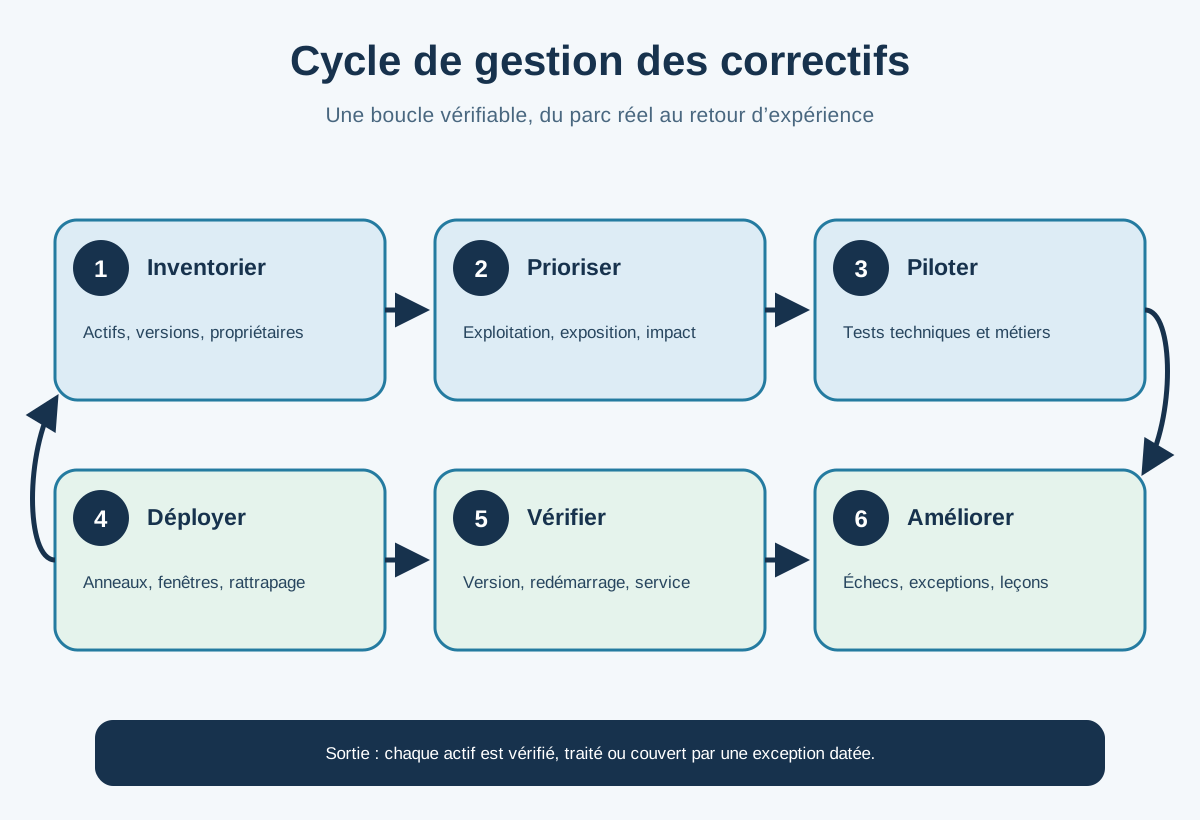
Apply an eight-step operational cycle
A short, repeatable procedure is better than a theoretical document nobody follows. Use these eight steps as a basis, then adapt them to your devices.
- Discover: reconcile assets, versions, owners and last contact.
- Monitor: collect vendor advisories, exploitation information and relevant national alerts.
- Assess: check applicability, exposure, criticality and existing measures.
- Decide: classify as emergency or normal cycle, define the deadline and approver.
- Test: deploy to a lab and representative pilots with a functional scenario.
- Deploy: use documented waves, windows and catch-up rules.
- Verify: check version, restart, service health and user feedback.
- Improve: address failures, exceptions, unknown assets and lessons before the next cycle.
If your Microsoft environment supports it, the Microsoft Intune and endpoint management services can support rings, deadlines and reports. The process must nevertheless also cover servers, third-party software and equipment outside this scope.
Windows Autopatch automates several Microsoft workloads and uses ring sequences. The official documentation, updated on 13 July 2026, covers Windows, Microsoft 365 Apps, Edge and Teams according to applicable entitlements. Do not assume a “patch management” product covers everything: create a product-tool-owner matrix.
Measure risk reduction, not activity volume
The number of patches sent measures effort; verified compliance and ageing exceptions measure outcomes better. A dashboard must lead to action.
Track inventory coverage, recently seen assets, time from decision to installation, success by wave, pending restarts, exploited vulnerabilities still present, and open exceptions with their age. Separate workstations, servers, third-party applications and network equipment. A global average can hide a small, highly exposed group.
Present failures by cause: absent device, insufficient storage, policy conflict, unsupported version, installation error, missing restart or business dependency. Each category needs an owner and next action. Archive the timestamp, scope, approval, result and gaps to reconstruct a decision.
A short monthly meeting can review three questions: which assets are uncontrolled, which exceptions are overdue and which incidents require changes to rings or tests? Management reporting must translate technology into exposure and continuity without promising zero risk.
Avoid common mistakes
Failures often come from an incomplete process rather than the patch itself. The following mistakes are predictable.
- Deploying everything at once: a minor issue becomes a widespread incident.
- Piloting only within IT: business applications and peripherals are never tested.
- Waiting for the monthly window for every vulnerability: active exploitation may require an emergency procedure.
- Treating absent devices as compliant: the dashboard improves while exposure remains.
- Patching only Windows: browsers, third-party tools, firmware and appliances remain forgotten.
- Forcing a restart without communication: users bypass rules or lose work.
- Closing at “deployed”: installation, restart and service are not checked.
- Accepting an exception without a date: technical debt becomes permanent.
Start with a reconciled inventory, two representative rings, an emergency rule and a failure report. Then add applications, servers and equipment.
Frequently asked questions
Should all patches be installed immediately?
No. Active exploitation or an exposed asset can justify an emergency; other patches follow proportionate testing and waves. The decision must be documented.
How many deployment rings are needed?
There is no universal number. A lab, a representative pilot group and a broad wave often form a foundation, supplemented for critical systems.
What should you do with computers switched off during the window?
Define catch-up at the next connection, a deadline, a grace period and clear communication. Track long-absent devices separately.
Does Intune patch all software?
No. Its capabilities depend on the system, product, policy and licences. Map third-party software, servers and equipment needing another mechanism.
Is a high CVSS score enough to decide?
No. Add known exploitation, exposure, privileges, business criticality, compensating measures and patch reliability.
How do you check whether a patch succeeded?
Check the version and technical status after restart, then test important functions. Address errors and absent devices rather than counting only commands sent.
Does a backup guarantee rollback?
No. Restoration must suit the application and be tested. Some changes require a vendor procedure or full recovery rather than simple uninstallation.
Conclusion: accelerate without improvising
Useful speed comes from a prepared process, not blind deployment. By knowing the devices, pre-approving emergencies, testing dependencies and tracking gaps, the organisation can reduce exposure without turning every patch into a crisis. To scope or operate this cycle in a hybrid environment, you can talk to the GVISION team in Belgium.
Official sources
- NIST SP 800-40 Rev. 4 — Guide to Enterprise Patch Management Planning (new tab)
- CISA — Known Exploited Vulnerabilities Catalog (new tab)
- Microsoft Learn — Windows update management overview (new tab)
- Microsoft Learn — What is Windows Autopatch? (new tab)
- Microsoft Learn — Enforcing compliance deadlines for updates (new tab)
Published on . Updated on .
Let’s talk about your project
Want to apply this advice in your organisation? Let's review your needs and next steps together.
Talk to GVISION