
The short answer
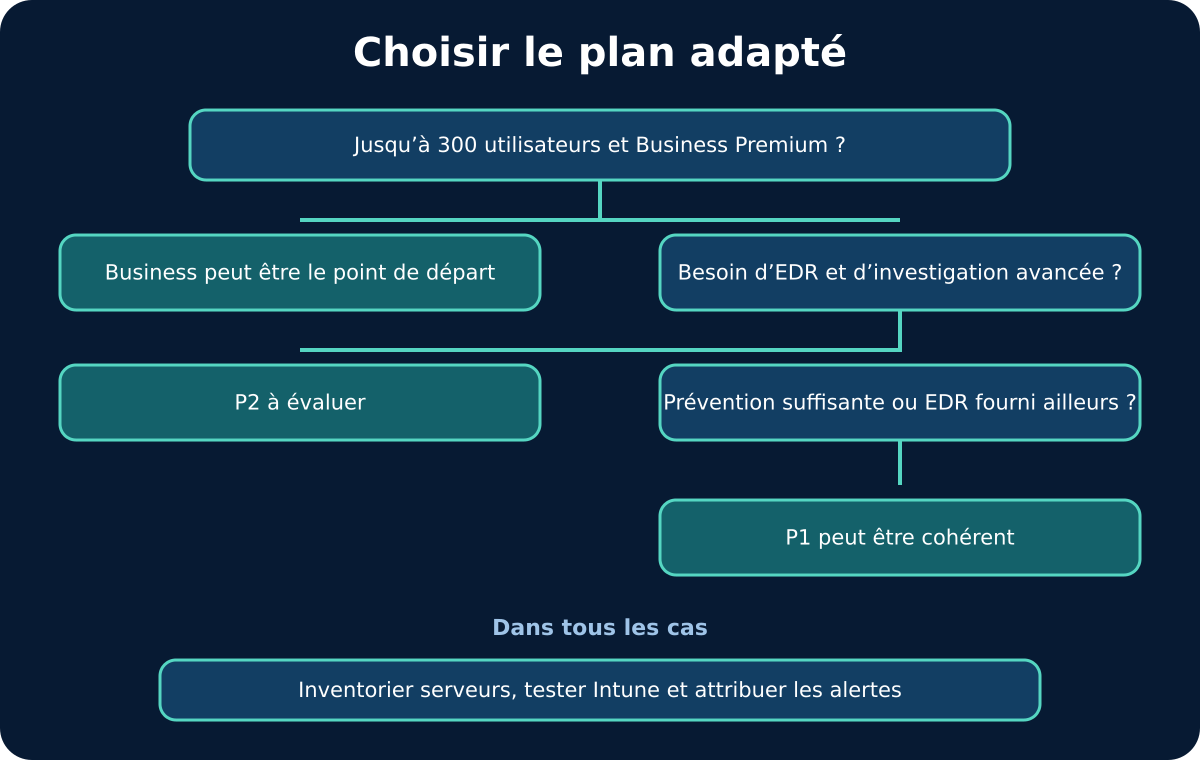
Defender for Business often suits eligible organisations with up to 300 users seeking prevention, EDR and automated remediation in a simplified offering. Defender for Endpoint P1 focuses on prevention and hardening; P2 adds EDR, automated investigation, vulnerability management and advanced features. The right choice also depends on servers, existing licences and the team able to handle alerts.
- Business: simplified scope, up to 300 users, with EDR and automation.
- P1: prevention and attack surface reduction, without full EDR.
- P2: advanced detection, investigation and response for more mature security operations.
- Servers, Intune administration and human handling of alerts must be budgeted separately.
What is the real choice to make?
The choice involves more than three licences: it combines a level of prevention, detection capability, an operating model and an actual device estate.
Start with the incidents the organisation needs to be able to prevent, see and handle. Modern antivirus blocks known threats and reduces the attack surface; EDR retains and correlates more signals to investigate suspicious behaviour. Automated investigation can then analyse an alert and propose or perform remediation depending on the configuration. If nobody monitors the queue, triages incidents or decides to isolate a machine, buying the feature alone does not create response capability.
Then map users, workstations, mobile devices and servers, operating systems, sites and responsibilities. The GVISION page on XDR/MDR endpoint protection illustrates the operational step that follows choosing a technology: bringing signals together, handling alerts and organising response. This article remains a Microsoft comparison and does not assume that one solution suits every environment.
What do Business, P1 and P2 cover?
Business combines P1 prevention and some P2 features in an optimised experience; P1 hardens and protects; P2 adds advanced investigation and response.
According to the Microsoft Defender for Business overview, updated on 20 January 2026, Business is designed for organisations with up to 300 users. It is available separately or included in Microsoft 365 Business Premium. It includes next-generation protection, attack surface reduction, optimised EDR, automated investigation and remediation, and core vulnerability management features. Its aim is to make an advanced set of capabilities manageable with a simpler configuration.
The official Microsoft Defender service description, updated on 22 May 2026, describes P1 as the prevention foundation: next-generation antimalware, attack surface reduction rules, device control, firewall, network protection and application control. P2 adds EDR, automated investigation and remediation, vulnerability management, threat analytics, deep analysis and Microsoft Threat Experts, among other capabilities. P2 therefore is not simply 'more blocking': it provides more tools for investigation work.
How do you compare capabilities without oversimplifying?
The table shows that no plan wins outright: P1 may be sufficient for a prevention strategy, Business combines simplicity and EDR, and P2 targets advanced operations.
Read each row in its licensing and operational context. An organisation already equipped with Microsoft 365 Business Premium may have access to Business without a separate purchase for eligible users, but still needs to deploy, configure, test and monitor the service. An organisation with E3 may have P1 depending on its contract and decide whether the risk and response capability justify P2. Product names and inclusions may change: check the licensing portal and Microsoft terms at the time of purchase.
Costs are not shown in this table because they depend on the programme, country, commitment, discounts, base licences and servers. Compare total cost instead: licences, administration, onboarding, alert operations, SIEM/SOC integration, retention, training and incident handling. An advanced feature without a process can cost more than the protection it provides; a minimal licence without sufficient visibility can delay detection.
| Criterion | Defender for Business | Endpoint P1 | Endpoint P2 |
|---|---|---|---|
| Target audience | Organisations with up to 300 users | Organisations with enterprise prevention needs | Organisations with advanced detection and response operations |
| Next-generation protection | Yes | Yes | Yes |
| Attack surface reduction | Yes | Yes | Yes |
| EDR | Yes, optimised experience | No, no full EDR | Yes, advanced capabilities |
| Automated investigation and remediation | Yes | No | Yes |
| Vulnerability management | Core features | Not listed as a P1 capability | Advanced features |
| Advanced Hunting | Not listed in the Microsoft comparison | No | Yes, data and six-month retention according to Microsoft |
| Configuration | Simplified, Intune integration possible | Managed through enterprise tools | Managed through enterprise tools and the SOC |
| Cross-platform | Windows, macOS, Linux, Android, iOS subject to prerequisites | Same platform, capabilities depend on plan and OS | Same platform, capabilities depend on plan and OS |
| Servers | Additional server licence required | Separate server licence depending on the scenario | Separate server licence depending on the scenario |
| Main limitation | 300-user limit and simplified experience | No full EDR | More features to operate and govern |
| Best choice according to need | Eligible team seeking simplified EDR and automation | Microsoft prevention with another detection solution | Organisation needing advanced investigation, hunting and response |
What difference does the 300-user limit make?
The 300-user limit is a positioning condition for Defender for Business; beyond that, Microsoft directs organisations to the enterprise P1 or P2 offerings.
The Microsoft Defender for Business FAQ, updated on 7 August 2026, confirms that the offering targets up to 300 users and recommends enterprise offerings above that threshold. Do not count devices alone: document the identities that need a licence, external workers, prohibited shared accounts, subsidiaries and planned changes. An organisation with 285 people acquiring another company should not build an architecture that cannot scale.
Take care with mixed environments. Microsoft states that a tenant holding both Defender for Business and Defender for Endpoint P2 licences uses the Business experience by default. Switching to P2 requires licensing all affected users and contacting Microsoft support. This behaviour makes a partial transition more complex than simply adding licences. Validate coexistence, usage rights and the actual experience before signing or migrating.
Who should handle alerts?
An EDR licence does not replace the roles, working hours or decisions needed to triage and contain an incident.
Appoint a console owner, a deputy and an escalation chain. Define daily checks, alert priorities, triage time, conditions for isolating a workstation and how to contact the business owner. A school, hospital, administration or industrial group will not always accept the same automatic action. The security team must understand how isolation, quarantine or blocking affects operations.
P2 provides more material for investigation, but it needs interpretation. Business simplifies some views and automations, helping a small team without removing the need for governance. P1 can be appropriate when another tool or service provides detection and response. Also compare the internal SOC, provider, coverage hours, evidence collection, notifications and exercises. The decision concerns a sociotechnical system, not a box in a table.
How should you handle workstations, mobile devices and servers?
Inventory every operating system and server: cross-platform coverage exists, but onboarding, features and licensing differ.
Microsoft presents Defender for Endpoint as a platform covering Windows, macOS, Linux, Android and iOS in its documentation updated on 28 July 2026. This scope does not mean every feature is identical everywhere. Check supported versions, prerequisites, the agent, passive or active mode, application exclusions, connectivity and how each device type appears in the portal. Include off-site and rarely connected workstations in the test.
Servers require separate attention. Microsoft states that their protection requires an additional server licence or an appropriate Defender for Servers offering, depending on the architecture. Inventory physical hosts, virtual machines, legacy systems and third-party-managed servers. Do not blindly apply a workstation policy to a production server. Have the application owner validate exclusions, maintenance windows, performance and rollback procedures.
What role does Microsoft Intune play?
Intune simplifies endpoint onboarding and policies, but compliance, security configuration and incident response must be distinguished.
The Defender for Business setup procedure describes a wizard, roles, notifications, Windows onboarding and integration with Intune. The FAQ also states that customised ASR rules require Intune. In a Microsoft 365 estate, endpoint management with Microsoft Intune can therefore serve as a deployment and control layer. However, check which authority manages each setting to avoid conflicting policies.
Build a clear hierarchy: pilot groups, baseline policies, temporary exceptions, owners and expiry dates. Do not turn an application exception into a general exclusion. Test attack surface reduction rules in audit mode where observation is available, then measure affected applications before enabling them. Finally, check that devices are actually onboarded, active, up to date and in the correct group; assigning a policy does not prove it has been applied.
Which data and GDPR rules should you consider?
Collect the signals needed for security, limit access and document purpose, retention and employee monitoring.
An EDR processes technical information about devices, processes, files, connections and sometimes users. The5 of the GDPR requires, among other things, purpose limitation, data minimisation, accuracy, storage limitation and security. Involve IT, security, the DPO, HR and social consultation where applicable. Document purposes, data categories, recipients, duration, transfers, access rights and rules for use in an investigation.
According to Microsoft's table, P2 offers advanced hunting data and six-month retention for that capability; the comparison does not assign that retention to Business. Do not choose a duration simply because it is available. Link it to investigation scenarios, obligations, the SIEM and budget. Restrict access to search functions, log administrative actions and separate cybersecurity from general productivity monitoring.
How do you run a useful pilot?
A pilot must demonstrate onboarding, prevention, alert generation, escalation and recovery on representative devices.
Start with a reliable inventory and a limited group covering several profiles: office, remote work, a business-application workstation, Mac or Linux if present, a mobile device and a separate test server. Capture the initial state, existing antivirus, exclusions and network dependencies. Configure roles, notifications and groups before onboarding. Use benign tests documented by Microsoft or your internal procedure; never simulate an attack in production without authorisation.
Then measure coverage, sensor health, false positives, triage time and application impact. Process an alert end to end: receipt, enrichment, decision, communication, remediation and closure. The following illustration shows that the pilot must combine tools and people. Expand in rings with a stop criterion and rollback procedure. Keep an exception log and a formal decision on the chosen licence.

Which Belgian scenarios help inform the decision?
Size helps determine eligibility, but criticality, devices, operating hours and response capacity determine the level that is actually useful.
A 120-person services company already using Microsoft 365 Business Premium may favour Defender for Business, then invest in onboarding, policies and monitoring. A 70-person association with limited IT capacity may make the same choice while outsourcing triage to a partner. A business with 450 E3 users may retain P1 if another system provides EDR, or evaluate P2 to consolidate investigations. In every case, inventory existing licences before comparing prices.
A multi-site group with 24/7 production must test isolation and exclusions on industrial workstations. A healthcare institution will prioritise continuity, traceability and separation of roles. An administration may need to integrate procurement procedures, delegations and on-call schedules. An international company will check tenant governance, regions and the SOC. These examples do not prescribe a licence: they show why operating context can overturn a choice based solely on user numbers.
Which mistakes should you avoid?
The costliest mistakes are choosing on price alone, forgetting servers, mixing licences without testing and leaving alerts without an owner.
Also avoid confusing an Intune-enrolled device with one correctly onboarded in Defender, enabling every ASR rule on the same day, retaining exclusions without expiry dates or assuming all features are identical on every OS. Do not duplicate policies across consoles without defining authority. Do not treat a green dashboard as proof of security: check sensors, events, notifications and response actions.
Finally, do not present P2 as automatically superior. If nobody investigates, the capability is underused; if risk requires visibility that P1 does not provide, the saving is misleading. Document assumptions, test a representative sample and reassess after an acquisition, licence migration or SOC change. The best choice is one the organisation can maintain, monitor and use during an incident.
Frequently asked questions
Does Defender for Business include EDR?
Yes. Microsoft lists optimised EDR and automated investigation and remediation. P1 does not provide full EDR; P2 offers the advanced features.
Is Business limited to 300 devices?
Microsoft positions the offering for organisations with up to 300 users. Devices and servers must still be inventoried and licensed under the applicable terms.
Can Business and P2 be mixed in the same tenant?
Microsoft's FAQ states that a mixed environment uses the Business experience by default. A transition to P2 must therefore be planned and validated with appropriate licences and Microsoft support.
Are servers included?
Not by default. Microsoft provides an additional server licence or a Defender for Servers offering depending on the scenario. Check every system and environment.
Is Intune mandatory?
Not for every feature, but it simplifies deployment and enables customised ASR policies in documented scenarios, among other things.
Does P2 replace a SOC or MDR?
No. P2 provides more data and automation; an organisation or provider must still monitor, triage, decide and respond.
How do you choose between P1 and P2?
Start with incident scenarios, EDR and investigation requirements, existing licences, devices, response capacity and a representative pilot.
Conclusion
Defender for Business, P1 and P2 serve different models. Business brings advanced features together in an experience for eligible organisations; P1 provides a preventive baseline; P2 supports deeper investigation and response. A good decision document links existing licences, actual devices, risks and alert ownership.
GVISION can help a Belgian organisation inventory devices, clarify the operating model and test deployment without turning the comparison into a universal promise. To move from the table to a verifiable scope, you can define your choice and pilot.
Official sources
Published on . Updated on .
Let’s talk about your project
Want to apply this advice in your organisation? Let's review your needs and next steps together.
Talk to GVISION