The short answer
Choose Windows 365 when each user needs a personal, persistent Cloud PC with simple budgeting. Prefer Azure Virtual Desktop to pool sessions, publish applications or finely adjust Azure resources. Retain or modernise RDS when a Windows Server application and local dependencies require it. Decide by usage profile, never solely user count.
- Windows 365 delivers a Cloud PC managed as a workstation, with chosen capacity and predictable per-user subscription cost.
- Azure Virtual Desktop delivers full desktops or RemoteApps, single- or multi-session, in an Azure environment sized by the organisation.
- RDS publishes Windows Server desktops or apps and leaves more infrastructure to operate: hosts, gateway, broker, licences and high availability.
- A reliable calculation includes licences, Azure, storage, networking, backup, monitoring, support and administration time.
- A pilot must test real applications, peripherals, video conferencing, printing, profiles and less favourable connections.
The real need: deliver a working experience, not simply a virtual machine
Start with the user's task: full desktop, single application, occasional access or a permanent personal environment. An accountant using several applications eight hours daily, a technician occasionally accessing a legacy app and a provider needing three-month project access have different profiles. Imposing one architecture can raise costs or worsen experience.
Describe applications, data, peripherals and connection locations first. Some apps require network proximity to a database. Others interact with scanners, label printers, card readers or USB equipment. Video conferencing uses real-time audio and video. A simple desktop login test therefore does not cover a working day.
Add the operating model. Who builds Windows images, applies updates, monitors saturation, handles profile failures and manages licences, capacity and security? The page GVISION Windows 365 presents the Cloud PC as an Intune-managed workstation. This comparison determines when that simplicity is enough and when AVD or RDS infrastructure remains more logical.
Windows 365, AVD and RDS: where does responsibility lie?
All three deliver Windows remotely but delegate different layers to Microsoft. Windows 365 resembles a SaaS workstation. AVD provides a managed control plane with session resources in Azure. RDS is a set of Windows Server roles deployed and maintained by the organisation or provider.
Windows 365: a Cloud PC assigned to a user
Microsoft describes Windows 365 Enterprise as a service creating Cloud PCs managed with Intune, Entra ID and AVD connectivity. The result resembles a personal workstation: selected capacity, applications, settings and persistent session.
This suits rapid standardisation for regular users without sizing VM pools. Fixed billing by size eases forecasting, but dedicated resources may be inefficient when unused much of the time. Microsoft also offers Flex and Reserve; suitability, availability and terms must be checked for the project.
Azure Virtual Desktop: a desktop and application platform
AVD is a virtualisation service on Azure. It delivers full desktops and RemoteApps, single- or multi-session. Microsoft states capacity depends on resources, applications and workloads: a universal ratio would mislead.
The organisation selects hosts, images, profiles, storage, networking, host pools and scaling strategy. This can improve efficiency for predictable concurrent or seasonal usage. It also introduces Azure operations: capacity, variable costs, images, profiles, monitoring and recovery must be designed.
Remote Desktop Services: publish from Windows Server
RDS relies on several Windows Server roles : Session Host, Connection Broker, Gateway, Web Access and Licensing. They run sessions, distribute connections and secure access. Resilient architecture addresses certificates, high availability, backup and upgrades.
RDS remains relevant for some Windows Server applications, strong local dependencies or controlled existing investment. Do not retain it through inertia. RDS CALs, supported versions and infrastructure components are part of cost and risk. AVD migration may simplify some layers but cannot fix a slow or unsupported application.
Full comparison: which model fits your organisation?
There is no absolute winner: Windows 365 optimises simplicity, AVD flexibility and RDS control of Windows Server. An organisation can combine models, such as Cloud PCs for permanent users and AVD RemoteApp for a specialist application.
| Criterion | Windows 365 | Azure Virtual Desktop | RDS |
|---|---|---|---|
| Model | Cloud PC as a service. | Desktop and application platform on Azure. | Session virtualisation roles on Windows Server. |
| Assignment | Mainly persistent personal experience; variants to verify. | Personal hosts or multi-session pools. | Shared sessions on Session Hosts or a VDI collection. |
| Applications | Full desktop with applications installed on the Cloud PC. | Full desktop or applications published through RemoteApp. | Windows Server desktop or RemoteApp. |
| Administration | Workstation management in Intune; less underlying infrastructure to operate. | Hosts, images, networking, profiles, storage and capacity in Azure. | Servers, roles, certificates, licences, networking and high availability. |
| Cost | Fixed subscription per user and size, plus required licences. | Eligible licences and Azure consumption depending on architecture. | Servers or cloud, Windows Server, RDS CALs, operations and resilience. |
| Elasticity | Add, remove or resize Cloud PCs according to offerings. | Wide scope for sizing, pooling and autoscale. | Capacity added through hosts and team-managed components. |
| Benefit | Simpler deployment and budgeting for regular workstations. | Customisation, multi-session and application publishing. | Proximity to server applications and control of existing infrastructure. |
| Limitation | Less architectural freedom and sometimes underused dedicated capacity. | Azure complexity and costs needing ongoing optimisation. | Operational load, server lifecycle and specific licences. |
| Best choice according to need | Standardised persistent personal workstation. | Varied users, shared use, RemoteApp or fluctuating demand. | Local Windows Server application, legacy constraint or controlled scenario. |
Compare total cost without inventing a per-user price
A serious financial comparison starts with profiles, usage hours and responsibilities, not an isolated online price. Prices, currencies, discounts, eligible licences and terms evolve. This analysis therefore shows no unverified amount and offers a reproducible method.
For Windows 365, count Cloud PCs by size, required licences, networking, application backup and support. Oversizing costs throughout assignment; undersizing degrades experience.
For AVD, add active VMs, disks, profile storage, networking, images, backup, monitoring and administration time. Model peaks, evenings and weekends separately. Autoscale reduces unused periods only if thresholds and minimum capacity protect user sign-in.
For RDS, count session hosts, broker, gateway, Web Access, licence server, certificates, storage, backup and high availability. Add Windows Server and applicable RDS CALs. Depreciated infrastructure is not free: hardware renewal, energy, datacentre, patching and on-call duty remain.
Present normal, peak and degraded scenarios over the same period. Count IT time, interruptions and onboarding. A higher subscription can make sense if it removes real work; flexibility can win if the team can optimise it.
Security: centralising data is not enough
Remote desktops reduce some local copies, but security still depends on identity, endpoint, session and administrators. Require suitable MFA, conditional access, separate roles, protected emergency accounts and useful logs. Block legacy authentication and limit privileged accounts.
Decide session redirection: clipboard, local drives, printers, microphones, cameras and USB. A blanket ban can make the tool unusable; blanket permission can ease exfiltration. Apply profile-based rules and test business exceptions.
Intune brings Windows 365 Cloud PCs alongside other managed devices. AVD also requires hardened hosts, protected images, profile management, secure Azure networking and capacity monitoring. RDS gateways, certificates, patches and network exposure need continuous attention. Do not publish session hosts directly on the internet.
Check location and processing in selected regions and contracts. GDPR is more than the datacentre: purpose, access, retention, processors, logs and incidents matter. Document continuity if internet, Azure, identity or the application becomes unavailable.
The GVISION page on VDI virtual desktops helps scope hosting, access, applications and support. It is intended to convert interest once a profile is selected; this guide remains deliberately comparative.
Five Belgian scenarios for thinking by profile
Organisation size matters less than stable usage, application diversity and available expertise.
Practice with permanent employees
Users work daily in Microsoft 365 and a few Windows apps, wanting the same desktop at the practice, home or client site. Windows 365 eases individual assignment and budgeting. The pilot must validate printing, scanning, signatures, Teams and business-app performance.
Multi-site group with shift teams
Several people use the same applications at different times. AVD multi-session can pool resources if apps support it and actual concurrency is measured. Include login peaks, image, FSLogix profiles, networking and shift-start support.
School or training centre
Learners need a standard environment during specific times. AVD can publish a desktop or app to a cohort and shut down some capacity outside classes. Windows 365 remains relevant for permanent staff or personal labs. Check education licences and access terms.
Organisation with a legacy server application
The vendor certifies software on Windows Server and the database remains local. Well-maintained RDS may be least risky short term. Add a support schedule, proportionate high availability and modernisation study so the constraint does not become permanent by default.
Administration or healthcare institution
Roles, data and peripherals vary widely. Avoid uniform deployment. A personal desktop may suit administration; RemoteApp can limit access to one app; a local environment may remain necessary for a technical dependency. DPO, security, business owners and support must validate profiles and prohibited uses.
Decision tree: four questions before tendering
Persistence, pooling, application publishing and local dependencies distinguish options better than brands. Use the tree as an initial filter, then confirm through a pilot.
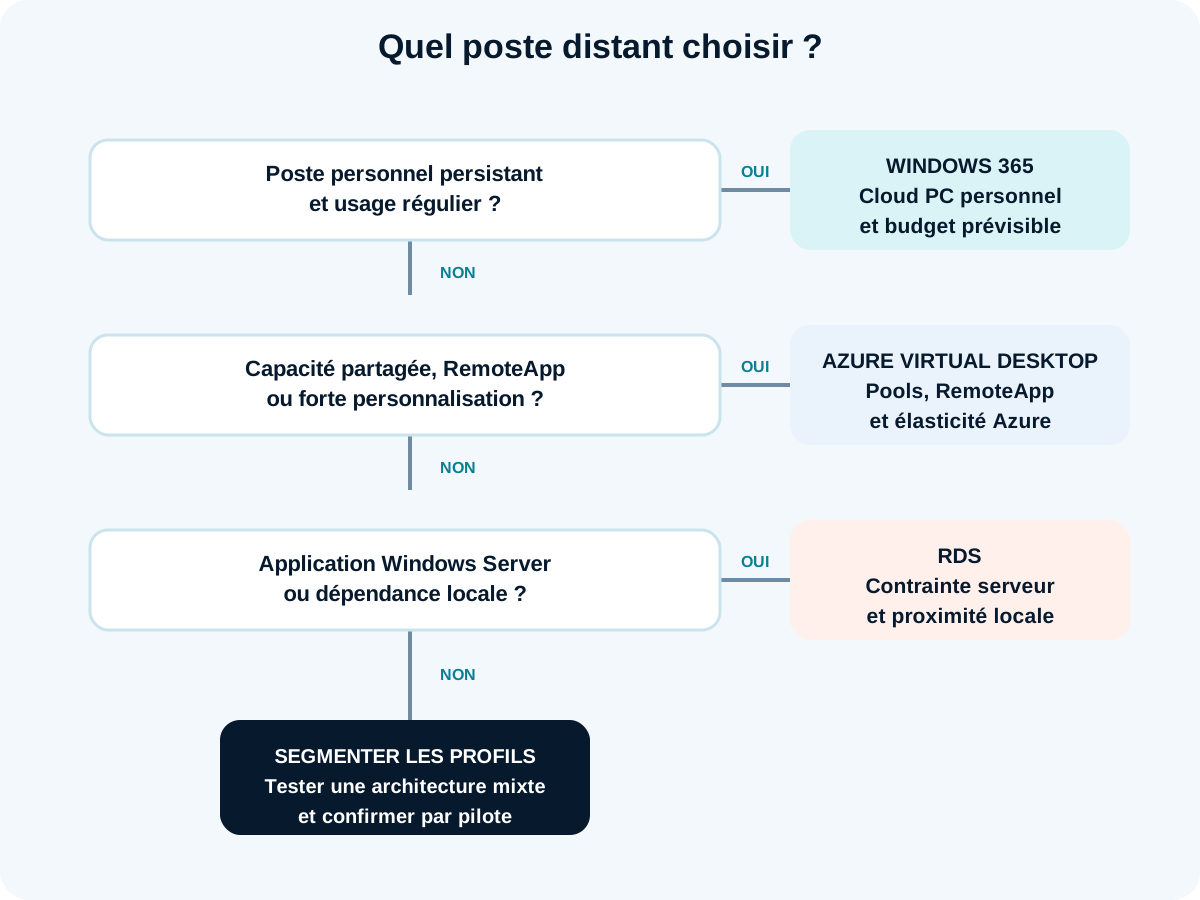
- Does everyone need a persistent, regularly used workstation? Evaluate Windows 365.
- Must you share capacity, publish an app or extensively adapt the environment? Evaluate AVD.
- Does an app require Windows Server or local proximity? Evaluate RDS and a modernisation plan.
- Do profiles differ? Separate them instead of forcing one solution.
Test a remote desktop in six steps
A useful pilot reproduces a working day and produces evidence, not just a successful login.
1. Segment users
Create profiles: permanent, occasional, external, mobile, heavy application and single application. Record schedules, concurrency, data, peripherals and support level. Choose five to fifteen representative testers, not only IT.
2. Inventory applications
For each app, document vendor, version, supported system, database, ports, latency, printing, updates and licence. Test seemingly secondary components: Outlook plug-ins, macros, drivers, signatures and exports to shares.
3. Build the cost model
Compare three realistic sizes or capacities. Add licences, storage, networking, backup, monitoring and operations. For AVD and RDS, measure actual concurrent sessions; for Windows 365, track usage of assigned sizes.

4. Test the experience
Measure login time, app launch, data entry, printing, audio and reconnection. Test in the office, at home and on a less stable connection. Record incidents with time, user, network, host and app to avoid vague impressions.
5. Validate security and operations
Check MFA, conditional access, redirection, roles, logs, patches, images, backup and restoration. Simulate a blocked user, corrupted profile, unavailable host and saturation. Write down who intervenes and when.
6. Decide by profile
Compare experience, total cost, risk and administration load. The decision can be mixed. Document review triggers: growth, new vendor, end of support, licence change or new location requirement.
Ten common mistakes
The costliest mistakes stem from untested assumptions about concurrency, applications and operations.
- Choosing by company size. Usage profiles matter more.
- Comparing licences alone. Administration time and infrastructure change the total.
- Assuming a fixed users-per-host ratio. Microsoft recommends validation against resources and workloads.
- Ignoring peripherals. Printing, scanning, audio and USB can block the project.
- Testing on a perfect network. Home and remote sites reveal latency and loss.
- Giving all users the same size. Heavy and light profiles must be separated.
- Forgetting images and profiles. They determine AVD/RDS updates and stability.
- Exposing RDS directly. Use secure architecture with a gateway and access control.
- Promising savings before the pilot. They depend on utilisation and operations.
- Not planning an exit. Document data, profiles, applications and future migration.
FAQ: Windows 365, Azure Virtual Desktop and RDS
What is the main difference between Windows 365 and AVD?
Windows 365 provides Cloud PCs as a service with defined capacity and subscription. AVD provides a platform where the organisation configures hosts, pools, images, storage and networking. AVD offers greater flexibility but requires more operations.
Is AVD always cheaper than Windows 365?
No. AVD can be efficient when capacity is pooled well and stopped outside use. It can cost more if hosts remain active, are oversized or need substantial administration. Compare a real scenario including licences and human work.
Is RDS obsolete in 2026?
No. Microsoft still documents RDS for supported Windows Server versions. Its relevance depends on the app, support lifecycle and ability to maintain roles, licences, certificates and resilience. Assess an old environment rather than extending it automatically.
Can only one application be published with AVD or RDS?
Yes. Both publish through RemoteApp. This can reduce full-desktop exposure, but local integrations, printing, files, authentication and user experience must be tested.
Does Windows 365 work with Intune and Entra ID?
Yes. Microsoft states Windows 365 Enterprise uses Intune for Cloud PC management and Entra ID for identity and access. Exact licences and prerequisites vary by edition; check before deployment.
Must a VPN be retained for a remote desktop?
Not always. It depends on applications, networking, identity and architecture. Avoid adding a VPN by habit: it can create a network detour. Use the private access or connectivity needed by the service, then measure the actual path.
How many users can an AVD host support?
There is no universal number. Microsoft states capacity depends on processor, memory, disk, GPU, applications and user behaviour. Test load and retain headroom instead of copying a generic ratio.
Decide on evidence, then operate the chosen model
The project does not end when the first desktop opens. Images, access, capacity, licences, support and continuity need maintenance. The team can segment profiles, test apps and compare models without imposing one architecture. To scope a Windows 365, AVD or RDS pilot suited to your organisation, contact the GVISION team.
Official sources
- Microsoft describes Windows 365 Enterprise (new tab)
- AVD is a virtualisation service on Azure (new tab)
- RDS relies on several Windows Server roles (new tab)
- Microsoft Learn — Windows 365 size recommendations (new tab)
- Microsoft Learn — Windows Enterprise multi-session FAQ (new tab)
- Microsoft Learn — License Remote Desktop Services with CALs (new tab)
Published on . Updated on .
Let’s talk about your project
Want to apply this advice in your organisation? Let's review your needs and next steps together.
Talk to GVISION