
The short answer
Choose a SharePoint agent to answer quickly within a well-maintained Microsoft 365 document scope. Move to Copilot Studio when the assistant needs to combine multiple sources, channels or business actions. Prefer custom RAG when the interface, models, indexing, hosting or integrations require specific control. In all three cases, start by cleaning up content and permissions.
- SharePoint agent: the most direct route to targeted conversational search across authorised sites, pages and files.
- Copilot Studio: the right intermediate level for combining knowledge, instructions, connectors, workflows and multiple channels.
- Custom RAG: the most flexible option for heterogeneous data, a dedicated experience or specific technical requirements, with more engineering.
- A sourced answer is reliable only if the source document is valid, current, understandable and accessible to the right person.
- A pilot should measure answer quality, correct refusals, access leaks, actual use and maintenance burden.
The real problem: finding a reliable answer without opening access too widely
An organisation generally does not need 'another chatbot', but a controlled path between a question, an approved source and a useful action. An employee wants to know the purchasing procedure, reimbursement rule, intervention method or applicable clause. The assistant needs to find the right information, cite its origin, respect permissions and acknowledge when an answer cannot be established.
The language model is only part of this chain. Sources, search, identity, permissions, logs, owners and escalation also need to be defined. RAG — retrieval-augmented generation — retrieves relevant passages before answering. By itself, it guarantees neither accuracy, freshness nor confidentiality.
Before comparing tools, formalise a use case: 'technicians need to find a validated procedure during a service visit', 'HR wants to answer questions about internal policies' or 'customer service needs to consult product specifications'. The GVISION page on the SOP, wiki and RAG foundation shows how to structure this knowledge before exposing it to an assistant. This article covers the next step: choosing the architecture that makes it usable.
SharePoint agent, Copilot Studio and custom RAG: three levels of control
All three approaches can answer from internal documents, but they draw the product boundary in different places. The SharePoint agent prioritises proximity to content. Copilot Studio adds orchestration and distribution. Custom RAG puts the entire technical chain under your control.
SharePoint agent: a conversational layer close to the site
An agent created in SharePoint suits a clear scope: a team site, library or collection of pages or files. Microsoft documentation states that a user with site editing permissions can create and edit an agent, specify sources and customise instructions. End users should receive only content they are authorised to view.
This option speeds up the pilot when the organisation already works in Microsoft 365 and mainly wants to search, explain or summarise. It is less suited to a public interface, numerous systems, complex approvals or rich business logic.
Copilot Studio: knowledge, conversations and actions
Copilot Studio lets you define an agent, add SharePoint and other knowledge sources, use topics or instructions, call tools and publish to multiple channels according to the configuration. Microsoft states that the SharePoint source respects user permissions when appropriate authentication is used. Test this promise in the real context, including groups, sharing links, inherited content and guest accounts.
The product targets scenarios beyond consulting a single document space: answering then creating a ticket, collecting missing data, triggering an approval flow or handing the case to a human. It provides a low-code framework but does not remove the need for design, security, environment management and testing.
Custom RAG: an architecture controlled end to end
A custom solution chooses connectors, the ingestion pipeline, document segmentation, metadata, search engine, model, safeguards, interface and observability. It can combine SharePoint, ERP, CRM, an SQL database, extranet, multilingual data or product content. It also allows finer control over synchronisation frequency and ranking rules.
This freedom creates additional responsibility: applying permissions during search, monitoring updates, protecting indexes and evaluating answers. Microsoft Foundry recommends access control during retrieval and Microsoft Entra ID rather than API keys in production with Azure AI Search.
Comparison: which approach fits your needs?
The best choice is the simplest solution covering the scope, actions and governance actually required. A small team gains nothing from operating a complex platform for fifteen stable procedures. Conversely, an agent intended for several departments should not remain a personal configuration that is difficult to inventory.
| Criterion | SharePoint agent | Copilot Studio | Custom RAG |
|---|---|---|---|
| Natural scope | Targeted SharePoint sites, pages and files. | Multiple sources, knowledge, tools and channels. | Microsoft and non-Microsoft sources, specific formats and rules. |
| Getting started | Fast if content and permissions are ready. | Intermediate; agent design, environments and publication. | Full software project with ingestion, search, security and operations. |
| Business actions | Primarily focused on knowledge and assistance in SharePoint. | Connectors, tools and workflows depending on the scenario. | Fully customisable APIs, logic and experience. |
| Permissions | Relies on users' Microsoft 365 permissions. | User authorisation for SharePoint with configured authentication. | Needs explicit design, synchronisation, testing and monitoring. |
| User experience | Close to SharePoint and Microsoft 365. | Microsoft channels and other available publishing options. | Portal, business app, extranet or dedicated interface. |
| Governance | Inventory of agents, owners, sites and shares. | Power Platform environments, roles, solutions, policies and lifecycle. | DevSecOps, architecture, secrets, logs, versions and operations. |
| Main advantage | Proximity and simplicity for a clearly defined Microsoft corpus. | Balance between low-code, actions and distribution. | Maximum control and adaptation to specific constraints. |
| Main limitation | Less suited to complex integrations and journeys. | Platform dependencies, licences and limits to check. | Higher cost, longer timelines and greater maintenance responsibility. |
| Costs | Tenant licences or consumption to confirm at the time of the project. | Licensing and/or consumption to check according to users and channels. | Development, cloud, models, search, monitoring and maintenance. |
| Best choice according to need | Sourced internal FAQ on a well-governed site. | Departmental assistant that consults and acts. | Multi-system AI product or a highly differentiated experience. |
Permissions: the agent does not fix overly open SharePoint access
The first check is to verify what users can already access without AI. An agent respecting permissions can still make an accidentally accessible document easier to discover. Conversational search reduces the effort needed to find information, making excessive permissions more visible and potentially more harmful.
Inventory sites, groups, 'anyone with the link' links, guests, sensitive libraries and inheritance exceptions. Identify HR, legal, financial, medical and customer-related content. Correct permissions before the pilot and test with several real profiles: employee, manager, provider, guest and administrator. A test team using only privileged accounts validates nothing.
For Copilot Studio, explicitly configure user authentication and sources. Microsoft documentation notes that SharePoint, Dataverse and business data require appropriate authentication. For custom RAG, do not simply copy every file into a shared index: carry authorised identities or groups through and apply filtering before passages are sent to the model.
Finally, keep a register showing purpose, owners, sources, users, actions, risk, version and review date. Without an owner, an assistant can easily continue citing expired procedures.
Prepare content before measuring the agent's intelligence
Corpus quality determines reliability more than spectacular prompt wording. A folder full of duplicates, unreadable scans and conflicting drafts produces ambiguous search results. Designate one source of truth per process, archive obsolete versions and give each document an owner, validation date, next review, audience and status.
Write for people first: a precise title, objective, scope, steps, exceptions and contact. Split long procedures without breaking context. Add department, country, language, product and version. In Belgium, validate FR and NL separately: an automatic translation of an HR or legal rule may be insufficient.

Then prepare a set of real questions. Include answers that are present, absent, ambiguous, confidential and outdated. For each question, state the expected answer, authorised sources and correct behaviour under uncertainty. The useful metric is not only 'the user likes the answer', but also: is the source correct, is the conclusion faithful, does the agent refuse when necessary and does time saved justify operations?
Four Belgian scenarios for choosing without overengineering
Organisation size alone does not determine the architecture; source diversity, risk and expected actions matter more.
A non-profit association with an internal handbook on one site
The team wants to find reimbursement rules, templates and onboarding procedures. The documents are validated, few in number and accessible to the same members. A targeted SharePoint agent is a good first test. The pilot should focus on guests, old versions and multilingual use.
A multi-site group wanting to open and route requests
The assistant consults procedures, asks for the site, creates a ticket, selects a team and sometimes obtains approval. Copilot Studio combines conversation and workflow more effectively. Development, testing and production remain separate.
A manufacturer with SharePoint, ERP and technical data sheets
Support searches manuals, product history and structured ERP data. Answers need to appear in a customer portal with specialist terminology and strict controls by product range. Custom RAG can justify the effort, particularly for ingestion, filters, hybrid ranking and the interface.
A healthcare institution with sensitive procedures
The need appears document-based, but profiles, confidentiality obligations, audit trails and validations change the decision. Start with a limited set of non-clinical procedures without patient data. Whatever the platform, involve the DPO, security and business owner; clearly define prohibited uses and human handover.
GVISION Studio presents its method for connecting documents, agents, automations and human validations on the page Automation & artificial intelligence. The value of neutral scoping is precisely to avoid turning every case into custom development when a simpler Microsoft option is sufficient.
Decision tree: four questions before choosing
Start with scope and actions, then use the interface and technical constraints as deciding factors. A reversible choice is often preferable: test on a limited corpus, observe usage, then migrate to Copilot Studio or a dedicated architecture if real needs exceed the initial framework.
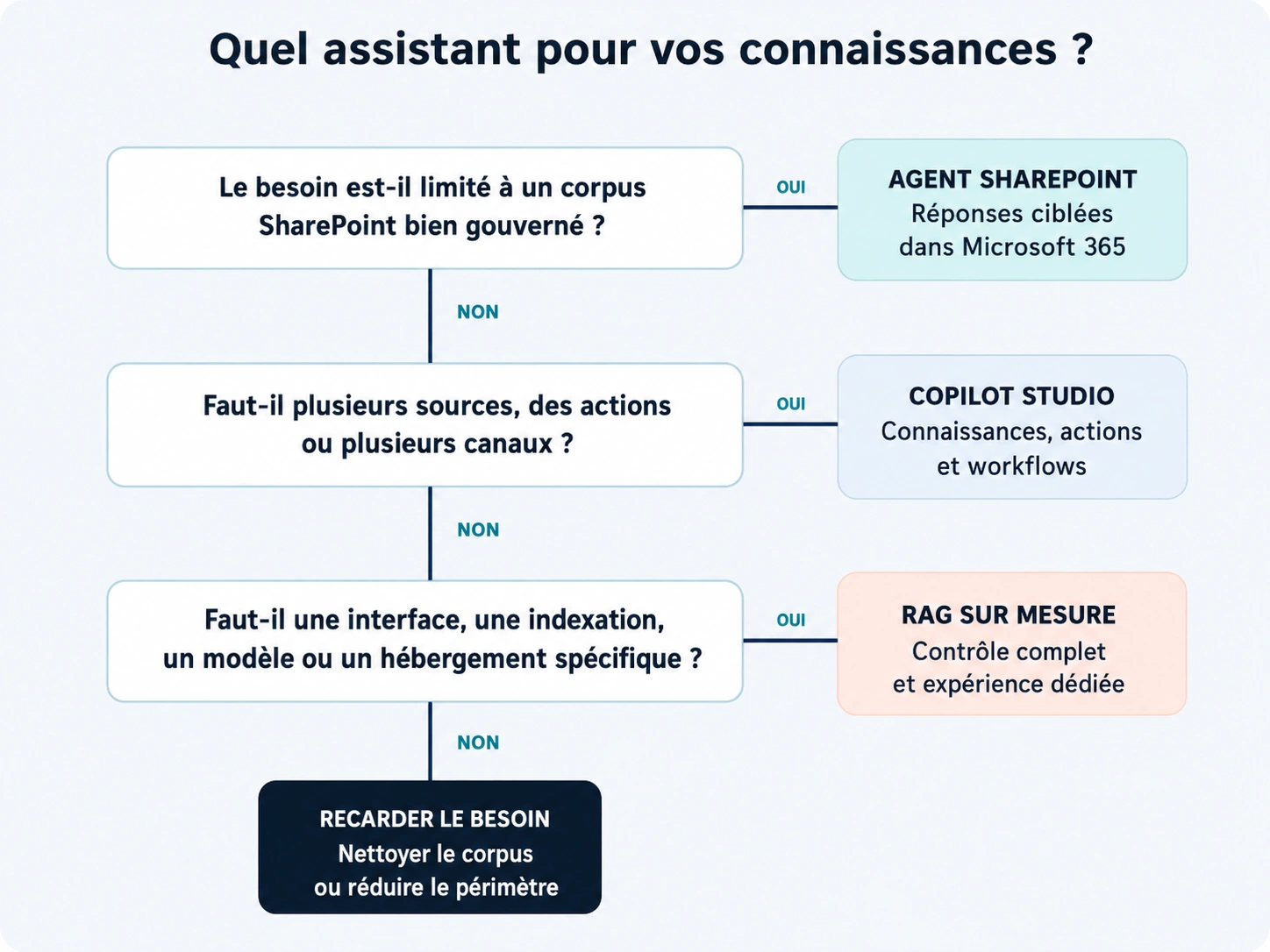
- Does knowledge mainly live within a well-managed SharePoint scope? If so, and if the assistant mainly needs to answer, test the SharePoint agent.
- Does the assistant need to perform actions or combine several channels? If so, evaluate Copilot Studio.
- Is a specific interface, indexing, model or hosting required? If so, examine custom RAG.
- Can the team operate the solution for three years? If not, reduce the scope or choose a more managed platform.
Build a useful pilot in six steps
A good pilot validates a business decision with real permissions and documents; it does not aim to impress during a demonstration.
1. Choose a frequent, limited question
Choose a process whose owner is available. Avoid 'all company knowledge'. Describe users, languages, time lost and the step following the answer.
2. Reduce and qualify the corpus
Keep necessary documents, remove duplicates and drafts, check OCR and add metadata and dates. Document exclusions. A small, consistent base makes diagnosis easier.
3. Define permissions and identity
List authorised groups and test accounts. Check external links and historical access. For a custom architecture, design retrieval-time filtering. Never place confidentiality solely in a text instruction such as 'do not show secret documents'.
4. Write acceptance criteria
Build a set of 30 to 50 questions, including traps. Define sources, acceptable wording, citation, refusal and human handover. Have the business owner score the answers.
5. Observe usage and workload
Measure questions, useful answers, empty searches, corrections, response time and maintenance. Separate licensing or consumption from human costs for content, support and security.
6. Decide: stop, stabilise or expand
A pilot can prove that a conventional search engine or better navigation is enough. It can also show that a SharePoint agent meets the need without additional development. Expand only if usage, quality and risk justify new sources, actions or users.
Nine common mistakes
Most failures arise from unclear scope and ungoverned knowledge, not a lack of model sophistication.
- Indexing all of SharePoint. Noise, duplicates and inherited permissions make answers unpredictable.
- Choosing the tool before the use case. An appealing demonstration defines neither value nor risk.
- Confusing respected permissions with correct permissions. AI can make already excessive access easier to discover.
- Testing only with administrators. The results do not represent ordinary users.
- Forgetting NL or FR. Poorly aligned multilingual sources produce inconsistent answers.
- Allowing actions too early. Start read-only, then add validations, limits and logging.
- Measuring only fluency. A pleasant answer can be wrong or based on the wrong version.
- Ignoring operating costs. Content, licences, consumption, support and observability evolve differently.
- Failing to appoint an owner. An agent without review quickly becomes a channel for obsolete procedures.
FAQ: SharePoint agents, Copilot Studio and RAG
Is a SharePoint agent already a RAG system?
It uses search and grounding in authorised content to produce source-based answers. For an architecture decision, the key point is that this is a managed experience within Microsoft 365: you do not control every component as you would in a custom RAG pipeline.
Does Copilot Studio replace SharePoint?
No. SharePoint can remain the document repository and Copilot Studio the conversational and orchestration layer. Agent quality still depends on the structure, owners, permissions and freshness of content in SharePoint.
Which solution is the cheapest?
There is no universal answer. Microsoft licences, consumption, user numbers, channels, development and maintenance affect cost. Request an estimate for your scenario and check Microsoft terms at the time of selection, as they change.
Can Copilot Studio connect to data outside Microsoft 365?
Yes, depending on the connectors, knowledge sources, tools and APIs available for the scenario. Check authentication, data policies, connector limits, freshness and error behaviour. Technical capability does not automatically mean suitability for sensitive data.
Does custom RAG avoid hallucinations?
No. It can improve grounding, filtering and evaluation, but the model can still misinterpret a passage or answer beyond the evidence. Require citations, define refusals, test edge cases and retain human validation for important decisions.
Do you need to clean up all of SharePoint before starting?
No. Isolate a limited corpus, correct its permissions and versions, then launch the pilot. This approach generates insights quickly without waiting for an organisation-wide governance programme. Issues discovered then inform the broader cleanup plan.
Can the agent be used with FR and NL documents?
Yes, but both versions need to be aligned and validated. Add language, owner, status and date to metadata. Test questions in each language and check that the agent does not mix different rules or an obsolete translation.
Choose an architecture your organisation can still operate tomorrow
The choice goes beyond 'low-code or code'. It involves document quality, identity, permissions, experience, monitoring and the operating model. Scoping can prepare the corpus, compare options and build a measurable pilot. To turn your constraints into a concrete architecture, discuss your document assistant with GVISION Studio.
Official sources
- Microsoft Support — Get started with agents in SharePoint (new tab)
- Microsoft Learn — Choose between Microsoft 365 Copilot and Copilot Studio (new tab)
- Microsoft Learn — Add SharePoint as a knowledge source (new tab)
- Microsoft Learn — Knowledge sources summary (new tab)
- Microsoft Learn — Enhance AI responses with retrieval-augmented generation (new tab)
- Microsoft Learn — Retrieval-augmented generation and indexes (new tab)
Published on . Updated on .
Let’s talk about your project
Want to apply this advice in your organisation? Let's review your needs and next steps together.
Talk to GVISION