



Enterprise AI comparison · 2026 edition
Microsoft 365 Copilot or ChatGPT Enterprise: which should you choose for your organisation in 2026?
Copilot vs ChatGPT Enterprise: two professional AI environments, but they do not solve exactly the same problem. Copilot is particularly close to day-to-day work in Microsoft 365 and data accessible through Microsoft Graph. ChatGPT Enterprise provides a more general-purpose AI workspace, suited to research, analysis, creation and multi-tool processes. The right choice depends on your data, use cases and governance capabilities.

In brief
- Copilot integrates deeply with the Microsoft 365 ecosystem and respects permissions already defined across Microsoft services.
- ChatGPT Enterprise is a versatile AI workspace with research, analysis, creation, agent and authorised tool connection capabilities.
- Professional data is not used by default to train foundation models at Microsoft or OpenAI, according to their official documentation.
- Poor document governance remains a risk: AI can make content that the user already had access to more visible.
- The choice should be tested using real-world scenarios with usage, time, quality and risk metrics.
Two professional products, but two different starting points
Microsoft 365 Copilot starts from the Microsoft workplace; ChatGPT Enterprise starts from a cross-functional AI workspace. This difference explains much of the variation in user experience.
Copilot can operate within Word, PowerPoint, Excel, Outlook, Teams and other Microsoft 365 experiences. It uses Microsoft Graph to provide responses based on the professional context accessible to the user: documents, emails, meetings, conversations and contacts. If your organisation already works almost entirely in Microsoft 365, this proximity reduces the number of tool changes.
ChatGPT Enterprise combines advanced conversation, file and data analysis, research, image generation, projects, agents and applications or connectors depending on the features enabled by the administrator. It can therefore suit teams that combine many sources, produce complex deliverables or need an exploratory environment less centred on an office suite.
It would be misleading to reduce the decision to “Copilot knows the documents and ChatGPT does not”. ChatGPT can connect to SharePoint and other sources in compatible plans and configurations. Conversely, Copilot can be extended with agents and connectors. The question then becomes: which environment provides the shortest, best-governed and most understandable path for the intended scenario?
Before making any purchase, also check the difference between Microsoft 365 Copilot Chat, available with certain eligible licences, and the full Microsoft 365 Copilot licence. The page Microsoft Copilot from GVISION outlines the main use cases and preparations required for a controlled deployment.
Microsoft 365 Copilot vs ChatGPT Enterprise: practical comparison
No product wins everywhere. The table below compares general approaches as of 23 August 2026. Features and commercial terms may change; always check the documentation and offers applicable to your tenant, country and contract.
| Criterion | Microsoft 365 Copilot | ChatGPT Enterprise | Best choice according to the need |
|---|---|---|---|
| Starting point | Microsoft 365 work and data | Cross-functional AI workspace | Your primary environment |
| Office integration | Native across several Microsoft 365 applications | Work through the ChatGPT workspace and enabled applications | Copilot for everyday use in Office |
| Internal context | Microsoft Graph and authorised connectors | Files, projects, applications and authorised connected sources | Depending on the location and governance of knowledge |
| Deep research | Research and synthesis across the Microsoft ecosystem and the web, depending on the feature | Deep research, web research and connected sources depending on the plan | Test quality using your real-world cases |
| Analysis and creation | Highly seamless for Microsoft documents, presentations, meetings and emails | Versatile for analysis, writing, code, images and multi-step deliverables | Copilot for Office; ChatGPT for cross-functional work |
| Agents and automation | Copilot Studio, agents and the Power Platform ecosystem | Agents, applications, actions and authorised integrations | Depending on your architecture and skills |
| Administration | Entra, Microsoft 365, Purview and associated controls depending on licences | Workspace administration, SSO/SCIM and feature controls depending on the plan | Depending on your identity and compliance model |
| Training on professional data | Not by default for prompts, responses and Graph data according to Microsoft | Not by default for professional data according to OpenAI | Equivalent, then verify the precise terms |
| Public pricing | Microsoft lists USD 30/user/month with an annual commitment for the Enterprise offering, excluding an eligible Microsoft 365 licence | Enterprise pricing on quotation | Compare the negotiated total cost, not just the headline price |
| Targeted deployment | Licences assigned to priority Microsoft 365 roles | Workspace for populations with cross-functional AI use cases | Segment by persona and expected value |
Where does your work context reside?
The best assistant is often the one that gets the right context with the fewest manual copies and the fewest excessive permissions. A director who works in Outlook, Teams and PowerPoint may get more value from native integration. An analyst who combines reports, spreadsheets, web pages and multiple repositories may prefer a cross-functional workspace.
Microsoft explains that Copilot accesses organisational content through Microsoft Graph and only presents information for which the user has at least read access. This is a fundamental safeguard, but it does not guarantee that your permissions are correct. An old SharePoint site open to “all members” remains open; Copilot can simply make the information easier to find.
ChatGPT Enterprise allows administrators to control the available agents, tools and actions. Applications and connectors should be assessed source by source: authentication, scope, inherited permissions, indexing, retention period, possible actions and revocation. The existence of a connector does not mean it should be enabled for everyone.

Before the pilot, map five elements: data sources, owners, authorised groups, sensitive information and content lifespan. Correct anonymous sharing, overly broad groups, abandoned folders and ownerless sites. This hygiene improves AI, but also security and traditional search.
Which use cases favour Copilot or ChatGPT Enterprise?
Choose a tool based on the work to be done, not an impressive demonstration. A demo using a perfect document does not prove that the system will work with your meetings, permissions and document quality.
Scenarios where Microsoft 365 Copilot is often a natural fit
- prepare a meeting based on accessible Microsoft 365 conversations, emails and files;
- summarise a Teams meeting and turn discussions into actions;
- create a first draft of a PowerPoint presentation from a document;
- find information scattered across well-organised SharePoint spaces;
- write or summarise in Word and Outlook without switching applications;
- deploy agents closely integrated with Microsoft 365 and Power Platform.
Scenarios where ChatGPT Enterprise can stand out
- multi-source research and synthesis using an exploratory approach;
- analysis of files, data and documents in various formats;
- production of complete deliverables combining text, tables, code or visuals;
- working with multiple authorised applications beyond Microsoft 365;
- prototyping assistants, agents and business processes;
- strategy, development, marketing, analysis or innovation teams with cross-functional requirements.
The boundary is not absolute. Features overlap and evolve. This is why a comparative test should use the same objectives, authorised data and criteria. Ask participants to solve the complete case, not simply rate the quality of a response.
Security and privacy: are both offerings suitable for business?
Both providers publish commitments to protecting professional data, but your configuration remains decisive. Microsoft states that prompts, responses and data accessible through Microsoft Graph are not used to train foundation models. OpenAI likewise states that ChatGPT Enterprise professional data is not used to train its models by default.
Do not turn this similarity into the conclusion “there is no risk”. You still need to address:
- identity, SSO, provisioning and account deactivation;
- permissions on SharePoint, Teams, OneDrive and connected applications;
- sensitive data that users may submit;
- retention, eDiscovery, logs and contractual requirements;
- agents capable of launching an action, sending information or modifying a system;
- human validation rules for important responses;
- training on hallucinations, weak sources and malicious instructions.
The risk of oversharing in Microsoft 365 deserves particular attention before deploying Copilot. Review broadly accessible sites, external links, dynamic groups, old project spaces and sensitive documents without labels or owners. For ChatGPT Enterprise, focus in particular on authorised applications, synchronised sources, available actions and the categories of information teams can upload.
Licences: why the per-user price is not enough
The real cost includes the licence, data preparation, adoption, administration and oversight time. Microsoft publicly lists Microsoft 365 Copilot Enterprise at USD 30 per user per month with annual billing, to which an eligible Microsoft 365 licence is added. Belgian pricing, taxes, promotions and contractual terms must be verified at the time of purchase. ChatGPT Enterprise is quotation-based; therefore, do not compare a public price with an unconfirmed estimate.
Also avoid uniform deployment. An employee who summarises two emails a month does not create the same value as a project manager who handles meetings, documents, plans and minutes every day. Build personas: management, sales, HR, finance, support, IT, marketing, analysts and developers. Assign a licence only when three to five recurring and measurable scenarios exist.
Opportunity cost also matters. A cheaper tool that is rarely used is more expensive than a well-adopted licence. Conversely, a highly active assistant can produce large amounts of mediocre text, increase validation requirements and expand the risk surface. Measure the final outcome: net time saved, quality, processing time, satisfaction and incidents.
Decision matrix: which choice suits your situation?
Use six weighted criteria with your business teams. Give each option a score from 1 to 5 and multiply it by the importance of the criterion. The score is not universal: a Microsoft services company and a development studio will have different weightings.
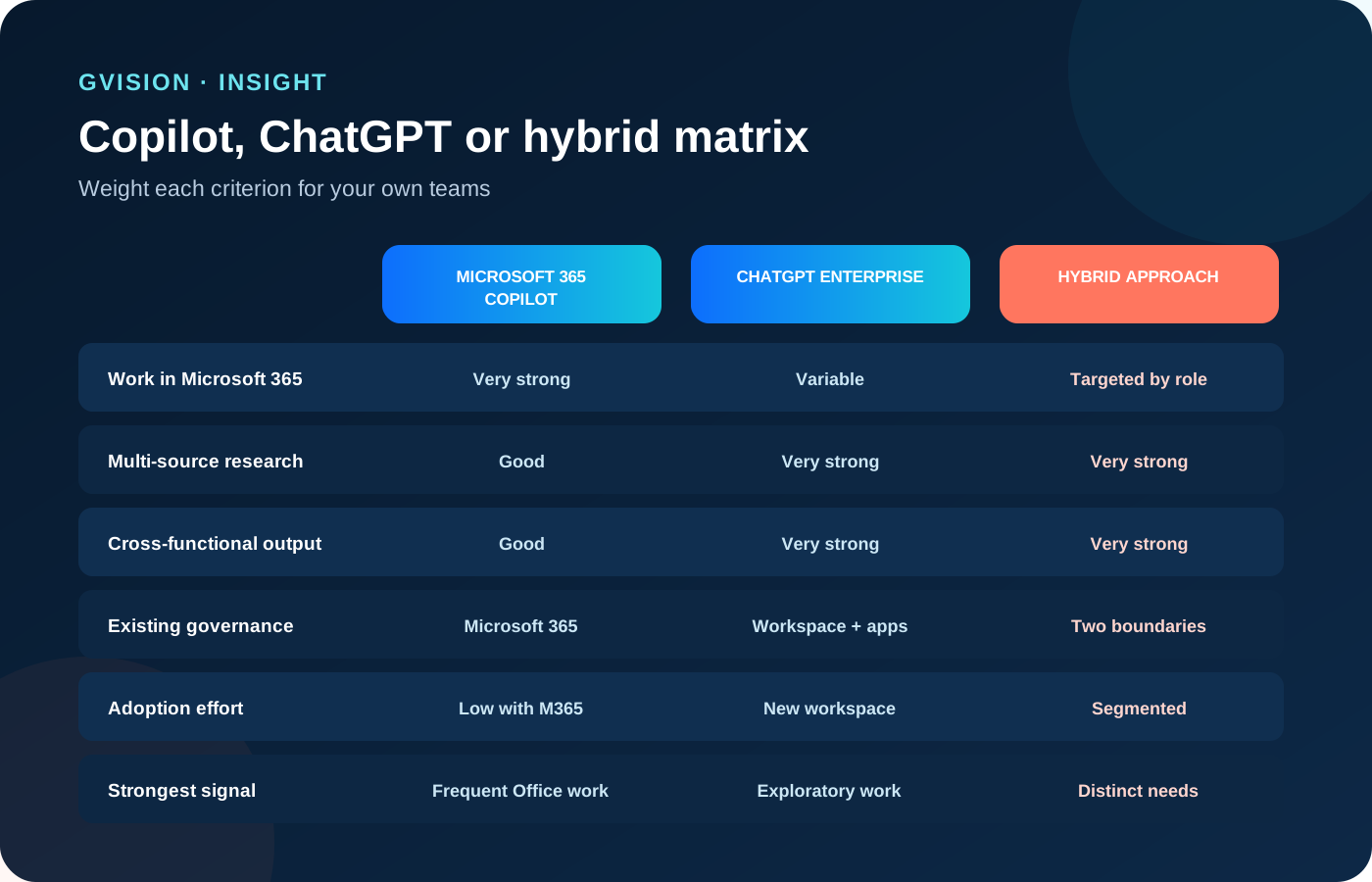
- Microsoft 365 context: high weighting if tasks depend on Teams, Outlook, SharePoint and Office.
- Deliverable diversity: high weighting for research, analysis, code, images and multi-step work.
- Existing governance: ability to control permissions, connectors, logs and data.
- Integration skills: Power Platform, APIs, MCP, agents and automation.
- Total cost: licences, preparation, support and operations.
- Adoption: proximity to tools already in use and change effort.
A hybrid option does not mean two licences for everyone. It can mean Copilot for functions deeply embedded in Microsoft 365 and ChatGPT Enterprise for a research, production or innovation team. An AI and automation architecture designed by GVISION can also connect specific processes without imposing a general-purpose assistant on every user.
How can you organise a comparable six-week pilot?
A good pilot compares outcomes, not the number of prompts. Select 12 to 30 representative participants and three to five scenarios per persona. Prepare the data and permissions before launch.
- Week 1 — baseline: measure time, errors, quality and current tools.
- Week 2 — preparation: licences, groups, sources, guidance, privacy and brief training.
- Weeks 3 and 4 — usage: real-world cases, issue log and review of significant outputs.
- Week 5 — improvement: correct data, permissions, instructions and poorly chosen scenarios.
- Week 6 — decision: compare value, adoption, risk, cost and operational capacity.
Set stop conditions: recurring submission of unauthorised data, dangerous results, lack of real usage or control costs exceeding the gain. Also set expansion criteria: frequency, net gain, satisfaction, stable quality and an identified owner.
Frequently asked questions
Do Copilot and ChatGPT Enterprise use our data to train their models?
Microsoft states that prompts, responses and Graph data are not used to train foundation models. OpenAI states that it does not train its models on professional data by default. Always check the exact terms of the offering, configuration and third-party applications used.
Is Copilot automatically safer because it is in Microsoft 365?
No. It benefits from Microsoft 365 controls and limitations, but it also respects existing permissions. If a user has access to content that is too broadly shared, Copilot can find it. Access governance remains essential.
Can ChatGPT Enterprise access SharePoint?
OpenAI documents applications and connection mechanisms for SharePoint for compatible offerings. The administrator must control activation, permissions and the populations concerned. Features may vary by offering and region.
Do we need to buy a licence for every employee?
No. Start with roles that have frequent and measurable use cases. Expand only when usage, value and controls have been demonstrated.
Can both platforms be used?
Yes. A hybrid strategy can be sensible if user groups and responsibilities are clear. However, avoid duplication without a purpose, copying data between tools and contradictory rules.
Which tool is best for creating agents?
Both ecosystems provide agent and integration mechanisms. The best choice depends on the systems to connect, actions, internal skills, required controls and operating model.
How should return on investment be calculated?
Measure net time saved after validation, quality, turnaround times, volume processed, adoption and incidents. Compare these results with the total cost of licences, preparation and support.