



FrenchCybersecurityMicrosoft
Microsoft Entra ID · Current guide · Belgium
Microsoft Entra passkeys in 2026: preparing for the end of SMS and voice calls
Microsoft Entra passkeys: from 1er September 2026, Microsoft Entra ID will automatically enable passkeys for users who are still authorised to authenticate via SMS or voice calls. On 1er February 2027, Microsoft will stop natively providing these two channels. For a Belgian organisation, the priority is therefore not to “remove SMS urgently”, but to inventory usage, choose the right type of passkey, manage enrolment and plan for recovery scenarios.
Essential answer
A passkey replaces the input-based secret with a pair of cryptographic keys linked to the legitimate service and unlocked locally using a PIN or biometrics. Before September 2026, identify SMS/voice users, define risk-based profiles, test enrolment and recovery, then deploy in waves. After February 2027, Microsoft's telecom channel will no longer provide a safety net.

What is actually changing in Microsoft Entra ID
Two distinct changes will occur in succession: automatic prompting in September 2026, followed by the end of a Microsoft telecom service in February 2027. Confusing the two can either lead to exaggerating an immediate outage or underestimating the adoption work required.
The 1er September 2026, users enabled for SMS or voice in the authentication methods policy, including certain legacy MFA configurations, will automatically be enabled for passkeys. The enrolment campaign will be placed in a Microsoft-managed state and will prompt these users to register a passkey during a subsequent multifactor authentication. Microsoft states that, by default, the prompt can be postponed several times. This is therefore not yet an account lockout.
The 1er February 2027, Microsoft will instead stop natively providing SMS and voice calls in Entra ID. When a user only has these methods and no telecom provider managed by the organisation has been configured, passkey registration will become mandatory to continue signing in. Microsoft specifies that there will be no option to disable this step. These dates apply to the Entra ID public cloud; other cloud environments should follow their own timelines. The official timeline is detailed in the Microsoft Learn documentation on the end of SMS and voice.
Yes, with more complete configuration.
To frame this change within a broader strategy, the GVISION page dedicated to Microsoft Entra and identity management makes it possible to link passkeys to Conditional Access, account lifecycle management and governance. An isolated passkey improves authentication; it does not address dormant accounts, excessive permissions or unmanaged applications.
How does a passkey provide better protection against phishing?
A passkey does not transmit a reusable code: it signs a cryptographic challenge for the domain where it was registered. This origin binding prevents a fake website from obtaining a secret that can be used on the legitimate service.
During enrolment, the device or authenticator generates a key pair. The public key is registered with Microsoft Entra ID. The private key remains in the authenticator: phone, computer, passkey manager or security key. When signing in, Entra sends a unique challenge. The user locally unlocks their passkey using biometrics or a PIN; the authenticator signs the challenge, and Entra then verifies the signature using the public key.
An SMS can be entered into a fake portal or intercepted; a push notification can be approved due to notification fatigue. A passkey only responds to the legitimate service. Microsoft describes it as a FIDO2 phishing-resistant method based on WebAuthn and CTAP. The detailed operation is explained in the official presentation of FIDO2 passkeys in Entra ID.
“Phishing-resistant” does not, however, mean “immune to every attack”. A session that has already been compromised, an unmanaged device, a weak recovery procedure, a deceived administrator or excessive permissions remain risks. The right architecture combines passkeys, device management, Conditional Access, least privilege, logging and verifiable support procedures.
Passkey, Authenticator, SMS or FIDO2 key: which option should you choose?
Purchase, logistics and personal use policy needed. An organisation can use multiple methods, provided that each exception is justified and sensitive accounts receive the highest level of protection.
| Criterion | SMS / voice | Authenticator push | Synced passkey | Device-bound passkey / FIDO2 key |
|---|---|---|---|---|
| Phishing resistance | Low: code or call can be manipulated | Medium: risk of fatigue and relay attacks | High thanks to service binding | High thanks to service binding |
| User experience | Familiar, but dependent on the mobile network | Simple, with an additional approval | Fast and available on synchronised devices | Fast, but requires the right device or key |
| Recovery | Depends on the number and operator | Purchase, logistics and personal use policy needed. | Facilitated by the provider's synchronisation | Must provide for a second key or a controlled procedure |
| Hardware attestation | Not applicable | According to the method | Not supported according to Microsoft | Possible depending on the profile and authenticator |
| Use cases | Documented temporary exception | Transition or users not yet eligible | General population with compatible devices | Administrators, executives, sensitive roles or stringent requirements |
| Main limitation | Phishable channel and Microsoft service being withdrawn | Not inherently phishing-resistant | Trust in the synchronisation ecosystem | Purchase, logistics and personal use policy needed. |
| Best choice according to the need | Only if a residual need is demonstrated | Controlled transition stage | Broad and smooth deployment | Enhanced protection for high-risk profiles |
- General population
- Synced passkey if permitted by the organisation's policy and if the devices are compatible.
- Privileged accounts
- Device-bound passkey, Authenticator passkey or FIDO2 key, with a backup authenticator.
- Transitional phase
- Authenticator push can remain useful, but should not be presented as equivalent to a phishing-resistant method.
- SMS/voice exception
- Retain only an explicitly documented population and prepare the appropriate telecom provider.
How do you choose between a synced passkey and a device-bound passkey?
A synced passkey prioritises adoption and recovery; a device-bound passkey prioritises control and assurance of the authenticator. Users should therefore be segmented rather than imposing a single method on everyone.
Synced passkeys for the general population
Company device
The choice of provider, personal devices, employee departures and the separation between personal and professional use must nevertheless be decided. A school, ASBL or service group may prioritise simplicity, whereas a healthcare organisation should more strictly verify authorised devices and recovery procedures.
Device-bound passkeys and FIDO2 keys for sensitive roles
Administrators, financial managers, senior management, security teams and exposed personnel may be issued with passkeys bound to a managed device or FIDO2 keys. This approach facilitates the application of restrictions and, depending on the configuration, attestation. In return, it requires an inventory of keys, a provisioning model, a backup solution and a rapid procedure in the event of loss.
A simple rule is to match the method to the risk: the more a given account can modify security settings, transfer money, access sensitive data or interrupt a service, the more tightly the authenticator should be controlled. The policy should not be defined solely by licence or department.
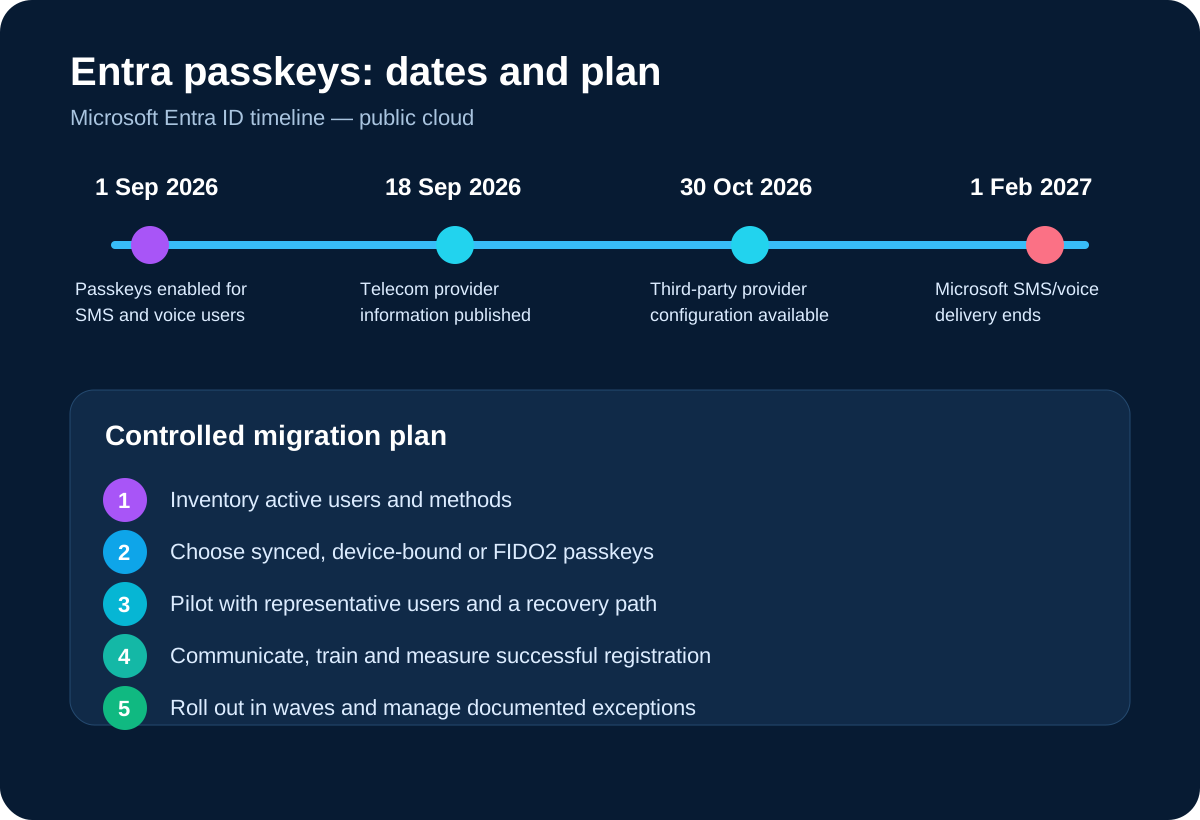
Five-step migration plan without locking users out
A secure migration starts with usage evidence, moves through a representative pilot and ends with a controlled reduction of legacy methods. Enabling a global setting without understanding dependencies creates tickets, workarounds and sometimes accounts that cannot be recovered.
1. Inventory active methods
List users authorised for SMS or voice, then verify their actual usage. Separate employees, administrators, service accounts, guests, workers without smartphones, field teams and emergency accounts. Also review legacy policies, enrolment campaigns, combined authentication and Conditional Access. The goal is to produce a migration population, not merely a screenshot of the portal.
2. Define risk- and device-based profiles
Mobile summary
3. Pilot the complete journey
The pilot should cover enrolment, daily sign-in, phone replacement, loss of a key, working off-site, device replacement and onboarding of a new employee. Include non-technical users and multiple sites. Microsoft documents, in particular, possible loops when Conditional Access rules already require phishing-resistant authentication at the very moment the user attempts to register their passkey.
Purchase, logistics and personal use policy needed.
Mobile Application Management applies rules to work applications and business data without placing the whole endpoint under device management. Microsoft describes MAM for unenrolled devices as a way to combine application configuration and protection. On supported apps, policies can require an app PIN, restrict copying to personal apps, limit local storage and selectively remove organisational data.multifactor authentication and Conditional Access, so that the migration does not remain merely a communication exercise.
5. Roll out in waves and measure
Purchase, logistics and personal use policy needed.

Which scenarios should Belgian organisations plan for?
The same passkeys will not necessarily be suitable for a professional practice, a school, a hospital and a multi-site industrial group. Purchase, logistics and personal use policy needed.
Healthcare organisations and medical practices
Shared workstations, on-call duties, emergencies and access to sensitive data require a fast but controlled process. Test team changes, shared devices, named accounts and out-of-hours recovery. Privileged accounts and sensitive clinical roles may justify device-bound authenticators or physical backup keys.
Schools, government bodies and public-sector organisations
The diversity of users and equipment makes support a key factor. Segment permanent staff, temporary workers, students, guests and administrators. The start of the academic year, examination periods or administrative closing periods are poor windows for a mass migration. A group-based schedule and temporary support desk reduce the risk of digital exclusion.
Multi-site groups, industry and logistics
Field teams may have irregular mobile connectivity, ruggedised devices or shared workstations. Test operation on the networks actually used and plan for physical key distribution when using a personal smartphone is not appropriate. Each site should know the escalation channel and identity verification procedure.
Associations, small businesses, SMEs, mid-sized enterprises and large companies
Size alone does not determine the level of risk. A small organisation may handle highly sensitive data; a large group may have a mature IAM team. Adapt the number of profiles and governance, but retain the same fundamentals: named accounts, a pilot, strong recovery, measurement and the gradual removal of weak methods.
Belgian scenarios
Deployment failures are more often caused by the user journey and exceptions than by cryptography. Here are the pitfalls that generate the most friction or risk.
- Confusing activation with adoption: enabling passkeys in Entra does not mean that users have registered them.
- Targeting all users at once: Purchase, logistics and personal use policy needed.
- Forgetting legacy methods: old MFA settings may still include unexpected populations.
- Failing to test Conditional Access: an overly strict rule can block registration of the new factor.
- Providing only one passkey: losing a phone or key then becomes an access incident.
- Using weak identity verification at the helpdesk: an attacker can bypass the passkey through recovery.
- Presenting the temporary option as permanent: the postponement option in September does not remove the February 2027 deadline.
Is recovery the real critical point?
Yes: strong authentication is only sustainable if recovery remains both available and difficult to abuse. The loss scenario must therefore be tested before general deployment.
For standard users, a synced passkey can reduce the impact of losing a device, but it transfers some trust to the synchronisation provider and the account that protects it. For privileged accounts, a second FIDO2 key stored separately is often more predictable. Emergency accounts should follow a documented, monitored and periodically tested procedure.
Microsoft also offers the Temporary Access Pass, a time-limited code that allows enrolment of a method without a password. Its issuance should be restricted to defined roles, preceded by robust identity verification and logged. The Microsoft documentation on the Temporary Access Pass Company device
Finally, distinguish three incidents: device unavailable, authenticator compromised and administrator account inaccessible. Measure recovery during the pilot and refine the procedure until access can be restored without an easily manipulated channel.
Frequently asked questions
Will users be blocked from 1er September 2026?
Limitationer February 2027 if their only available method remains SMS or voice without a configured telecom provider?
Is Microsoft Authenticator being discontinued?
Limitation
Is a synced passkey suitable for administrators?
It may be permitted under the organisation's policy, but Microsoft recommends considering device-bound passkeys or FIDO2 keys for administrators and highly privileged users. The decision should take attestation, recovery and hardware management into account.
Do you need to purchase a physical key for every employee?
Not necessarily. Synced passkeys or Microsoft Authenticator passkeys can cover a large population. Physical keys are particularly useful for sensitive profiles, device constraints or backup solutions.
Can SMS be retained after February 2027?
Microsoft announces an option via a customer-managed telecom provider in the Microsoft Security Store when a legitimate need remains. Providers, prices and terms should be verified when they are published; Microsoft's native service itself will end.
What should you do with employees without a corporate smartphone?
Mobile summary
Does a passkey replace Conditional Access?
Limitation
Verified sources
- Microsoft Learn — Passkeys by default and removal of Microsoft-provided SMS/voice calls, information accessed on 24 August 2026.
- Microsoft Security Blog — Passkeys as the default authentication method in Entra ID, 13 July 2026.
- Microsoft Learn — Passkeys (FIDO2) authentication method, accessed on 24 August 2026.
- Microsoft Learn — Enable synced passkeys, accessed on 24 August 2026.
- Purchase, logistics and personal use policy needed., accessed on 24 August 2026.