



FrenchCybersecurity
Professional networking · 2026 comparison guide
Wi-Fi 7 or Wi-Fi 6E in Belgium: which should you deploy in business in 2026?
Wi-Fi 7 is now available in professional access points and from some Belgian operators. This does not mean that every Wi-Fi 6E access point needs to be replaced immediately. The right choice depends on the device estate, density, applications, cabling, switches, PoE power and, above all, the quality of the radio design.
Essential answer
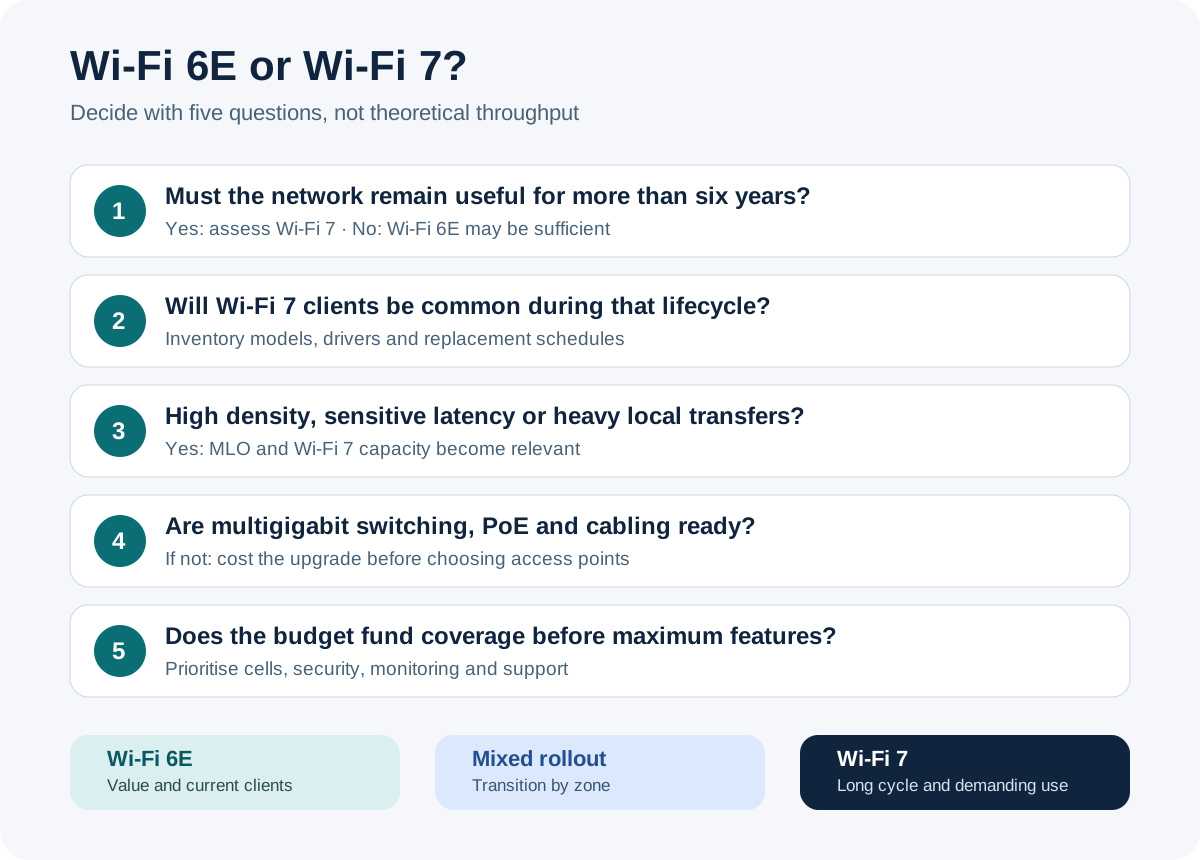
For a new network planned to last six to eight years, Wi-Fi 7 is generally worth considering. Wi-Fi 6E remains relevant when the compatible device estate is limited, usage is conventional or the budget needs to prioritise coverage. In both cases, a radio survey, suitable wired networking, WPA3 and proper segmentation matter more than the advertised theoretical throughput.

What is the real difference between Wi-Fi 6E and Wi-Fi 7?
Wi-Fi 6E extends the Wi-Fi 6 generation into the 6 GHz band; Wi-Fi 7 retains this band and improves the way multiple links, wider channels and denser modulation are used. The useful difference is therefore not simply “more gigabits”. It concerns the ability to better serve demanding applications when the access point and client genuinely support the same features.
Wi-Fi 6E is based on IEEE 802.11ax. It provides newer radio spectrum in the 6 GHz band, with fewer legacy devices. Channels can reach 160 MHz. A well-designed 6E network can already provide an excellent experience for video conferencing, cloud applications, Wi-Fi voice, file transfers and modern workstations.
Wi-Fi 7 is based on IEEE 802.11be. Cisco documents four key developments: 320 MHz channels, 4096-QAM, Multi-Link Operation or MLO, and preamble puncturing. MLO allows a compatible client to establish multiple links within the same association. Depending on the implementation, these links can improve throughput, latency or resilience. Preamble puncturing allows a usable portion of a wide channel to be retained when part of it experiences interference.
These capabilities are conditional. 4096-QAM requires a very high-quality signal. 320 MHz channels use a large amount of spectrum and are not automatically the best setting in a dense building. Cisco also notes in its testing documentation that maximum throughput often requires close proximity and that using 320 MHz may be unrealistic in some professional environments.
To frame the project beyond the radio standard, the GVISION page dedicated to professional networks and Wi-Fi links coverage, LAN, VLAN, security, monitoring and quality of service. It is this complete chain that determines the user experience.
Why does the Belgian context change the comparison?
In Belgium, 6 GHz Wi-Fi does not use exactly the same amount of spectrum or the same conditions as in the United States. You should therefore avoid reproducing channel counts or throughput figures from US documentation without verification. IBPT states that the 5945–6425 MHz range can be used at 200 mW EIRP indoors and at 25 mW EIRP under the very-low-power regime.
This range represents 480 MHz. It does not allow three non-overlapping 320 MHz channels to be aligned as in scenarios based on 1,200 MHz of spectrum. A 320 MHz channel can technically occupy a large part of the available band; in an office building, school or hospital with many access points, this channel width can make channel reuse more difficult.
The practical consequence is simple: an 80 or 160 MHz configuration can provide a more predictable network than a 320 MHz configuration. Wider does not always mean faster for the site as a whole. Overall performance depends on the number of radio cells, client contention, walls, permitted power and the frequency plan.
European Decision 2021/1067 harmonises the use of the 5945–6425 MHz band for radio local area networks. IBPT publishes the current Belgian conditions. These sources should be checked at the time of deployment, particularly for a warehouse, courtyard, campus or another environment where outdoor access points are being considered.
The 6 GHz band does not automatically replace the existing bands
6 GHz provides greater capacity, but its propagation through obstacles is generally less favourable. IBPT notes that higher frequencies have more difficulty passing through obstacles. In an older school, a medical practice with multiple partitions or a Brussels building with heavy masonry, more access points may sometimes be required to provide consistent 6 GHz coverage.
The 2.4 and 5 GHz bands remain useful for older clients, connected devices and areas where range is the priority. A modern architecture therefore uses all three bands intentionally rather than forcing every device onto 6 GHz.
Wi-Fi 6E or Wi-Fi 7: comparison table for an organisation
Wi-Fi 7 offers the greatest technical potential, but Wi-Fi 6E can deliver better value when it frees up budget for coverage, cabling, security and monitoring. The table below compares the technologies, not specific commercial models.
| Criterion | Wi-Fi 6E | Wi-Fi 7 |
|---|---|---|
| Technical foundation | IEEE 802.11ax extended to 6 GHz | IEEE 802.11be |
| Possible bands | 2.4, 5 and 6 GHz | 2.4, 5 and 6 GHz |
| Maximum channel width | 160 MHz | 320 MHz, subject to country, equipment and radio plan |
| Maximum modulation | 1024-QAM | 4096-QAM when the signal and devices allow it |
| Multi-Link Operation | No | Yes, with compatible clients and features |
| Preamble puncturing | More limited capabilities | Feature designed to use the unaffected portion of a wide channel |
| Device estate | More mature; however, not all clients are 6E | Growing; check each model, driver and operating system |
| Main advantage | Proven access to 6 GHz with a generally more manageable budget | Greater potential throughput, latency and resilience |
| Main limitation | No MLO and a lower functional ceiling | Reduced benefit with legacy clients or an undersized wired network |
| Costs | Depend on access points, licences, switches, PoE, cabling, installation and support; no generic price is reliable without an inventory. | |
| Best choice according to the need | Office use, predominantly Wi-Fi 6/6E estate, budget focused on coverage | New long-term cycle, high density, heavy traffic, latency requirements or growth of the Wi-Fi 7 estate |
- Choose Wi-Fi 6E
- If 6 GHz is useful but Wi-Fi 7 clients are rare and consistent coverage is the priority.
- Choose Wi-Fi 7
- For a durable new infrastructure, with compatible clients and a suitable multi-gigabit network.
- Choose a mixed deployment
- To reserve Wi-Fi 7 for critical areas and retain Wi-Fi 6E elsewhere during the transition.
When is Wi-Fi 7 genuinely justified?
Wi-Fi 7 is justified when the network needs to serve compatible clients, latency-sensitive traffic or high density for several years. It should not be chosen simply because its advertised throughput figure is higher.
Offices and multi-site groups
In a recently cabled headquarters equipped with multi-gigabit switches and regularly refreshed laptops, Wi-Fi 7 reduces the risk of buying an interim generation. For a multi-site group, the benefit may also come from a shared management platform. A small site with Wi-Fi 6 devices will often gain more from well-positioned access points, an isolated guest VLAN and centralised monitoring.
Schools and high-density environments
In a school, density appears in waves: the start of a lesson, online exams, educational streaming or hundreds of devices reconnecting. Wi-Fi 7 can help, but sizing should start with the number of active devices per room, not just the floor area. Narrower channels and more controlled cells may be preferable.
Healthcare, practices and mobile applications
For a healthcare facility or practice, stability, roaming, separation of biomedical equipment and access traceability take priority over a throughput record. MLO can become interesting for the resilience of compatible clients, but applications, medical devices, scanners and specialised terminals must be validated before migration.
Industry, logistics and warehouses
In a warehouse, shelving, goods and vehicles alter the signal. Ruggedised terminals sometimes retain older radios. An on-site survey carried out under conditions close to actual operations is more valuable than a theoretical choice of generation. Outdoor use also requires specific regulatory and hardware verification.
Creative, engineering and heavy-transfer workloads
Teams working with video, imaging, CAD or large datasets can benefit from Wi-Fi 7, especially when accessing multi-gigabit local storage. But the entire path must support it: access point port, switch, fibre or copper, NAS, server and client. A single 1 Gbit/s link can become the actual bottleneck.
What infrastructure elements should be checked before purchasing?
Before ordering Wi-Fi 7 access points, check the clients, multi-gigabit ports, PoE budget, cabling, controller, security and Internet or server capacity. Otherwise, the new access point will work, but its potential will remain constrained by an invisible component.
1. The clients and their actual capabilities
Inventory laptops, smartphones, tablets, scanners, printers, connected devices and specialised equipment. Record the bands, channel width, number of streams, WPA3, MLO and drivers. A device advertised as “Wi-Fi 7” does not necessarily support every certification option in the same way.
2. Switches and uplinks
A modern access point can exceed the capacity of a Gigabit port under certain conditions. Check 2.5, 5 or 10 GbE ports, switching capacity, uplinks between floors and redundancy. There is no need to oversize every port, but the accepted bottleneck must be understood.
3. PoE power
The required power varies according to the model, number of radios and enabled features. Check the PoE standard per port and the total switch budget. An access point may start in a degraded mode if power is insufficient. The calculation must cover all access points simultaneously, with headroom for future growth.
4. Cabling
Category, length, installation quality and connectors affect multi-gigabit negotiation. Reusing existing copper can be appropriate after testing. Replacing all cables without measurement, on the other hand, can waste the budget.
5. Security and segmentation
Plan for WPA3, appropriate authentication, separate VLANs for staff, guests and connected devices, inter-VLAN policies and logging proportionate to the risk. 6 GHz is not a security boundary. Poor access control remains poor, even on Wi-Fi 7.
6. Operational lifecycle
Licences, support, updates, configuration backup, replacement and monitoring must be part of the decision. The GVISION page onlocal, cloud and hybrid infrastructure places the access points within the wider context of switches, servers, Internet access, security and continuity.
How can you decide in seven steps without over-investing?
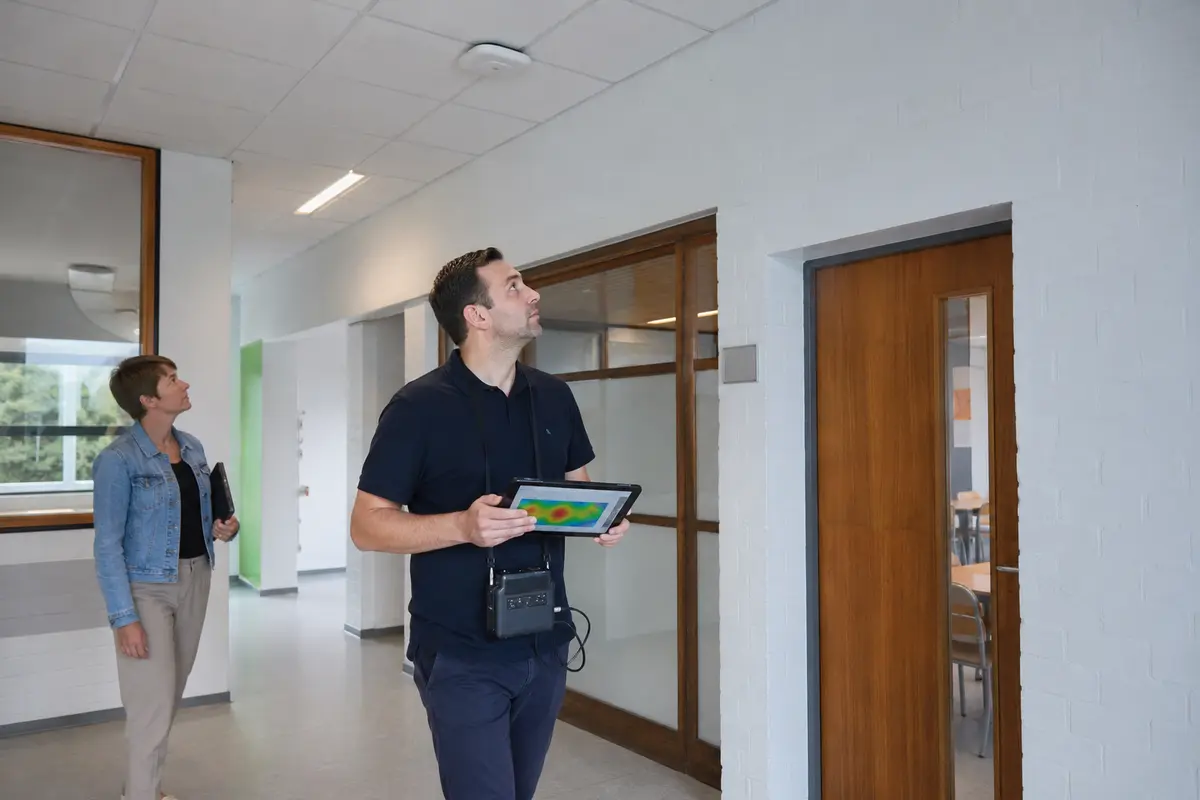
A reliable decision follows seven steps: objectives, inventory, radio measurements, wired architecture, scenarios, pilot and validation. This method produces a traceable recommendation and allows offers to be compared on the same scope.
- Define critical applications. List voice, video conferencing, ERP, virtual desktops, scanners, IoT, local transfers and guest usage. Set observable criteria: availability, roaming, capacity per room and response time.
- Inventory clients. Measure the proportion of Wi-Fi 5, 6, 6E and 7 devices. Include the refresh schedule over three to five years, not just today’s estate.
- Carry out a predictive survey followed by an on-site survey. The plan helps with preparation; measurements confirm walls, interference, heights, obstacles and high-density areas.
- Check the wired layer. Document cabling, ports, PoE, uplinks, firewall, DHCP, DNS and WAN access. Cost mandatory adaptations and optional improvements separately.
- Build three scenarios. Compare optimised retention, Wi-Fi 6E, Wi-Fi 7 and, where appropriate, a mixed approach. Include hardware, licences, installation, migration and operation over the planned period.
- Pilot a representative area. Choose a dense room, a typical office and a difficult area. Test real devices, roaming, voice, guests and support procedures.
- Validate and document. Keep plans, settings, inventory, acceptance tests, fallback procedures and responsibilities. Measure after going live so that issues can be corrected without waiting for complaints.
What mistakes most often distort the project?
The most costly mistakes are confusing theoretical throughput with the user experience, ignoring clients, oversizing channels and neglecting the wired network. They can be avoided with a few simple checks.
- Replacing an access point to solve poor placement. A newer generation does not pass through a thick wall any better.
- Enabling 320 MHz everywhere. This width consumes a large part of the available Belgian spectrum and can reduce reuse between cells.
- Comparing only the price of the access points. Switches, PoE, licences, cabling and operation all affect the total cost.
- Forgetting legacy equipment. Printers, scanners and IoT devices may require a dedicated SSID or band.
- Multiplying SSIDs. Each broadcast network adds overhead. Keep the structure simple and justified.
- Confusing mesh with mobility. A well-designed network of wired access points generally remains preferable on a professional site when cabling is available.
- Failing to test roaming. Voice and mobile applications can fail even when the throughput test looks excellent.
- Ignoring support. Without centralised visibility, history and procedures, every incident becomes an investigation again.
Key takeaway
- Wi-Fi 7 is the forward-looking choice for a new long-term cycle, not a universal requirement.
- Wi-Fi 6E remains performant when the clients, budget or use cases do not yet justify Wi-Fi 7.
- In Belgium, the available 6 GHz band and IBPT conditions should guide the radio plan.
- Coverage, channels, cabling, PoE and security determine the real value.
- A representative pilot is more reliable than a manufacturer’s throughput promise.
FAQ on Wi-Fi 7 and Wi-Fi 6E in Belgium
Does Wi-Fi 7 offer better range than Wi-Fi 6E?
Not automatically. Both can use 6 GHz, whose propagation through obstacles is less favourable than that of lower-frequency bands. Coverage depends primarily on permitted power, antennas, the building, placement and client sensitivity.
Does a Wi-Fi 6 computer work on a Wi-Fi 7 network?
Yes, professional access points normally retain compatibility with earlier generations. However, the computer will use its own capabilities; it will not benefit from MLO or 4096-QAM if it does not support them.
Should 320 MHz channels be used in Belgium?
Not by default. Belgium permits 5945–6425 MHz for Wi-Fi under the conditions published by IBPT. A 320 MHz channel consumes a large part of this range. 80 or 160 MHz channels may be better suited to a site with multiple cells.
Does Wi-Fi 7 require all switches to be replaced?
No. You need to measure the required capacity, multi-gigabit ports, PoE power and uplinks. Some sites may be able to reuse part of the wired network; others will have a bottleneck or insufficient power.
Is Wi-Fi 6E already obsolete in 2026?
No. It provides 6 GHz, channels of up to 160 MHz and good performance. Its value depends on price, clients and the length of the next cycle. For a new installation intended to remain in place for a long time, however, Wi-Fi 7 should be seriously considered.
Does Wi-Fi 7 improve Teams and VoIP?
It can improve latency or resilience with MLO and compatible clients. A good experience also depends on roaming, QoS, WAN capacity, interference and client configuration. The Wi-Fi 7 logo alone does not guarantee an uninterrupted conversation.
Can Wi-Fi 6E and Wi-Fi 7 be mixed?
Yes. A phased deployment can equip dense or critical areas with Wi-Fi 7 while retaining Wi-Fi 6E elsewhere. However, consistent management must be maintained, roaming must be tested and hardware diversity that unnecessarily complicates support should be avoided.