

The short answer
Choose Teams Phone if users already work mainly in Microsoft Teams and you want one experience for calls, meetings and messages. Prefer Yeastar if reception, queues, IP phones, DECT, PBX integrations or mixed scenarios dominate. Hybrid architecture remains possible: Yeastar can also make calls available in Teams.
- Teams Phone particularly suits Microsoft 365-centred organisations and hybrid workers.
- Yeastar P-Series emphasises specialist telephony, varied devices and advanced call flows.
- The budget must compare licences, PSTN connectivity, trunks, devices, integration, support and migration.
- Quality depends as much on network, operator and configuration as on the platform.
- A pilot must test difficult scenarios before number porting.
Teams Phone and Yeastar: what is the fundamental difference?
Teams Phone turns Teams into a telephone system; Yeastar remains a specialist PBX operating independently or integrated with Teams. This architectural difference affects user experience, administration, devices, reception functions and incident responsibilities.
Teams Phone brings telephony into the space where staff chat, meet and check calendars. Users answer through Teams on computer, mobile or a certified phone. For the public network, the organisation chooses a PSTN option: Microsoft Calling Plan where available and suitable, Operator Connect with a certified operator, Teams Phone Mobile or Direct Routing with an SBC and operator. Microsoft describes these as separate options with differing control and complexity.
With Yeastar P-Series, the PBX remains the routing core. It manages extensions, voice menus, groups, queues, schedules and devices. Users use Linkus, an IP phone, DECT handset or an app embedded in Teams depending on integration. Yeastar documents that P-Series can associate a Teams user with a SIP extension while retaining numbers, SIP equipment and PBX functions.
The alternative is more than “Microsoft versus Yeastar”: native Microsoft voice, a dedicated PBX or a combination. The GVISION page on VoIP telephony for Belgian organisations presents these approaches without limiting them to one company size.
Teams Phone vs Yeastar: complete comparison
There is no universal winner: Teams Phone simplifies life for Microsoft 365 teams, while Yeastar offers a more specialised PBX framework. The choice mainly depends on the weight of digital collaboration versus telephone handling.
| Criterion | Teams Phone | Yeastar P-Series |
|---|---|---|
| Main approach | Telephony integrated into Microsoft Teams. | Specialist PBX and unified communications. |
| User experience | Calls, meetings, chat, presence and contacts in Teams. | Linkus, web, mobile, IP/DECT phones and Teams integration depending on setup. |
| Public network access | Calling Plan, Operator Connect, Teams Phone Mobile or Direct Routing. | SIP trunk and operator chosen for the PBX. |
| Reception and routing | Auto attendants, queues and resource accounts configured in Teams. | IVR, queues, groups, schedules and Call Flow Designer in the PBX. |
| Devices | Teams clients and compatible/certified devices depending on scenario. | Wide range of SIP phones, DECT, Linkus clients and mixed scenarios. |
| Integrations | Strong alignment with Microsoft 365, Entra and Teams. | CRM and business integrations plus documented Teams integration. |
| Administration | Teams Admin Center, policies, numbers and resource accounts. | PBX console for extensions, trunks, routing, devices and reports. |
| Costs | Teams Phone licences, PSTN option, operator, devices, project and support; contract-based pricing. | PBX licence/subscription, optional hosting, SIP trunk, devices, project and support; quoted pricing. |
| Typical advantage | One daily interface for Microsoft 365 staff. | Telephony depth and equipment flexibility. |
| Typical limitation | PSTN design and licence governance can become complex. | An additional platform must be administered and adopted. |
| Best choice according to need | Hybrid and office teams already active in Teams. | Reception, sales, customer service, operational sites and mixed phone estates. |
When is Teams Phone the best choice?
Teams Phone is generally the most coherent choice when Teams is already most users' daily communication hub. It reduces the gap between messages, meetings and external calls while giving IT communication policy linked to Microsoft identities.
A Microsoft 365-centred organisation
Practices, administrative headquarters, sales teams, national associations and services groups familiar with Teams can build on a known tool. Presence, contacts and calendar sit in the same environment. Training remains necessary, but office users need fewer clients explained.
Hybrid or mobile employees
A business number on computer and smartphone suits people alternating between office, home, travel and meetings. Policies, client and identity follow the user. Still validate mobile notifications, headsets, transfers and emergency calls: mobility promises never replace testing on actual networks.
Already structured cloud governance
Teams Phone is more convincing when the business already controls Entra ID, groups, licences and account lifecycle. Auto attendants and queues use resource accounts. Microsoft requires each to receive a Teams Phone Resource Account licence, even when free.
When is Yeastar the best choice?
Yeastar often suits telephony as a full operational process with reception, queues, schedules, shared devices or business integrations. The PBX becomes a specialist routing engine rather than an added collaboration feature.
Demanding reception or customer service
Reception handles transfers, overflow, absences, languages and sometimes multiple sites. Support or appointment teams need queue visibility, abandoned calls and schedule-based routing. Design these as journeys with a business owner and fallback.
A mixed device estate
Schools, care institutions, warehouses, shops, workshops and residences combine desk phones, DECT, common-area phones, smartphones and softphones. SIP flexibility and PBX management matter. Check every model, firmware, feature and provisioning method; “SIP-compatible” does not guarantee an identical experience.
CRM or business integrations
Yeastar documents several CRM integrations and custom templates. The point is the right flow: identify callers, open records, log activity, add notes and avoid duplicate entry. Before deciding, select two or three scenarios to demonstrate end to end.
The page GVISION Yeastar Cloud PBX details clients, unified communications and call centre uses in this ecosystem. Use it as a commercial starting point, then confirm exact quoted and edition features.
Must you really choose between Teams Phone and Yeastar?
No: a hybrid scenario can give Teams to those who want it while retaining Yeastar as the PBX core for advanced telephony. This combination is useful only if it reduces a real problem; it must not become unnecessary layering of licences and responsibilities.
Yeastar describes two distinct integrations. Linkus can be embedded in Teams so users control their PBX extension through Teams, without a Teams Phone licence in this mode. Other architectures use Direct Routing and an SBC. These setups differ in prerequisites, costs, features and support responsibilities.
Hybrid can serve headquarters in Teams and operational sites on PBX. Two clients, voicemail systems and histories without clear rules create more complexity than value.
The four questions to ask
- Which platform holds the number and decides inbound routing?
- Which client manages presence, voicemail and history?
- Who diagnoses degraded calls across LAN, operator, PBX, SBC and Microsoft?
- What is the fallback if Teams, PBX or the main connection is unavailable?
Which Belgian requirements should the project include?
In Belgium, technical selection must include number porting, emergency calls, caller identification and anti-spoofing. These are service and operator requirements that cannot wait until after migration.
Numbers and portability
Inventory main and direct numbers, residual fax, intercoms, alarms, lifts and backup lines. Check the contractual holder, address, porting schedule and rollback plan.
Emergency calls and location
VoIP mobility complicates caller location. Document sites, presented numbers, remote-worker rules and update responsibilities. Test procedures with the operator without unauthorised emergency calls. Technology must reflect operational reality.
Caller ID and anti-spoofing
BIPT recalls that the Royal Decree of 12 May 2024 requires blocking certain international calls displaying Belgian numbers, with an exception for legitimate uses. Call centres, staff abroad or infrastructure hosted outside Belgium must validate caller ID with their operator rather than assuming it works everywhere.
Recording and personal data
For recorded or transcribed calls, define purpose, information, access, retention and security. An available feature is not automatically permitted; involve the data protection officer where necessary.
How do you compare total cost without inventing a per-user price?
Compare three-year total cost under identical assumptions: an isolated licence price excludes operator, devices, migration and support. Prices vary by country, edition, partner, volume and contract and must be checked when quoting.
For Teams Phone, separate the existing Microsoft 365 licence, optional Teams Phone add-on, PSTN, operator, SBC or Direct Routing service, numbers, devices, project and operations. For Yeastar, separate PBX edition and hosting, extensions, SIP trunk, options, devices, integration, project and support.
Add change costs: inventory, configuration, training, coexistence and startup support. Count only demonstrable savings, such as an actually cancelled contract or measured administration time.
Organise the model into four lines: recurring costs, one-off costs, operational risk and measurable value. This keeps offers comparable without treating assumed savings as certainty.
How do you migrate without losing calls?
A reliable migration follows eight steps: inventory, journeys, architecture, pilot, user preparation, porting, hypercare and measurement. Number cutover is only the middle of the project.
- Inventory: contracts, numbers, trunks, devices, sites, queues, announcements, schedules and dependencies.
- Map journeys: main call, direct, overflow, closure, emergency, transfer and callback.
- Segment profiles: reception, management, knowledge worker, field, shared phone, contact centre and administrator.
- Choose architecture: native Teams, Yeastar, embedded integration or Direct Routing, with written responsibilities.
- Pilot: one site and varied profiles, including reception and a mobile user.
- Prepare: network, QoS where relevant, headsets, devices, documentation, licences and training.
- Port and monitor: controlled window, test numbers, reachable team and rollback plan.
- Measure: missed calls, abandonment, quality, tickets, adoption and satisfaction after two and six weeks.
The pilot must include inbound and outbound calls, transfers, queues, schedules, voicemail, mobile, direct numbers and outages. Testing two internal extensions is insufficient.
Which mistakes should you avoid?
Failures rarely stem from missing features, but from untested assumptions about usage, networking and responsibilities. These are the most common mistakes.
- Choosing by habit: “we have Microsoft 365” or “we have always had a PBX” is not analysis.
- Comparing incomplete prices: a price without PSTN, trunk, support or migration is not comparable.
- Forgetting reception: a receptionist has different needs from someone making three calls daily.
- Neglecting networking: unstable Wi-Fi, double NAT, no monitoring or a single connection weaken both platforms.
- Assuming compatibility: test every essential headset, phone, DECT, intercom and integration.
- Porting too early: numbers should migrate only after routes and fallback procedures are validated.
- Multiplying owners: an incident must not become endless exchanges between operator, integrator and vendor.
- Training only IT: reception, managers and mobile users need tailored scenarios.
Which decision matrix should you use?
Weight criteria by your usage and require evidence for each score. A matrix does not replace the pilot but prevents the most visible criterion obscuring others.
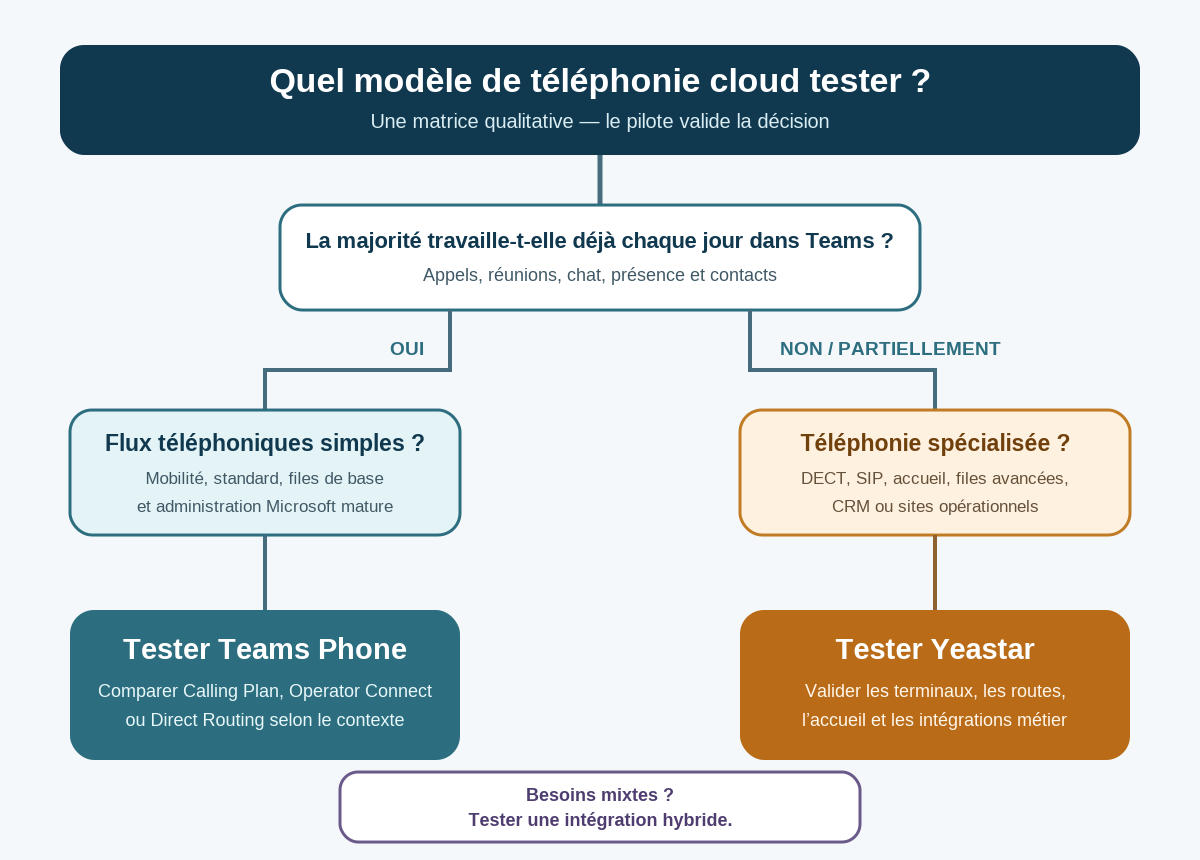
- Weight Teams use, reception, mobility, devices, integrations, continuity and administration from 1 to 5.
- Score each architecture with a demonstration, documentation or test as evidence.
- Analyse disqualifying criteria separately, then pilot the top-ranked solution before porting.
FAQ: Teams Phone or Yeastar in Belgium
Does Teams Phone fully replace a PBX?
Yes, Teams Phone can provide cloud telephone functions including auto attendants and queues. However, PSTN, numbers, resource accounts, policies and continuity must be chosen and configured. Specialised environments may prefer a PBX or hybrid integration.
Can Yeastar be used directly in Microsoft Teams?
Yes. Yeastar documents a P-Series integration embedding Linkus in Teams and linking users to PBX extensions. Other setups use Direct Routing. Check edition, licences, features and the exact call path with the integrator before comparing costs.
Which solution suits a multi-site organisation?
Both can fit. Teams Phone suits sites already using Teams and shared Microsoft policies. Yeastar appeals where sites combine reception, DECT, common phones or local routing. Internet redundancy, numbers, emergency calls and site support are decisive.
Must all desk phones be replaced?
Not necessarily. It depends on compatible devices, firmware, provisioning and use. Some prefer a headset and softphone; others need IP or DECT. Inventory and test critical models before planning to retain them.
Does Teams Phone include external calls?
Teams Phone provides the telephone system, but public calls require compatible PSTN, such as Calling Plan, Operator Connect, Teams Phone Mobile or Direct Routing. Availability, numbers and terms depend on country, operator and contract.
Which solution is the cheapest?
There is no reliable answer without scope. Compare three-year licences, operator, trunks, optional SBC, devices, hosting, migration, integrations and support. Use current Belgian quotes and identical user profiles.
How long should migration take?
Duration varies by sites, numbers, devices, queues and integrations. A serious project reserves time for inventory, pilot, porting and post-cutover support. Set the porting date only after critical tests.
Conclusion: choose a call journey, not just a platform
Teams Phone is an excellent extension of mature Microsoft 365; Yeastar is a solid cloud PBX where specialist telephony shapes operations. An integrated model can serve different profiles. The best architecture makes reception, daily calls and continuity easier to operate.
GVISION maps profiles, checks networks and devices, compares architectures and organises a pilot before porting. To turn this into a costed, testable Belgian scenario, present your telephony project to the GVISION team.
Official sources
Published on . Updated on .
Let’s talk about your project
Let’s review your needs and the next steps for your organisation.
Talk to GVISION