
The short answer
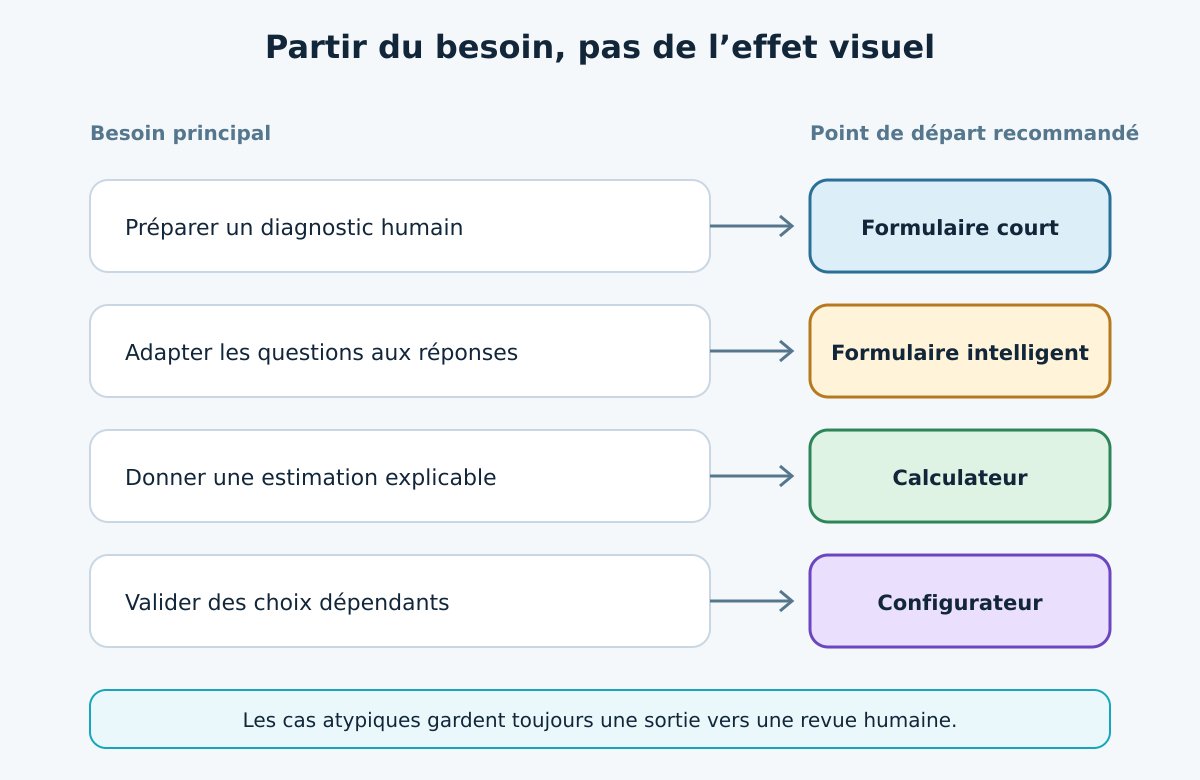
A form suits requests that still require human assessment. A calculator is relevant when a few variables produce an explainable estimate. A configurator becomes useful when options, compatibility, customer profiles or pricing rules structure the offer. The best choice is not the most spectacular: it is the simplest level that gives customers a useful answer and teams directly usable data.
- Form: flexible and quick, but qualification and pricing remain manual.
- Calculator: immediate estimate from limited, understandable variables.
- Configurator: guided journey, compatibility rules and structured summary.
- Before development, appoint the pricing owner, test edge cases and define the CRM/ERP handover.
Which tool should you choose, in one sentence?
Choose according to offer variability and the decision the visitor can make without sales intervention.
If the price depends on an interview, inspection or still-unclear specification, a short form preparing a conversation is often enough. When three or four quantities explain a range, a calculator can give an initial answer. If choices depend on one another, affect feasibility or must be sent to production, a guided configurator becomes more coherent. This is not about opposing a modern solution to an old one, but aligning the interface with the actual sales logic.
The GVISION Studio page dedicated to the e-commerce and configurator service presents guided journeys, dynamic pricing, rules and integrations. Here, the aim is to decide how far to go. Start by structuring useful data, then add calculations or dependencies based on observed use.
What are the four possible levels?
The right continuum runs from a simple form to a connected configurator; a smart form is often a useful intermediate step.
A simple form collects identity, needs and a few attachments. A smart form reveals questions based on answers and normalises units or categories. A calculator converts a small number of inputs into an estimate, timeframe or indicative figure using a transparent formula. A configurator manages options, incompatibilities, dependencies, customer profiles, sometimes a visualisation and a usable summary. These levels can share the same visual interface but carry different responsibilities and maintenance costs.
Avoid calling every sequence of fields a “configurator”. The difference lies in encoded business knowledge. If an answer changes permitted choices, price, a deadline or the bill of materials, the tool executes a rule. That rule needs a source, owner, version and tests. Conversely, a conditional form can already eliminate many incomplete requests without calculating a price. Terminology matters because it sets expectations for management, marketing, sales and development.
How do you compare options without choosing an absolute winner?
Compare the value given to the prospect, data quality, maintenance workload and the risk of an incorrect answer.
The table summarises a decision framework. Costs are not quantified because they vary with rule count, languages, integrations, administration, 3D, authentication and availability requirements. Ask instead for a verifiable scope: scenarios covered, pricing source, update frequency, integration count, roles and acceptance criteria. A small connected calculator can be more demanding than a standalone visual configurator if upstream data is unstable.
The best choice may also vary by segment. A new visitor accepts an estimate with assumptions; a contract customer expects their negotiated price; a distributor wants to save several variants; production requires a valid configuration. Offering two paths is legitimate: a simple request for unusual cases and a guided journey for standardisable offers. Then measure where users abandon the journey and which requests actually become usable.
| Criterion | Simple form | Smart form | Calculator | Configurator |
|---|---|---|---|---|
| Response to the visitor | Acknowledgement | Adapted questions | Estimate or range | Valid configuration and summary |
| Business logic | Very low | Simple conditions | Limited formula | Rules and dependencies |
| Pricing | No | Rarely | Indicative or calculated | Calculated, negotiated or awaiting approval |
| Data received | Text and fields | Structured fields | Inputs and result | Options, rules, version and result |
| Maintenance | Low | Low to medium | Formulas and assumptions | Catalogue, rules, tests and integrations |
| Ideal case | Need still undefined | Repetitive qualification | Parameter-based service | Complex or configurable offer |
| Limitation | Manual exchanges | Poor fit for dependencies | Difficult exceptions | Risk of overengineering |
| Best choice according to need | Human conversation essential | Qualify better without calculation | Provide an indicative figure | Guide and safeguard linked choices |
How do you measure offer complexity?
Count the variables, but above all their dependencies, exceptions and the number of people needed to approve an offer.
List the decisions a salesperson makes today: dimensions, volumes, frequency, finish, location, urgency, associated service, contractual profile and minimum margin. For each, note whether it affects another choice. Fifty independent options can remain simple; eight options with cross-exclusions may justify a rules engine. Add exceptions by sector, country, channel or customer. If the answer depends on an expert’s memory, capture that knowledge before drawing screens.
Analyse uncertainty too. A form suits cases where an expert reviews every file, but becomes frustrating when the same data is always missing. A formula is risky if exceptions are frequent. Classify cases as standard, parameter-based and bespoke; automate the standard first and send exceptions for human review.
Where should prices and business rules live?
A single source must be authoritative; the interface must not become a forgotten second price list.
Designate the system of record: ERP, CRM, product catalogue, editable table or pricing service. Document who may change a rule, when it takes effect and how to return to the previous version. Separate the visible calculation, contractual discounts, additional charges and conditions requiring approval. A public estimate can use a range or explicit assumptions; a firm price needs more controls, customer context and commercial governance.
Test each rule with examples accepted by the teams. Include minimum and maximum limits, units, rounding, taxes, currencies, cumulative discounts and forbidden combinations. The result must be explainable: a salesperson must be able to retrieve the inputs and rule version. If price cannot be displayed, the configurator can still produce a precise summary and qualify the request. Value then comes from eliminating emails and re-entry, not an artificial promise of instant results.
How do you design a journey that actually helps the prospect?
Start with the customer’s decision, group questions into steps and explain why information is requested.
Ask first what helps choose a direction, not contact details. A visitor who understands the options and receives a summary is further along than one immediately facing ten personal fields. Use business language, familiar units and examples. Show progress, preserve answers when going back and offer “I don’t know” where uncertainty is legitimate. A good journey guides without demanding precision the customer does not yet have.
Qualification is not about multiplying mandatory fields. It means collecting signals that change the answer: volume, constraint, timing, compatibility, site or contract type. Each question must lead to a decision, rule or sales preparation. Remove “just in case” fields. Provide a readable summary before submission, a clear confirmation and a request ID. For lengthy offers, allow saving or sending a secure link rather than requiring a single session.
How do you connect the journey to CRM, ERP and invoicing?
Transmit a structured configuration, an identifier and the rules version; do not reduce the result to an unstructured email.
Define mapping before integration: which field feeds the contact, opportunity, product, quote line or approval task? Keep the label shown to the customer and the technical value. Handle duplicates, failures, retries and missing data. A reliable integration must show what was transmitted and what awaits intervention. The quote calculator demonstration from Studio illustrates a front-end interface; production adds precisely real data, history, roles and connections.
In Belgium, the transition from quote to invoice needs a clear boundary. The federal portal notes that structured B2B e-invoicing has been mandatory since 1 January 2026 for the transactions concerned. An estimate or quote does not automatically become a compliant invoice: plan for acceptance, legal data, numbering and the invoicing system. Consult the official e-invoicing FAQ for the exact scope. Integration must preserve sales and accounting stages rather than confuse them.
How do you address personal data, security and accessibility?
Collect the minimum, validate on the server, control access and make every stage usable with a keyboard and screen reader.
Article5 of the GDPR requires purpose limitation, data minimisation, accuracy, storage limitation and security, among other things. Explain why contact and project data are required, avoid unnecessary sensitive information, set a retention period and limit access. Do not put confidential data in the URL. For attachments, check type, size, storage and scanning. A saved configuration must be linked to an unpredictable token and expire when no longer useful.
Browser validation improves the experience, but theOWASP Input Validation Cheat Sheet also calls for server-side validation. Apply lists of expected values, limits and safe error handling. For accessibility, the W3C form tutorials recommend understandable labels, instructions, groupings and error feedback; the WCAG 2.2 cover keyboard, focus, errors and contrast, among other things. Test without a mouse and at 200% zoom.
How do you build the business case without inventing an ROI?
Measure current work and define indicators before the pilot rather than borrowing generic percentages.
Time a sample of requests: qualification, information searches, calculation, validation, drafting, follow-up and re-entry. Count returns for missing data, impossible configurations discovered late, version errors and abandoned requests. Separate sales time from engineering or production time. This baseline estimates a value range and helps choose the first process area to automate without promising a universal figure.
Track completion, requests usable on first pass, response time, exceptions, integration errors and human handling. Conversion alone can mislead if poorly qualified requests overload sales. Include operations, hosting, support, rule maintenance and evolution.
How do you manage the project in six steps?
Build a prototype for a profitable subset, test with real scenarios and integrate systems only after validating the journey.
First, select a stable offer family. Second, map rules, exceptions and the data owner. Third, create a clickable prototype with a summary without pursuing every feature. Fourth, have customers or colleagues unfamiliar with the model use it. Fifth, implement calculation and automated tests. Sixth, connect CRM or ERP with logging and recovery. At each stage, define a stopping criterion and the expected decision.
The workshop visual below represents the least visible but most important work: aligning sales, operations, product and IT. Prepare at least twenty scenarios, including limits and common errors. Compare results with an approved quote. Test three languages if the market requires it, number and address formats, mobile, keyboard, load time and API failure. Deploy gradually, retain a manual path and observe requests before expanding scope.

Which Belgian scenarios illustrate the choices?
Recurring services favour a calculator; technical products favour a configurator; highly variable projects retain a human stage.
A cleaning company can estimate work from areas, frequencies and options while reserving unusual sites for a visit. An accounting firm can guide by document volume, employees and obligations, then send a summary. A joinery or equipment manufacturer combines dimensions, materials and compatibility: the configurator protects feasibility before the request. A multi-site group can add addresses, hours and service levels without immediately requesting every technical detail.
A non-profit can offer packages; an administration integrates roles and approvals; an engineering office retains human qualification. The journey must always state whether it provides an estimate, an offer to confirm or a configuration ready to order.
Which mistakes should you avoid?
Failures mainly stem from ungoverned rules, an overlong journey, fragile integration and an ambiguous price promise.
Do not copy the internal questionnaire unchanged onto the website. Do not request data before showing its usefulness. Do not hide all calculation assumptions. Avoid duplicated prices in code, ownerless exceptions, endless dropdowns and impossible configurations detected only after submission. Do not require an account before the offer is understood. Do not send only a PDF to CRM: retain structured data for search, reporting and recovery too.
Do not launch 3D before validating selection logic. Plan for ERP downtime, pricing, separate marketing consent, access and support. Beyond clicks, measure accepted requests, errors avoided and repetitive work removed.
Frequently asked questions
What is the difference between a calculator and a configurator?
A calculator converts inputs into a result using a limited formula. A configurator guides dependent choices, applies compatibility rules and produces a structured configuration.
Must you display an exact price?
No. An estimate or range may be more honest where exceptions require validation. The result's status and assumptions must be explicit.
Can you start without CRM or ERP?
Yes, with a prototype or structured submission. Still plan identifiers and the data model to avoid a complete rebuild during integration.
Is a configurator suitable for services?
Yes. Packages, frequencies, volumes, timelines and options can form a service offering if the rules are stable and understandable.
How do you handle custom cases?
Offer a route to human review while retaining answers already provided. The journey must neither block nor invent a price.
Is 3D essential?
No. It helps if it clarifies dimensions, finishes or layout. A clear summary is enough where the decision does not depend on visualisation.
How long does launch take?
No universal timeline is reliable. It depends on rules, data, languages, integrations, tests and the expected administration level.
Conclusion: choose the level that actually reduces friction
A form is not a maturity failure, and a configurator is not automatically a good experience. The right level matches business knowledge the organisation can formalise, maintain and explain. If a few variables suffice, calculate. If choices depend on each other, configure. If uncertainty remains central, prepare a human conversation with a simple, useful form.
GVISION Studio can help map rules, prototype journeys, build integrations and organise post-launch follow-up. To turn this guide's assumptions into testable scope, you can scope your configurator with Studio.
To go further, explore our support: Our business applications.
Official sources
Published on . Updated on .
Let’s talk about your project
Want to apply this advice in your organisation? Let's review your needs and next steps together.
Talk to GVISION