



FrenchModern Workplace
Modern Workplace · Windows Lifecycle · Belgium
Windows 10 ESU for businesses: year 2 or migration to Windows 11?
Windows 10 ESU: should you pay for year 2 or migrate to Windows 11? As October 2026 approaches, Belgian organisations still using Windows 10 must decide: purchase the second year of Extended Security Updates, migrate compatible devices to Windows 11, replace certain equipment or isolate some business-critical systems. The right answer is decided device by device, but managed as a single programme.

October 2026 is not a new general end date for Windows 10
The date mainly concerns the transition from the first to the second year of ESU for organisations; it does not mean that all Windows 10 PCs follow the same rules. Microsoft ended standard support for Windows 10 22H2 on 14 October 2025. A device not enrolled in an applicable programme therefore no longer receives normal operating system updates.
For commercial and educational organisations, Microsoft provides up to three years of Extended Security Updates. The licensing documentation specifies that the subscription is paid for annually, with no partial periods, and that the years are cumulative. An organisation joining directly in year 2 must also purchase year 1. This mechanism changes the calculation: waiting does not eliminate the previous cost.
The consumer programme is separate. Microsoft has extended consumer ESU coverage until 12 October 2027, but this does not turn business devices joined to a domain, managed by MDM or used in a business environment into consumer devices. A Belgian organisation must therefore verify the qualification and licensing channel for each device rather than relying on information intended for consumers.
Finally, certain LTSC/LTSB editions have their own lifecycle. Windows 10 Enterprise LTSB 2016, for example, reaches the end of extended support on 13 October 2026. An inventory that mixes 22H2, LTSC, IoT and virtual machines can produce incorrect conclusions if the exact edition is not recorded.
Windows 10 ESU: what it protects and what it does not resolve
ESU reduces exposure to system vulnerabilities, but does not return Windows 10 to full support status. Microsoft limits the programme to security updates classified as critical or important. It does not add features, address change requests or include general system support.
The device must, in particular, be running Windows 10 version 22H2 for the standard commercial programme. Activation can be performed using a MAK key or, in some scenarios, through cloud activation and centralised management. Microsoft publishes separate identifiers for years 1, 2 and 3. A licence that has been purchased but not correctly activated therefore provides no protection; activation status and actual receipt of updates must be measured.
ESU does not guarantee compatibility with third-party software either. A vendor may stop supporting its application, driver, antivirus or peripheral on Windows 10 before ESU ends. Conversely, Microsoft will continue providing security updates for Microsoft 365 Apps on Windows 10 until 10 October 2028, but states that support options may be limited when an issue occurs only on Windows 10.
To monitor compliance, encryption, versions, restarts and migration waves, centralised endpoint management quickly becomes essential. The GVISION page dedicated to Microsoft Intune and MDM describes this role in managing devices, whether on-site or remote.
ESU, upgrade, replacement or cloud PC: comparing the options
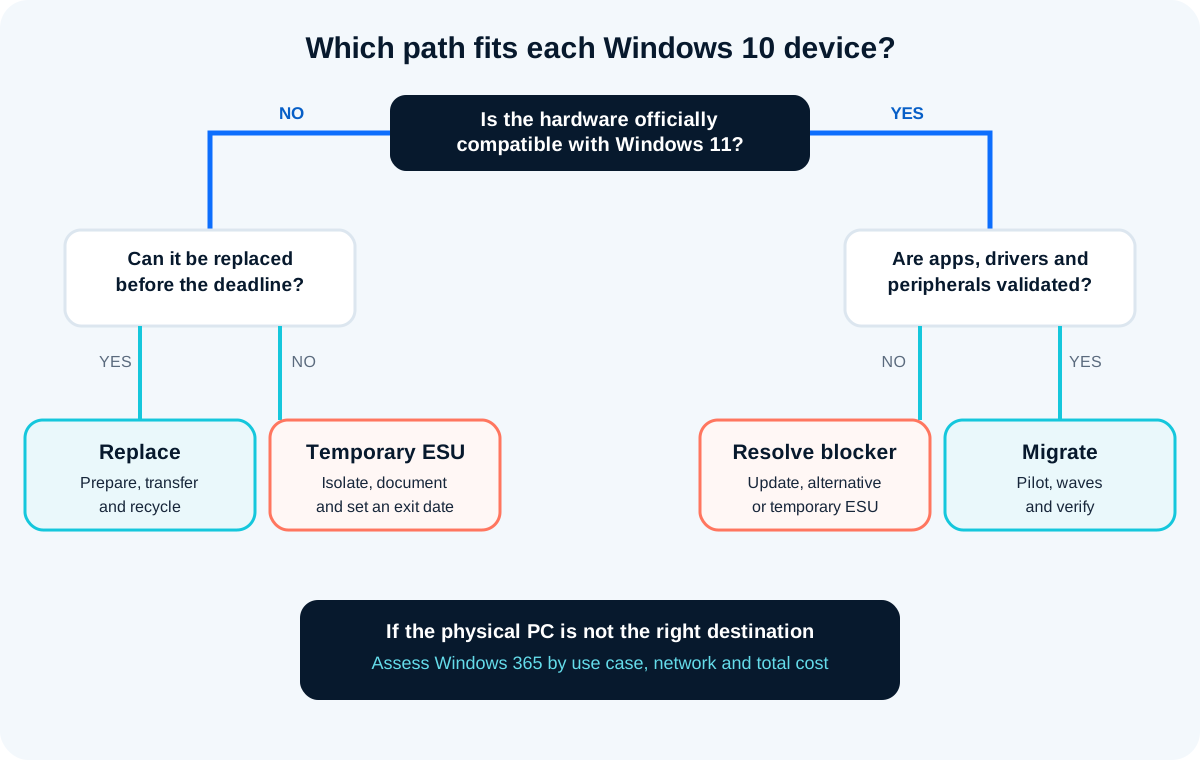
No single option wins everywhere: the right choice depends on the hardware, critical application and time required to reduce the risk. An upgrade is generally the logical choice for a compatible, healthy device; ESU is suitable for a temporary exception; replacement addresses hardware debt; a cloud PC meets certain use cases, but adds network dependency and a subscription.
| Criterion | Windows 11 on the current PC | New Windows 11 PC | Windows 10 ESU year 2 | Windows 365 / cloud PC |
|---|---|---|---|---|
| Prerequisites | Officially compatible hardware, validated drivers and applications | Budget, logistics and data transfer | Eligible Windows 10 22H2, licence and activation | Reliable connection, cloud identity and appropriate sizing |
| Main advantage | Modernisation while reusing existing hardware | Renewed hardware and software lifecycle | Secure timeframe for an exception | Windows 11 environment accessible from a device |
| Main limitation | Compatibility risk to be tested | Investment and physical deployment | Increasing cost, limited and temporary coverage | Recurring cost, network and user experience to be validated |
| Use cases | Recent, high-performance and compatible PC | Old, incompatible or unreliable PC | Device linked to an application or piece of equipment in transition | Hybrid working, contractors, need for a centralised environment |
| Verified cost | No universal price: project, licences and support to be costed | Depending on the hardware and services selected | Microsoft cites USD 61/device in year 1 with an annual doubling; Belgian price to be confirmed | Depending on the edition, resources and Microsoft agreement |
| Best choice according to the need | Preserve a good device | Reduce technical debt and failures | Save time with an exit date | Decouple the working environment from the device |
Quick read on mobile
- Compatible PC: deploy Windows 11, then migrate.
- PC too old: planned replacement.
- Temporary business blocker: ESU with an owner and exit date.
- Standardised remote use: assess Windows 365, network and recurring cost.
Start with an inventory that genuinely enables decision-making
A useful inventory does not simply count PCs: it links each device to its user, usage, dependencies and exit date. Export the device name, Windows edition and version, model, processor, memory, storage, TPM/Secure Boot status, encryption, warranty, last activity and business owner.
Then add what technical tools often cannot see: accounting application, medical software, card reader, label printer, industrial machine, Office macro, legacy VPN, browser plug-in, shared device or local account. An apparently simple machine may become a priority if it controls production or reception.
Four operational groups
- Migrate: compatible hardware, sufficient performance and validated dependencies.
- Replace: official incompatibility, likely failure, expired warranty or disproportionate maintenance cost.
- Extend: genuine constraint, identified owner, ESU activated and planned exit.
- Isolate or retire: device with no upgrade path whose use can be discontinued, virtualised or separated from the standard network.
Do not classify “later” as a fifth group. A device without a decision becomes an invisible exception. Give each exception a reason, owner, compensating measure, deadline and forecast budget.
Test real work, not just the startup screen
A Windows 11 pilot succeeds when business tasks, peripherals and support work from start to finish. Select representative users: management, finance, reception, field workers, remote workers, creative teams, technical functions and users of sensitive applications. Avoid a pilot made up solely of IT staff.

Create a short but observable test scenario: MFA sign-in, file access, opening the business application, printing, scanning, Teams call, VPN, signing, PDF export, macros, sleep, restart and remote assistance. Record the result, time, severity of any failure and fallback solution.
Also verify recovery: user profile, BitLocker, recovery keys, file restoration and the ability to temporarily return to the previous device. “Vendor-declared” compatibility remains useful, but evidence on your version, data and peripheral is more valuable.
Pilot exit criteria
- No unresolved critical blockers.
- Essential applications have an owner and validation.
- Drivers and peripherals work on the selected models.
- Migration time is known and reproducible.
- The service desk has a procedure, escalation channel and rollback plan.
Deploy in waves and preserve continuity
An industrialised migration reduces disruption by standardising preparation, backup, installation, verification and closure. Start with a small wave of standard devices, then increase progressively. Keep the most critical machines for a wave prepared with the business, rather than necessarily leaving them until the very end.
An eight-week plan could cover: two weeks for inventory and decisions, two weeks for the pilot, three weeks for waves and one week for catch-up. This is an example of organisation, not a universal promise. A multi-site estate, school term, accounting firm during year-end or healthcare environment requires a different schedule.
Automation through Intune, Autopilot or a deployment tool limits manual operations: profiles, applications, encryption, compliance policies and version control. However, it does not replace communication. Inform the user, indicate the likely duration, what will change, how to access their data and where to get help.
For devices to be replaced, the Professional PCs and IT hardware GVISION service is the logical step between the technical decision, model selection, preparation and lifecycle renewal.
Measuring progress
- Number and percentage of active Windows 10 devices.
- Windows 11-eligible devices, migrated, replaced, under ESU or isolated.
- Failures by cause: application, driver, capacity, user or licence.
- Average migration time and tickets within seven days.
- Exceptions without an owner or whose exit date has passed.
Compare the cost of transition, not just the licence price
The true budget adds up licensing, IT labour, user time, support, hardware, risk and the cost of a deferred migration. Microsoft cites a reference price of USD 61 per device for year 1 ESU for organisations and states that the price doubles each year. Ask for the applicable contractual price in Belgium, taxes, CSP or volume licensing channel and any cloud management requirements.
An ESU licence may appear cheaper than a new PC over twelve months. But if the device then requires year 3, additional support and replacement, deferring the decision may cost more. Conversely, immediately replacing a specialised machine without validating its software may cause an interruption far more costly than ESU.
Build three scenarios: accelerated migration, mixed transition and maximum extension. For each, list certain costs, assumptions, risks and end date. The mixed scenario is often the most realistic: migrate compatible devices, replace devices in waves and reserve ESU for a small number of exceptions.
Adapt the plan to the organisation's constraints
The method remains common, but acceptable risk and the migration window vary considerably by sector. A school avoids exams and the start of the academic year; an accounting firm avoids VAT deadlines and year-end closing; a healthcare organisation tests card readers, clinical software and equipment; a public authority coordinates procurement, shared devices and decentralised sites.
Multi-site groups and distributed organisations
Standardise a few PC models, pre-position devices and track each site separately. Connectivity, delivery and the presence of a local contact can determine the order of the waves.
Associations and non-profit organisations
Prioritise devices accessing beneficiary data, payments or administration. Batch replacement and a standard image can reduce operational costs without handling all devices on the same day.
Industry, healthcare and specialised equipment
Do not force Windows 11 onto a device not certified by the vendor. Isolate the system, restrict traffic, use dedicated accounts, back up its configuration and obtain a vendor roadmap. ESU can protect the Windows system, but cannot fix an abandoned driver or an unsupported application.
Mistakes that make migration riskier
Most failures result from a late decision, an incomplete inventory or testing that is too technical. Here are the pitfalls to eliminate before the first major wave.
- Applying consumer information to business devices: ESU programmes and their conditions differ.
- Bypassing Windows 11 requirements on unsupported hardware: this creates a new unsupported configuration instead of resolving technical debt.
- Buying ESU without checking activation: verify the licence and receipt of the latest update on each device.
- Forgetting rarely connected devices: meeting rooms, storage areas, remote workers and backup machines often escape the inventory.
- Testing only Office and the browser: peripherals and business applications cause the most costly disruptions.
- Migrating without communication: a technically successful change can generate avoidable tickets.
- Failing to close exceptions: a machine under ESU with no exit date remains in place until the next emergency.
Frequently asked questions
Is Windows 10 ESU free for a Belgian business?
No, the commercial programme intended for organisations is paid. The free offer or extension announced for certain consumers in the European Economic Area must not automatically be applied to business devices. Check the device status and licensing channel.
How long can a business receive ESU?
Microsoft states that commercial and educational organisations can receive up to three years of security updates after Windows 10 reaches the end of standard support, subject to eligibility, licensing and activation.
Can you purchase only year 2?
Microsoft documentation states that ESU years are cumulative. An organisation joining the programme during year 2 must also pay for year 1; partial purchases for a few months are not available.
Can an incompatible PC still install Windows 11?
Technical workarounds exist, but they create an unsupported configuration. In a business environment, prioritise an officially compatible device, replacement, a cloud solution or a temporary ESU exception.
Will Microsoft 365 Apps stop working on Windows 10?
The applications may continue to work. Microsoft plans to provide security updates for Microsoft 365 Apps on Windows 10 until 10 October 2028, but the Windows 10 operating system follows its own lifecycle and support may be limited for issues specific to Windows 10.
Is Intune mandatory for migration?
No. Migration can be performed in other ways, but Intune or an equivalent platform facilitates inventory, deployment, compliance monitoring, cloud activation in eligible scenarios and visibility of remote devices.
Where should you start if the estate is undocumented?
Start by discovering active devices, enrich the data with owners and applications, then classify each device for migration, replacement, extension or retirement. Deal with exposed machines and critical dependencies first.
Turning the deadline into controlled renewal
13 October 2026 should not trigger a rushed purchase of licences or hardware. It should close year 1 exceptions and fund an estate that is easier to maintain. GVISION can inventory devices, organise the pilot, prepare equipment, plan the waves and document exceptions. To define the scope and priorities, discuss your Windows migration with GVISION.