



FrenchModern Workplace
Technical SEO · Website redesign · Belgium
Website redesign without losing search visibility: an SEO migration plan
A practical method for preserving valuable URLs, search signals and conversions during a redesign in Belgium.

Why can a redesign affect search visibility?
A redesign often changes several systems at once: design, templates, navigation, content, URLs, CMS, hosting and measurement. Google then has to recrawl the pages, interpret the new relationships and confirm which addresses replace the old ones. Temporary fluctuations may occur, but a lasting loss is not inevitable. It is most likely when valuable pages disappear without an equivalent, redirects are incorrect or signals become contradictory.
Start by assessing the project. A visual refresh with the same URLs introduces fewer variables than a change to the site structure. A domain, protocol or CMS migration adds further dependencies. Google recommends changing one thing at a time where possible and preparing a precise mapping between old and new URLs. This discipline also makes diagnosis easier: if everything changes on the same day, it becomes difficult to isolate the cause of a decline.
The useful question is therefore not “can zero fluctuation be guaranteed?”, but “what evidence will allow an anomaly to be detected and corrected quickly?”. The answer combines an inventory, pre-launch testing, decision criteria and post-launch monitoring.
| Redesign type | Relative risk | Key controls | Best choice according to the need |
|---|---|---|---|
| Same URLs, new design | Low to moderate | Content, templates, performance | Targeted visual refresh |
| New site structure and URLs | High | Mapping, redirects, links, hreflang | Repositioning or simplification |
| New CMS or hosting | Moderate to high | Rendering, status codes, canonicals, performance | Technical modernisation |
| New domain | Very high | All controls and Search Console property | Justified brand change |
Same URLs, new design
Relative risk: Low to moderate
Best choice according to the need: Targeted visual refresh
New site structure and URLs
Relative risk: High
Best choice according to the need: Repositioning or simplification
New CMS or hosting
Relative risk: Moderate to high
Best choice according to the need: Technical modernisation
New domain
Relative risk: Very high
Best choice according to the need: Justified brand change
Build an inventory before designing
The inventory is the memory of the current site. Export all URLs found in the sitemap, CMS, analytics tools, Google Search Console, logs where available and an internal crawl. Add pages that receive external links, conversions or seasonal traffic. No single tool sees everything: the sitemap may omit an old landing page, while the crawl may overlook an orphan page that is still visited from Google.
For each URL, record the HTTP status code, title, canonical, language, depth, template, traffic, queries, inbound links, conversions and business owner. The data does not need to be perfect to be useful; it needs to make decisions explicit. Then classify each page: keep, improve, merge, redirect, remove or review.
The inventory should also cover forms, downloads, measurement events, consented pixels, feeds, internal search engines and legal pages. A successful redesign is not limited to the pages that appear in the menu. In a project supported by the service Sites web & refontes de GVISION Studio, GVISION can link this mapping to UX, content and technical requirements rather than treating SEO as a final check.
Preserve intent, not just words
A new page can reuse the text from an old one while losing its function. Intent depends on the subject, but also on the format, depth, audience, navigation and next action. A service page that becomes three paragraphs on a general page no longer provides the same answer. Conversely, merging two redundant pages can improve clarity if the destination genuinely addresses both needs.
Work by role: commercial page, guide, case study, category, resource, contact or help. Compare the main query, secondary questions, internal links and expected conversion. Retain the elements that explain why the page receives visits or enquiries, then improve their presentation. Do not mechanically protect all old content: protect what provides verifiable value.
For a multilingual Belgian website, check consistency of the value proposition between versions. An important French page without a Dutch equivalent should not be redirected to a generic Dutch page for convenience. Decide whether the translation should be created, whether the page should temporarily remain in place or whether a localised alternative genuinely meets the same need.
Build a URL-by-URL mapping table
The mapping table is the central document of the migration. Each old indexable URL receives a decision and, when it changes, a single new URL. The destination should be the closest equivalent, not automatically the homepage. A mass redirect to the homepage offers little value to users and may be interpreted as a logical error.
Add the old URL, new URL, expected status, reason, language, owner, test date and result to the table. Flag difficult cases: content merges, removal without replacement, parameters, PDFs, campaigns, subdomains and pages dependent on a login. The table serves development, acceptance testing and post-launch support.
Avoid generating rules solely from the new menus. URLs have a history: old campaigns, slash variants, uppercase versions, translated paths or files still linked from partners. Normalise patterns without creating overly broad redirects. Manual sampling is still necessary, even when rules are generated automatically. Finally, keep the table in a version-controlled format so you can identify who changed a destination and why.
Choose and test the right redirects
For a permanent move, Google considers permanent HTTP redirects, including 301 and 308, to be a strong signal towards the new URL. The exact code depends on the platform, but the behaviour should be permanent, direct and stable. An old page should reach its final destination in a single hop. Chains slow crawling, complicate diagnosis and can break when one of the intermediate steps disappears.
Test the rules in a representative environment, then externally after launch. Check the status code, Location header, final destination, language and absence of loops. Check a sample of priority pages, but also test every URL automatically. Important resources — images, PDFs or indexed scripts — deserve their own decision.
A redirect is not a substitute for a good page. If the destination no longer meets the intent, consider retaining an explanatory page or returning a consistent removal status. Keep redirects for long enough to serve users, bookmarks and historical links. The Google documentation on redirects and search serves as a technical reference, but the relevance of the destination remains an editorial decision.
Align canonicals, hreflang and languages
Each localised URL should declare itself as its own canonical when it represents a distinct page. The FR, NL and EN variants are linked through hreflang; they should not be canonicalised to the French version. A contradictory canonical asks Google to consolidate the pages while hreflang states that they are alternatives. The result becomes unpredictable.
Check complete groups: each variant references the others and itself. The x-default value can point to the selection version or the intended default page. If TranslatePress manages these tags, do not duplicate them manually in the theme or SEO plugin. Test the rendered HTML, not just the interface configuration.
Slugs can be localised, but the redirect table must then handle each language separately. Also check menus, language selectors, canonicals, sitemaps and structured data. A common mistake is translating the interface while leaving internal links pointing to the old French URLs. Follow the actual paths of a Dutch- or English-speaking visitor to confirm that the migration is consistent from start to finish.
Protect staging without blocking the public site
Staging should remain out of the index while still being accessible to authorised people and tools. Authentication protection is generally more robust than a simple noindex tag. Robots.txt controls crawling, not necessarily the presence of a URL in search results; Google specifies that a blocked URL can still appear without a snippet if it is known from elsewhere.
The classic pitfall occurs at launch: the noindex, HTTP protection, robots rule or staging canonical remains active. Add these elements to the cutover checklist and test them from an external connection. Conversely, do not make staging publicly indexable simply to enable crawling. Use appropriate acceptance-testing access.
The architecture ofhosting, security and maintenance also influences the migration: certificates, DNS, caching, CDN, backups, monitoring and rollback capacity must be prepared. GVISION recommends appointing one person authorised to initiate the cutover and another to validate the result. This separation reduces improvised decisions when several teams are acting simultaneously.
Organise technical and editorial acceptance testing
Acceptance testing begins before the launch date. On a representative set of URLs, check HTTP status codes, titles, descriptions, H1s, canonicals, hreflang, structured data, links, images, alt attributes, forms and conversion events. Compare the old and new renderings to identify missing information or actions. Business validation complements the crawl: a bot cannot tell whether a quote request, registration or appointment booking actually works.
Also test less visible states: 404 errors, empty results, form confirmations, consent refusal, internal search, printing, downloads, keyboard navigation and mobile zoom. Assign a severity level, owner and decision to each issue. A defect list without an owner is not acceptance testing.
The photograph in this section illustrates the validation meeting between development and marketing. Keep evidence: crawl exports, screenshots of critical templates, form results and event comparisons. They speed up investigation if an indicator changes after launch. Acceptance testing is not intended to demonstrate perfection, but to establish what has been checked, accepted or deferred.

Migrate content, metadata and internal links
First, migrate the content that satisfies search needs and supports conversions. Retain useful factual information, evidence, questions and calls to action, then adapt the structure to the new design. A more elegant component does not compensate for removing a paragraph that answers the query. Check titles and descriptions page by page; copying a generic value across the entire site dilutes its meaning.
Internal links transmit context and organise discovery. Update links in content, menus, breadcrumbs, footers and related components. They should point directly to the new URLs without passing through a redirect. Identify orphan pages and ensure that strategic pages remain accessible from relevant hubs.
Do not forget media. Keep files that are still being searched for or redirect them to a useful equivalent. Provide dimensions, compression, alternative text and captions according to the context. If names change, update references in structured data and social cards. Finally, review the site on mobile: a block hidden by CSS may be present in the code but unusable by the reader.
Treat performance and accessibility as launch criteria
A redesign can improve the user experience while making the site heavier. Measure Core Web Vitals before and after using laboratory data and, where available, real-user data. The web.dev framework includes LCP for loading, INP for responsiveness and CLS for visual stability. Compare equivalent page types rather than a misleading global average.
Define budgets: page weight, image size, number of third-party scripts, server response time and behaviour on a realistic mobile device. Optimise images, fonts, caches and components before launch. A new theme is not a licence for unlimited resource growth.
Accessibility should be tested using automation and human verification. WCAG 2.2 covers areas including keyboard navigation, visible focus, contrast, text alternatives, labels and errors. An automated tool cannot validate the appropriateness of a reading order or message. Integrate these criteria into the definition of “ready”, together with critical forms and templates. This reduces costly post-publication fixes and improves usability for far more visitors than the officially recognised scenarios alone.
Preserve analytics, Search Console and conversions
An apparent decline may be caused by broken tracking rather than an actual loss. Document the current tags, consent management platform, events, goals, campaign parameters and internal exclusions. On staging, use a separate measurement environment or debugging mode to avoid contaminating production data.
Before the cutover, record a baseline: landing pages, organic clicks, impressions, queries, conversions, error rate and performance by page type and language. Avoid promising a specific level after migration; these data are used to detect deviations, not to guarantee a position. Check that events retain a comparable definition; otherwise the before-and-after trend no longer has the same meaning.
After launch, submit the new sitemap in Search Console and monitor coverage, errors, selected canonicals and performance. A sitemap helps discover URLs but does not guarantee their indexing. Keep the old sitemap or a list of old URLs during the monitoring phase if this facilitates redirect tracking. Always cross-check signals: Search Console, analytics, logs, monitoring and incoming requests.
Prepare the cutover and rollback
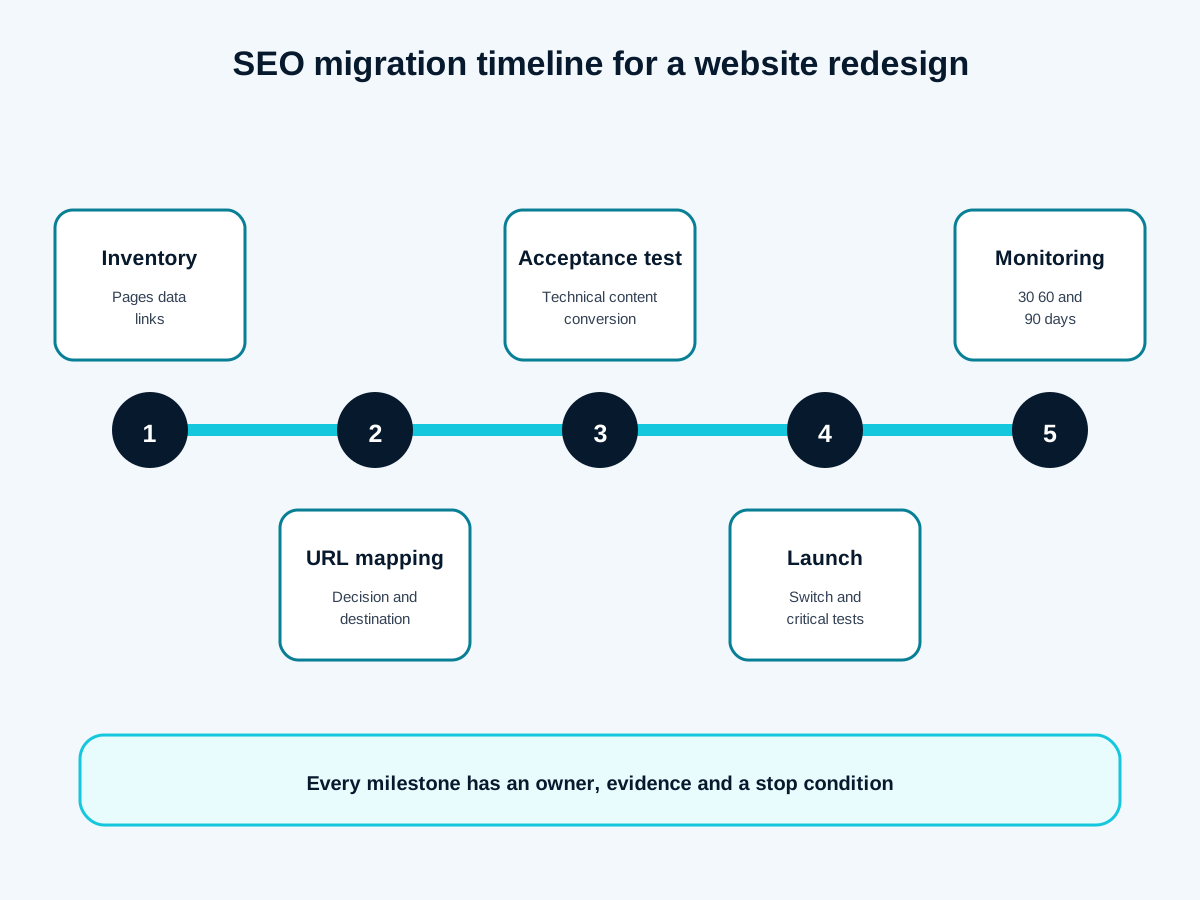
The launch plan should fit on a clear timeline. Freeze non-essential changes, perform backups, validate the URL table, reduce DNS TTL if necessary, publish, purge caches, run critical tests and then authorise communications. Each step has an owner, time, evidence and stop condition.
Rollback is not always a simple button. Reverting to the old code after the database, content or DNS has changed can create further inconsistency. Define what can be rolled back, within what timeframe, by whom and using which data. For a limited SEO issue, correcting the rule or page may be safer than a full rollback. For a payment or login failure, the stop condition may be immediate.
The localised infographic summarises five milestones: inventory, mapping, acceptance testing, controlled launch and monitoring. Use it as a support tool, not as a replacement for the detailed plan. Provide on-call coverage on launch day and a single decision channel. Sales and support teams should know where to report a broken URL or failed conversion without scattering the information.
Monitor at 30, 60 and 90 days without waiting for a crisis
The first few hours are used to verify availability, forms, priority redirects, robots, canonicals, sitemap and analytics. In the following days, analyse 404s, chains, non-indexable pages, canonical selections and differences by language. After several weeks, observe trends in clicks, impressions, conversions and engagement by page group rather than a global figure.
Create a correction log with impact, hypothesis, change, date and result. Do not change several variables simultaneously unless necessary: you would lose the ability to learn. Alerts should lead to a defined action. An increase in 404s from unknown bots does not have the same priority as a highly visited old service page with no destination.
At 30 days, correct mapping and measurement errors. At 60 days, review underperforming content and internal links. At 90 days, decide which redirects and monitoring measures become operational. Common mistakes include launching on a Friday evening, forgotten noindex, blanket redirects to the homepage, contradictory canonicals, an old sitemap and lack of ownership. Simple governance prevents them from recurring.
Frequently asked questions
Does a redesign always cause rankings to drop?
No. Fluctuations are possible during recrawling, but rigorous preparation reduces the risk of a lasting decline.
Should all old URLs be retained?
No. You need to retain valuable URLs or redirect them to a relevant equivalent. A removal without replacement may return an appropriate status code.
301 or 308: which should you choose?
Both indicate a permanent move. Choose according to the platform and, above all, test that the redirect is direct, stable and correct.
How long should redirects be kept?
Long enough for search engines, users, bookmarks and external links. Strategic redirects often become a long-term rule.
Can staging be blocked using only robots.txt?
It is not ideal. Authentication provides better protection; robots.txt prevents crawling but does not guarantee that a known URL will disappear.
When should the new sitemap be submitted?
After launch and validation of the URLs. Submit it in Search Console and monitor errors and selected canonicals.
What should be checked first after launch?
Availability, forms, key redirects, noindex/robots, canonicals, hreflang, analytics, sitemap and 404 errors.
Conclusion: treat the redesign as a measurable migration
A safe redesign connects objectives, inventory, mapping, acceptance testing and monitoring. It does not promise unchanged results; it organises evidence and corrective actions. To turn this plan into scope, responsibilities and a timeline, you can prepare your redesign with GVISION.