



Windows · Intune · Least privilege · Belgium
Local administrator rights: permanent account, Windows LAPS or just-in-time elevation?
A decision guide to removing permanent privileges without blocking applications, support or recovery.

Distinguish the account, password and elevated task
The debate becomes simple once three things are separated. A permanent administrator account gives a person or process lasting power over the device. Windows LAPS manages the secret of a local account and renews it; it does not decide which applications a user can elevate. Endpoint Privilege Management, or EPM, allows a specific task to run with higher privileges without placing the user in the Administrators group.
This distinction avoids two common mistakes: using the LAPS password as a daily installation solution, or assuming that EPM replaces every local fallback method. The first use exposes a powerful secret and weakens traceability. The second leaves the team without a solution when the device can no longer communicate properly with the cloud. A robust architecture provides a normal path, an exception path and a recovery path.
Why do permanent rights increase risk?
An administrator user can install a driver, modify services, disable protections and write to sensitive locations. The same power becomes available to malware running in their session. An error or phishing attack is therefore no longer limited to the user profile: it can affect the entire system, other local accounts and security mechanisms.
The issue is not simply the number of administrators. You need to know the duration of the privilege, the identity using it, the permitted actions and whether it can be revoked quickly. A separate account is already preferable to daily work with a powerful account, but it remains a lasting privilege. Least privilege aims to reduce both the scope and the duration of exposure.
Which models should you compare?
Four models are commonly found in practice. The first leaves the everyday account as a member of the local administrators group: simple, but difficult to control. The second creates a separate named administrative account: better separation, but power remains permanent. The third uses Windows LAPS for a local recovery account whose password is unique and regularly renewed. The fourth keeps the user as a standard user and elevates an approved application with EPM.
The right outcome is generally a combination, not a single winner. Recurring and known tasks use an elevation rule. Full administrative interventions remain restricted to authorised technicians. LAPS protects the recovery of an isolated device. Persistent exceptions have an end date, an owner and a justification.
What Windows LAPS does — and does not do
Windows LAPS automates the management and backup of a local administrator password. Each device can receive a different secret, renewed according to policy and retrievable by authorised roles. Microsoft documentation updated on 16 September 2026 explains that the backup target can be Microsoft Entra ID or Active Directory depending on the join type. A hybrid device chooses one destination; it does not back up to both simultaneously.
LAPS reduces the risk associated with the same local password being shared across the entire estate and makes rotation after use easier. It does not automatically turn an application into an approved task, replace identity management or justify giving the password to the user. Treat password retrieval as a sensitive action: minimum required role, logging, procedure and rotation after use.
Microsoft states that Windows LAPS is available at no additional cost on supported Windows platforms, while certain associated Intune or Entra features require their own licence. Always check the edition, version and tenant licence before deployment.
What just-in-time elevation provides
EPM allows a standard user to elevate an executable, an MSI installer or a PowerShell script according to a rule. The rule can recognise the publisher, certificate, hash, name or path, and control arguments and child process behaviour. Microsoft documents several responses: automatic elevation, user confirmation, support-approved request or denial.
Elevation applies to the task, not the entire session. It is suitable for a business utility, a controlled update or a recurring diagnostic operation. However, an overly broad rule recreates permanent privilege in another form. Allowing any file in a writable folder or any binary signed by a very broad publisher can create a bypass route.
EPM requires an eligible licence; the terms must be checked against the current tenant and contract. The article does not include any pricing, as the cost depends on the plan and may change.
How should you choose based on the need?
The decision starts with the need, its frequency and its level of control. A rare, full administrative intervention does not call for the same solution as a known application requiring elevated rights every week. The table compares the models in terms of scope, duration, traceability, offline operation and recommended use.
| Model | Scope and duration | Traceability | Limitation | Best choice according to the need |
|---|---|---|---|---|
| Everyday administrator account | Entire device, permanent | Immediate | Limited separation; high risk | Very temporary exception |
| Separate admin account | Entire device, permanent | Good when individually assigned | Power still permanent | Full administration by a technician |
| Windows LAPS | Local recovery account | Traceable retrieval and rotation | Not task elevation | Backup, offline operation, recovery |
| EPM / JIT | Approved file or task | Rules and reporting | Licensing and rule design | Targeted recurring tasks |
Everyday administrator account
Scope and duration: Entire device, permanent
Best choice according to the need: Very temporary exception
Separate admin account
Scope and duration: Entire device, permanent
Best choice according to the need: Full administration by a technician
Windows LAPS
Scope and duration: Local recovery account
Best choice according to the need: Backup, offline operation, recovery
EPM / JIT
Scope and duration: Approved file or task
Best choice according to the need: Targeted recurring tasks
Identify the actual elevation requests
Before removing rights, collect requests over a representative period. Classify them by application, publisher, version, site, business function, frequency and expected outcome. Distinguish a one-off installation from a daily function that unnecessarily requires administrative rights. Some applications may run as standard users after correcting a folder, registry key or update mechanism.
Consult the support team, field teams and application owners. Cases that are invisible at headquarters often appear in a laboratory, workshop, classroom or practice: legacy peripheral, card reader, nomenclature update, tax plugin, print driver or diagnostic tool. Also record offline situations and acceptable response times. The resulting catalogue becomes the basis for the rules and pilot.
GVISION can integrate this work into the management with Microsoft Intune, with groups, rings and deployment evidence adapted to the relevant populations.
Design rules that are difficult to bypass
A good rule is narrow, clear and reviewable. Prefer a trusted publisher or certificate combined with the product and version when sufficient. Hashing is highly precise, but must be updated with every new version. A path alone is fragile if the user can place or replace a file there. Check arguments, child processes, called files and update mechanisms.
Choose the least permissive response compatible with the business need. Automatic elevation is suitable for a highly controlled task. Confirmation with justification adds an additional signal. Support approval is useful for a rare or higher-risk request, provided the response time is acceptable. Explicit denial protects against an unexpected general rule.
For each rule, document the owner, reason, groups, test evidence, review date and removal procedure. A rule without an owner quickly becomes a security liability.
Link local privileges and identity
Endpoint security also depends on the identity retrieving the LAPS secret or approving an elevation. Limit these roles, enforce strong authentication, separate administrative accounts and monitor usage. A technician should not automatically have access to all secrets across the estate if their scope is limited to a site or team.
La Microsoft Entra identity governance helps structure groups, roles and access conditions. The aim is to link every privileged action to a named identity, a device and a context. For shared accounts or out-of-band procedures, keep a usage register and trigger rotation as soon as the secret has been used.
GVISION also recommends testing role removal: can an organisation actually revoke access for a technician, supplier or compromised account without disrupting continuity?
Plan for failure, offline operation and recovery
A device may be offline, poorly synchronised or unable to apply a new policy. The plan must specify which EPM rules remain available, how a support request is handled and under what conditions the LAPS-managed account is used. Do not promise immediate cloud approval at a site without reliable connectivity.
The recovery procedure should state who can retrieve the password, how to verify the requester's identity, where to record the ticket, which actions are authorised and when to force rotation. Avoid sending the secret through an uncontrolled channel. When the device comes back online, check the logs, compliance status and changes made.
Also test the negative scenario: password unavailable, account disabled, rotation incomplete or technician without access. An untested fallback path remains only an assumption.
Deploy in rings and measure
Start with a representative laboratory, then the IT support team, a small business group, a pilot site and finally larger waves. Each ring should include easy and difficult applications, fixed and mobile devices, and at least one offline case. Define rollback criteria before removing rights.
Measure the rate of successful tasks, blocked requests, processing time, rules created, exceptions and security incidents. A reduction in tickets is not enough if users bypass the controls. Conversely, a temporary increase in requests may simply reveal previously invisible needs.
The photograph of the package illustrates the joint test between support and the business. The user confirms that the work is possible; the IT team confirms that elevation remains limited and observable.

Adapt the service desk process
Support must recognise four situations: an already approved application, a known request requiring validation, a need for full administration and suspicious behaviour. Provide a short form with the device, application, action, business urgency and screenshot of the error. The analyst must not ask for the personal password or add the user to the Administrators group as a reflex.
For an approval, verify the file source, its signature, its hash where relevant and the business owner. In an emergency, use a separate administrative account or the LAPS procedure, then document the action and rotate the secret. A closed ticket should contain the outcome, the duration of the privilege and any rule requiring review.
Prepare simple messages. Explain that removing rights is not intended to slow down work: it replaces permanent power with a controlled and supported action.
Belgian examples by sector
In a school, EPM can authorise an educational tool or a controlled driver, while LAPS serves the technician dealing with an isolated device. In a healthcare organisation, changes to a terminal linked to a device require application and clinical validation; elevation never replaces this governance. In a practice, a signed tax update can be approved without giving every employee permanent administrative power.
A multi-site group must delegate without opening up the entire estate: groups by region, a common procedure and limited LAPS access. An administration team must retain evidence of approval and segregation of duties. An ASBL with limited support will favour simple rules, a small catalogue and a clearly documented support path.
Size does not determine the level of control. Risk, frequency, business dependency and support capacity guide the model.
Common mistakes to avoid
Do not remove all rights on a Friday without an inventory or pilot. Do not create a rule that elevates everything in Downloads. Do not give the LAPS password to the user as a convenience solution. Do not leave a support approval without a target response time, otherwise teams will look for a workaround.
Also avoid shared administrator accounts, failure to rotate after use, exceptions without an end date and rules based solely on a file name. Do not assume that a publisher signature is sufficient for all of its products. Finally, do not confuse logging with prevention: a report allows investigation, but an overly broad rule remains dangerous.
The final check must cover the user experience, offline operation, recovery, revocation and the quality of the evidence.
Eight-step implementation plan
Start by defining the policy: standard user by default, named exceptions and recovery criteria. Then inventory accounts, local groups, applications and elevated tasks. Enable LAPS on a pilot group, configure retrieval roles and verify rotation. Deploy EPM in monitoring mode and create a few precise rules for the most frequent needs.
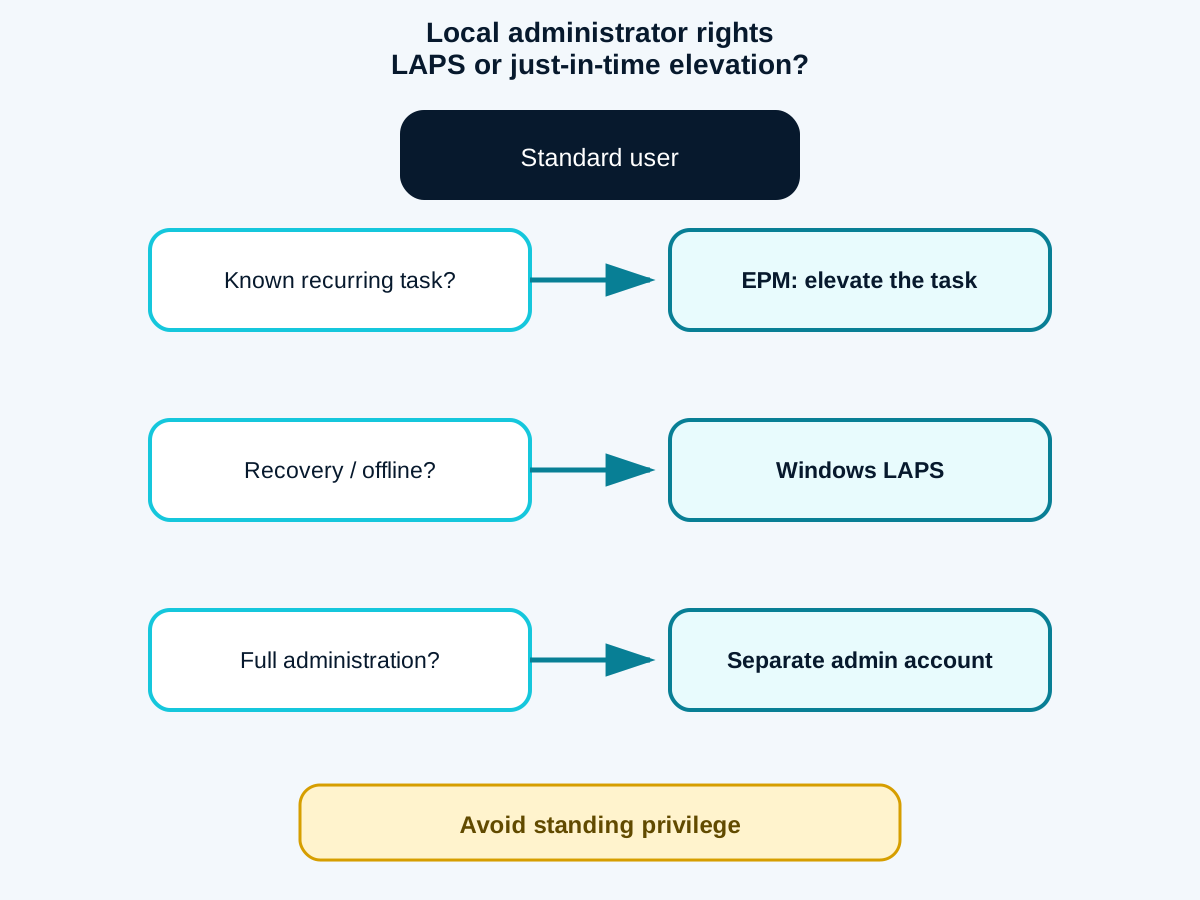
Test with the business teams, train the service desk, progressively remove local group memberships and monitor requests. Finally, review rules and exceptions at a defined frequency. For each step, retain the decision, outcome and owner. The visual matrix summarises the approach: EPM for a known task, LAPS for recovery, a separate account for full administration, and a permanent account only as a temporary exception.
A successful deployment is not measured by the number of rights removed in a single day, but by the lasting ability to work and troubleshoot without unnecessary privilege.
Frequently asked questions
Does Windows LAPS replace EPM?
No. LAPS manages the password of a local recovery account. EPM elevates a specific task for a standard user.
Should all local administrator accounts be removed?
Not necessarily. Keep a controlled recovery path, but remove unnecessary permanent memberships.
Does EPM work with all file types?
Microsoft documents the elevation of EXE, MSI and PowerShell scripts. Applications and dependencies must be tested.
Can the LAPS password be given to the user?
This is not a recommended daily-use model. Its retrieval should remain controlled, logged and followed by rotation.
Which rule is safer: publisher or hash?
Hashing is precise but fragile when updates occur. A publisher is more durable but must be restricted. The context determines the combination.
How should an offline device be managed?
Provide rules that are available offline and a LAPS recovery procedure with verification, ticketing and rotation.
How long should a pilot last?
Long enough to cover real application cycles, sites, mobile users and at least one failure scenario.
Conclusion: remove privilege, retain the ability to act
The target model combines a standard user, task-based elevation and protected recovery. Start with real-world usage, test exceptions and measure support. GVISION can help you set up a pilot with GVISION.