



FrenchCybersecurity
Network & cybersecurity
Guest Wi-Fi in Belgium: a password displayed at reception is not enough to create a secure guest network. The objective is more precise: provide simple Internet access to visitors, contractors, patients or parents, while preventing these unmanaged devices from reaching workstations, servers, printers, cameras, IP phones and administration interfaces.

What is the real objective of guest Wi-Fi?
The aim is not simply to provide Internet access: an unknown device must be contained within a zone where an error, infection or attempt to explore cannot reach the internal business environment. A visitor may arrive with a perfectly healthy phone, a poorly configured business laptop or an already compromised device. The organisation controls neither its updates, applications nor user. Trust must therefore be minimal by default.
The NIST SP 800-153 guide reminds us that WLAN security depends on the design, configuration and monitoring of its entire lifecycle, not just on radio encryption. This is a useful distinction: WPA2 or WPA3 protects the wireless link, while segmentation determines what the device can reach once connected. These two protections address different problems.
Before configuring a Wi-Fi controller, formulate the policy in one testable sentence: “a guest can resolve names, obtain the time and access the Internet, but cannot reach any private network, any other guest or any device administration interface”. This sentence then becomes a list of rules and tests. To define coverage, capacity and equipment, the professional networks and Wi-Fi page from GVISION presents the main service associated with this architecture.
The recommended architecture: SSID, VLAN, firewall and isolation
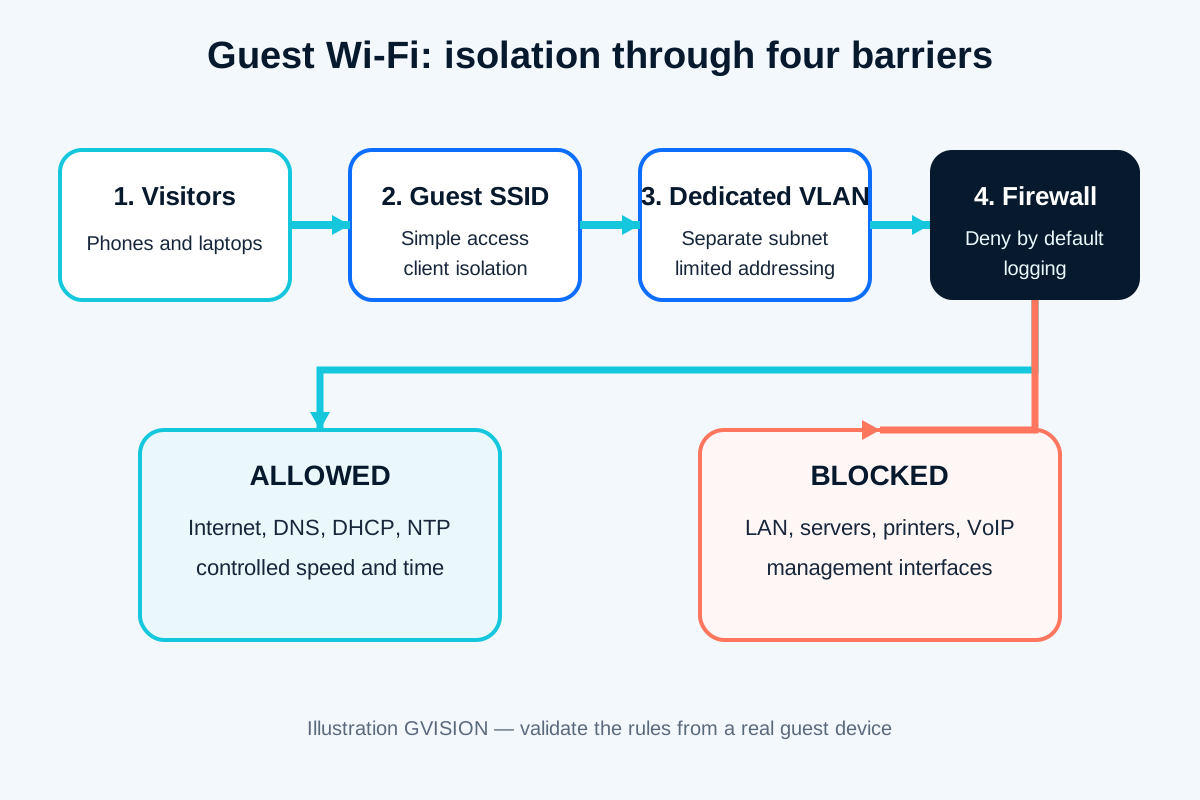
A robust architecture consists of four successive barriers: an SSID reserved for visitors, a dedicated VLAN and subnet, a firewall between this network and the rest of the organisation, and client isolation on the Wi-Fi. No single barrier should be considered sufficient on its own.
The SSID identifies the use
The network name helps users choose the correct connection and allows a policy to be associated with it in the controller. It does not automatically create a boundary. Two SSIDs can still end up on the same VLAN if the mapping is incorrect. A visual audit of the controller is therefore not enough: you must verify the IP address received, the gateway and the path actually followed.
The VLAN separates network domains
The guest VLAN must have its own addressing plan and must not be used by workstations, printers, cameras, phones or industrial equipment. On a multi-switch network, the VLAN should only be carried across the necessary trunks. A forgotten access port or incorrectly selected “native VLAN” can create an unexpected shortcut. Document the identifier, subnet, DHCP, gateway and affected sites.
The firewall decides; local isolation completes the protection
Inter-VLAN routing must pass through equipment enforcing a policy. The fundamental rule is an explicit denial to internal ranges, followed by limited authorisations for the required services. Client isolation, sometimes called client isolation or peer-to-peer blocking, additionally prevents two guest devices associated with the same access point from connecting directly to each other. Depending on the manufacturer and architecture, this option must be validated between two access points, not just on one.
Comparing four ways of providing guest access
The best choice depends on the risk, number of visitors and network maturity, but using the same LAN as staff is not an acceptable guest model. A small site can operate with a VLAN and simple rules; a campus or multi-site environment may require temporary identities, a NAC or dynamic policies.
| Model | Separation | Advantages | Limitations | Use cases |
|---|---|---|---|---|
| Password on the internal LAN | No real separation | Immediate implementation | Exposes internal resources and makes revocation more difficult | To avoid |
| Guest SSID with local isolation | Separated clients, dependent on network mapping | Simple for a very small site | Insufficient if the SSID still joins the LAN | Transitional step only |
| SSID + VLAN + firewall | Controlled network boundary | Clear, testable and suitable for many sites | Requires consistent end-to-end configuration | Default choice for most organisations |
| Guest access with identity/NAC | Policy by user, device or sponsor | Traceability and customised durations | More complex to operate and more costly | Campus, multi-site groups, recurring visitors |
| Best choice according to the need | VLAN and firewall for clear isolation; identity/NAC when profiles, sponsors and durations need to be managed in detail. | |||
Mobile reading
- To avoid: sharing the LAN or its password.
- Recommended foundation: Guest SSID, dedicated VLAN, firewall and client isolation.
- Complex environment: add temporary identity, sponsor or NAC if operations justify it.
What firewall rules should be applied?
Start with a default denial to internal resources, then allow only the traffic required for the guest service to operate. Rule order matters. A broad “LAN to any” rule placed before the block can invalidate the entire architecture. Name objects and rules clearly, with an owner and justification.
The guest network generally needs DHCP to receive a configuration, DNS to resolve names and NTP for time synchronisation. Depending on the architecture, these services may be provided by the firewall, a dedicated resolver or external services. If internal DNS is used, avoid unnecessarily exposing internal names and block requests to other DNS servers where the policy requires it. Outbound web access can be filtered according to the organisation’s rules.
Block all private ranges used by the organisation, management interfaces, Wi-Fi controllers, switches, hypervisors, NAS devices, printers, cameras, IP phones and technical equipment. Do not rely on a single RFC 1918 range if multiple private networks, VPN links or cloud routes exist. Also control IPv6: perfect IPv4 filtering does not prevent an overlooked IPv6 route.
A policy can also limit outbound ports, per-client bandwidth, total volume, session duration or the number of devices. These limits are availability and quality measures, not substitutes for isolation. To design the rules, management VPNs and boundaries between zones, the firewall, VPN and ZTNA page explores the additional control layer in greater depth.
Is a captive portal mandatory?
No: a captive portal is a decision about onboarding, identification and terms of use; fundamental security remains provided by segmentation. An organisation can provide a renewed password, temporary codes, sponsored access or a portal. The choice depends on visitor frequency, the acceptable level of support and the need to link a session to an individual.
A portal can display usage rules, a validity period and a support contact. Avoid requesting an email address, telephone number or full identity “because the option exists”. As soon as personal data is collected or retained, GDPR principles apply, including purpose limitation, data minimisation, retention periods, transparency and security. Article 5 of the GDPR is the primary reference; specific legal requirements should be validated with the organisation’s DPO or legal counsel.
Captive portals can also cause practical difficulties: a window that does not open, a certificate displayed incorrectly, a blocked redirect, an already active VPN, a device without a browser or missing translation. Provide a clear fallback route. A QR code can simplify connection, but it must point to the correct SSID and be replaced when the secret changes. Never display on the poster a password that provides access to the internal network.
How can you prevent guests from saturating the network?
Size wireless and Internet capacity for actual peaks, then apply fair limits rather than an arbitrarily low bandwidth that makes the service unusable. One hundred phones connected during a meeting do not consume bandwidth in the same way as ten consultants on video calls. The number of devices, radio contention, signal quality and WAN bandwidth must be monitored separately.
Reserve part of the connection for business applications and VoIP through quality of service. Consider limiting bandwidth per device and categories that are clearly incompatible with the intended use. A school during an open day, a hotel, a waiting room and a consultancy office do not have the same profile. Measure peak periods before modifying the radio configuration or adding access points.
Deploying guest Wi-Fi in ten steps
Successful deployment starts with a policy and ends with test evidence, not simply with creating the SSID. Use a controlled window and maintain a rollback option if the existing infrastructure already carries voice, cameras or other sensitive services.
- Take stock: access points, controller, switches, trunks, firewall, DHCP, DNS, cloud routes and VPN.
- Define use cases: occasional visitors, recurring contractors, events, devices without browsers and meeting requirements.
- Write the policy: permitted destinations, prohibited destinations, duration, bandwidth and operational responsibility.
- Reserve the network: VLAN, subnet, DHCP range, gateway and naming conventions.
- Configure transport: SSID-VLAN mapping, strictly necessary trunks and no guest VLAN on unnecessary ports.
- Create the rules: denial to internal resources, minimum technical authorisations, filtered Internet access and IPv6 handling.
- Configure access: WPA2/WPA3 according to compatibility, client isolation, secret or portal and session duration.
- Protect capacity: per-client limits, business priorities, bandwidth monitoring and alert thresholds.
- Test: multiple devices, multiple access points, DHCP renewal, roaming, DNS, user VPN and attempts to reach the LAN.
- Document: diagram, rules, onboarding procedure, owner, review date and validation evidence.

The pre-opening validation checklist
A test is conclusive only if it proves both what works and what remains inaccessible. A web page opening confirms Internet access, but does not prove that servers are isolated. Document the device, access point, address received, time and expected result.
- Connection and disconnection with a new device, then with an already known device.
- Obtaining an address belonging exclusively to the guest subnet.
- DNS resolution and HTTPS access to several legitimate Internet services.
- Blocking of gateways, servers, NAS devices, printers, cameras and internal network interfaces.
- Blocking between two guest clients, including when they use two different access points.
- Verification of IPv6, VPN routes and private networks accessible through the cloud.
- Portal operation on iOS, Android, Windows and macOS if these devices are expected.
- Code or session expiry, DHCP renewal and early revocation.
- Bandwidth limit, preservation of VoIP and no degradation of priority applications.
- Presence of useful events in the logs, without excessive data collection.
Finally, perform a negative test from a secondary site. Centralised configurations can conceal a difference in trunk, firmware or local rule. In a multi-site group, a “site × SSID × VLAN × gateway × policy” matrix is more reliable than assuming that all sites are identical.
Practical examples for Belgian organisations
The technical foundation remains the same, but workflows and exceptions must reflect the reality of each organisation. In a school, guest Wi-Fi can be opened during parent meetings and events without joining the teaching, administrative or display-screen network. Regular external contributors can receive longer codes, while managed staff devices use separate authentication.
In a healthcare facility or practice, visitors must remain separated from records, devices, printers and staff workstations. The portal must not request health data. The waiting room requires a stable connection, but clinical traffic retains priority. Technical contractors must not use guest Wi-Fi to administer equipment: a separate, restricted and logged maintenance connection is more appropriate.
Common mistakes to avoid
Incidents rarely originate from the SSID name; they result from an overly broad rule, inconsistent mapping or an untested change. The first mistake is to create “Guest” in the controller without checking the VLAN actually assigned. The second is to block only one internal subnet while routes to other sites, Azure, a data centre or a VPN remain accessible.
The third is to treat the portal as a firewall. Accepting terms does not restrict any packets. The fourth is to forget IPv6 or client isolation. The fifth is to reuse a secret for years, shared in photos and emails. The sixth is to impose heavy authentication on all visitors when it addresses no defined requirement, increasing support overhead without improving the network boundary.
Maintaining guest Wi-Fi over time
A guest network remains secure when its rules, firmware, certificates, secrets and test evidence are reviewed according to a defined cycle. Monitor client peaks, DHCP failures, radio saturation, unusual volume and configuration changes. Alerts must lead to a clear action, not simply fill an email inbox.
Review access when a site opens, moves or receives a new service: IP telephony, display, camera, printer, Teams room, payment terminal or connected device. Each new VLAN or VPN can create a destination that the previous block does not cover. A rule using a centrally maintained “internal networks” object group is often more robust than a series of manually copied addresses.
FAQ on guest Wi-Fi in business environments
Is a separate SSID enough to isolate guests?
No. The SSID must be associated with a separate VLAN and firewall policy. Verify the address received and test internal destinations, as two SSIDs can be incorrectly mapped to the same network.
Should WPA2 or WPA3 be used for visitors?
Use the strongest level compatible with the expected devices and the organisation’s policy. WPA3 provides improvements, but older devices may require a transition. Encryption never replaces network isolation.
Does a captive portal make the network more secure?
It can manage terms, codes and durations, but it does not block access to the LAN. Separation relies on the VLAN, firewall and client isolation.
Can guests use a VPN?
Often yes, if the required protocols are allowed. Test common visitor VPNs without unnecessarily opening traffic to internal resources. An overly restrictive policy can prevent consultants from working.
Should the identity of every visitor be collected?
Only if a genuine and documented purpose justifies it. Limit the data collected, inform individuals and define the retention period. Seek the DPO’s advice for sensitive cases.
How can a printer or meeting screen be shared?
Publish only the required service through a controlled gateway or place the equipment in a dedicated zone with targeted rules. Do not open the entire internal network to solve a projection requirement.
How often should guest Wi-Fi be tested?
After every network, firewall, controller, firmware, VPN or site change, and periodically according to risk. An annual test may be insufficient in infrastructure that evolves every month.
Simple access for visitors, a clear boundary for the organisation
Good guest Wi-Fi is barely noticeable: the connection works, Internet applications respond and users do not need a manual. Its quality is measured primarily by what remains inaccessible, the capacity preserved for business operations and how easily the IT team can explain and verify the policy.
GVISION can map the existing environment, design the segmentation, configure the equipment and validate the result across your different sites. To scope a deployment or correct an existing guest access configuration, you can speak to the GVISION team in Belgium.