



Uncategorised
VoIP · network · Belgium
Choppy or dropped VoIP calls: diagnosing audio quality in Belgium
VoIP audio quality in Belgium: a robotic voice, missing syllables, an awkward delay or a dropped call do not prove that "VoIP is bad". They indicate that a real-time stream is encountering a problem somewhere between the microphone and the other party. This guide turns a vague symptom into reproducible tests, timestamped evidence and a useful next step.

Start from the symptom, not a solution
Precisely describing what each party hears immediately narrows down the number of hypotheses. "Poor quality" can refer to at least six different phenomena that don't follow the same trail.
Choppy voice or missing words
Audio fragments disappear when packets arrive too late, out of order or not at all. If only the remote party hears you badly, examine the upstream path from your site first. If only you hear them badly, look at the downstream path. This distinction avoids averaging two streams when only one is degraded.
Robotic or metallic voice
The codec and concealment mechanism attempt to reconstruct incomplete sound. A brief Wi-Fi disruption, a saturated queue or a network change can produce this impression without dropping the call. Note whether it occurs at the start, during a transfer, when video starts, or at a fixed time.
Delay and people talking over each other
High round-trip delay doesn't necessarily drop words, but it breaks the natural rhythm. It can stem from slow internet access, a VPN redirecting the media, an unnecessarily long geographic path, or loaded queues. Ask whether the delay is constant or only present during peak periods.
Echo, one-way audio or dropped calls
Echo can be acoustic — speaker and microphone — or related to device adaptation. One-way audio often points to the media path, NAT, a firewall or address negotiation. A drop after a consistent duration suggests a timeout, session or signalling issue rather than simple jitter. Each pattern should be logged without jumping to conclusions too soon.
The GVISION page dedicated to VoIP telephony for Belgian organisations presents the service and possible architectures. Here, the goal is different: to build a reusable diagnostic approach for Teams Phone, a Yeastar PBX, a softphone or an IP phone.
Collecting the minimum evidence for each call
A ticket saying "it's been cutting out since yesterday" is almost impossible to correlate; a timestamped call with context can be traced in the logs. Prepare a short form that support staff can fill in in under two minutes.
Record the local time to the nearest minute and the time zone if several countries are involved, the numbers or accounts concerned, inbound or outbound direction, internal or external call, the site, the device, the headset, the application, the connection (Ethernet, Wi-Fi, 4G/5G or VPN), and who hears the fault. Add a verbatim phrase: "the external caller can't hear me for ten seconds", for example.
Then ask whether the problem is reproducible, whether it affects one user, one room, one floor, one site, one carrier or all calls. An isolated incident is worth recording, but a pattern allows the next step to be chosen. Three successful test calls are as useful as three failures: they show what distinguishes a healthy path.
Do not needlessly collect the content of the conversation. Technical metadata is generally sufficient. If a recording is being considered, follow internal confidentiality and disclosure rules. The goal is to identify the interfaces at fault, not to listen in on business conversations.
In Microsoft Teams, the Call Quality Dashboard and per-call data help distinguish between users, subnets, connection types and streams. Microsoft's guide onreviewing quality of experience with CQD, updated on 16 June 2026, recommends looking at trends and problem areas, not just an individual complaint.
Latency, jitter, loss and MOS: what the metrics actually tell you
No single metric is sufficient on its own: interpretation must link the figure to the direction of the stream, the timing of the call and the platform.
Packet loss
Real-time voice cannot wait long for retransmission. A brief loss can be masked; a burst produces missing syllables or a robotic sound. An average over a whole day can hide thirty disastrous seconds. Look for the distribution, the spikes and the affected direction.
Jitter
Jitter is the variation in delay between packets. The jitter buffer reorders the stream and absorbs reasonable variation, at the cost of some delay. If it's too small, late packets are dropped; if too large, the conversation becomes sluggish. The Yeastar documentation on the jitter buffer describes this trade-off and distinguishes between fixed and adaptive modes.
Latency and round trip
Latency affects interactivity. A ping to some arbitrary server does not necessarily represent the actual media path. Measure against the platform or relevant endpoints and separate, where possible, device-to-network, internet access and service. Microsoft's connectivity test uses success targets of under 1% UDP loss, under 100 ms latency and under 30 ms jitter; these are thresholds specific to that test, not a universal rule for every carrier or PBX.
MOS
The Mean Opinion Score condenses several parameters into a single quality estimate. It makes sorting easier, but may be calculated differently depending on the product. In its QoS report, Yeastar classifies a MOS below 3.5 as poor, 3.5 to under 4 as fair, and 4 to 5 as good. Use this classification in context, and keep the raw metrics to explain the score.
Isolating five failure domains
Diagnosis becomes manageable once each test is assigned to a domain: device, LAN/Wi-Fi, WAN/internet, media security, or platform/carrier.
1. Device and audio
Test a different headset, a different USB port, the handset and a different device. Check drivers, CPU load, power-saving settings, firmware and the application. If the fault follows the headset, there's no need to change the router's QoS. If several devices in the same office fail, look further into the network.
2. Local network and Wi-Fi
Compare the same call over Ethernet. Check coverage, interference, roaming, channel occupancy, port errors, duplex settings, PoE power and queues. A strong Wi-Fi signal guarantees neither low contention nor an absence of retransmissions. A wired IP phone and a wireless softphone also take different local paths.
3. WAN, internet and VPN
Look at upstream and downstream saturation, losses, route changes, dual access, SD-WAN and carrier incidents. Cloud backup, synchronisation or a video conference can fill a queue despite good contracted bandwidth. A VPN that unnecessarily centralises the media sometimes adds latency and points of failure; check the platform's design before making any exception.
4. Firewall, NAT and SBC
RTP or SRTP media must pass in both directions with the expected ports, addresses and session durations. Inspections, SIP transformations, NAT delays or overly narrow ranges can produce one-way audio and drops. Microsoft warns that an overly restrictive media port range can cause dropped calls and poor quality. However, don't disable a feature like SIP ALG at random: first confirm the vendor's recommendation and the topology.
5. PBX, cloud, trunk and telephone network
A healthy internal call alongside a degraded external one points to the SBC, the trunk, the carrier or the remote termination. Compare inbound and outbound, destinations, codecs, transcoding and routes. The PBX and provider logs must be correlatable with the test call. Without exact numbers and time, the analysis often stops at an impression.
Decision matrix: what test to run next?
The best test changes a single variable and produces a clear interpretation. This matrix avoids simultaneous changes that make the result unusable.
| Observation | Controlled test | What the result indicates | Limitation | Best next step |
|---|---|---|---|---|
| Only one user | Different headset, then different device, same network. | The fault follows the accessory, the workstation or the account. | A single failure can be intermittent. | Repeat a timestamped test call. |
| Wi-Fi poor, Ethernet good | Same device, same correspondent, two connections. | The wireless LAN becomes the priority. | Calls are never perfectly identical. | Measure channel, retransmissions, roaming and load. |
| Internal good, external poor | Peer-to-peer call, then a call to the public network. | SBC, trunk, carrier or external destination. | Codecs and routes can vary. | Compare direction, destination and carrier log. |
| All calls at a fixed time | Compare with WAN traffic and scheduled tasks. | Possible congestion or recurring process. | Correlation is not yet a cause. | Capture queues, loss and usage during the peak. |
| One-way audio | Compare inbound/outbound and media addresses. | RTP path, NAT, firewall or negotiation. | The device may also be selecting the wrong peripheral. | Read the signalling and counters on both legs. |
| Call drops after a consistent duration | Time several calls. | Session, timeout or signalling likely. | A carrier outage may coincide. | Compare timers, refresh and SBC/PBX logs. |
| Best choice according to the need | Start with the least intrusive test that separates two domains, then document before changing the configuration. | |||
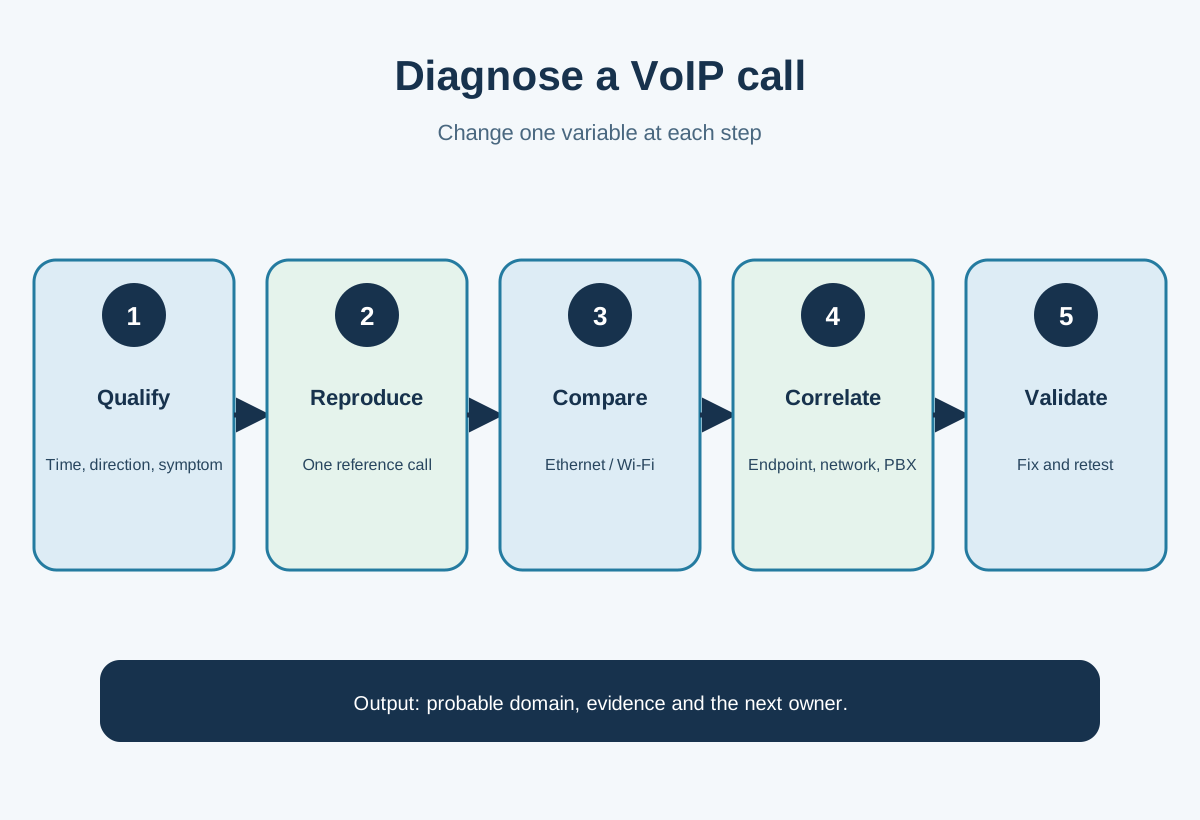
A thirty-minute diagnostic procedure
In thirty minutes, you won't resolve every incident, but you can produce a defined scope, two clean comparisons and an actionable escalation.
- Minutes 0–5: qualify. Note down three recent calls, the affected direction, the sites, devices, networks and symptoms.
- Minutes 5–10: reproduce. Call a stable destination with the same user. Note the exact time and what each party hears.
- Minutes 10–15: change one variable. Switch from Wi-Fi to Ethernet or change headset, without changing the account or destination.
- Minutes 15–20: compare the path. Test an internal call then an external one, or inbound then outbound.
- Minutes 20–25: read the evidence. Open CQD, the PBX/SBC report and the network counters corresponding to that time.
- Minutes 25–30: decide. Assign a likely domain, record what has been ruled out and designate the next owner.

A consumer speed test is only a clue. It often measures a nearby server, over a few parallel streams, without representing UDP traffic, the route to the service, micro-drops or the upstream queue at the precise moment. Supplement it with a continuous measurement, a test call and the platform's own tools. Yeastar's IP Ping tool, for example, can check reachability, latency and loss from the PBX to a relevant target.
When QoS genuinely improves calls
Quality of service is useful when voice packets are competing with other streams on a link or queue that you control. It doesn't create capacity and doesn't guarantee treatment beyond your own domain.
Start by correctly classifying the media, marking packets at consistent points, and configuring the equipment that actually queues the streams. Microsoft recommends DSCP 46 for Teams audio and specifies that marking at the device must be matched by corresponding configuration on the network equipment. If a switch strips the marking or the router ignores the class, the label achieves nothing.
Also size the queue correctly. Absolute priority with no limit can starve other services; too small a class drops voice during a peak. On the internet, markings can be altered or ignored. QoS remains most decisive within the LAN, on a private WAN, an SD-WAN, or an access where the organisation and the carrier have agreed on the treatment.
Before deploying, identify where the congestion occurs. Microsoft's QoS recommendations for Teams explain classification and ranges. Apply them to Teams, not automatically to every PBX. For a SIP trunk or Yeastar, use the documented requirements from the vendor and the carrier.
GVISION can bring telephony and network and Wi-Fi architecture together so that VLANs, queues, coverage, internet access and monitoring tell the same story. This step is relevant when tests show a recurring transport problem, not when a single headset is faulty.
Mistakes that prolong VoIP incidents
Changing several settings at once, relying on throughput, or escalating without a test call destroys the value of the diagnosis.
- Restarting before noting things down: the logs and the useful timing disappear.
- Confusing Wi-Fi signal with quality: a strong radio level can mask contention and retransmissions.
- Using a single speed test: it represents neither the media path nor bursts of loss.
- Applying universal thresholds: tools, codecs and calculation methods differ.
- Enabling QoS without measured congestion: complexity increases without addressing the cause.
- Systematically disabling SIP ALG: behaviour depends on the firewall, the PBX and the vendor.
- Ignoring the direction of the fault: the two parties may experience different quality.
- Forgetting successful calls: they form the comparison group.
- Blaming the carrier too early: no number, time or path is available to investigate.
- Declaring the issue resolved after a single call: test the peak period and the functions that were failing.
Frequently asked questions
What internet bandwidth is needed for a VoIP call?
The codec and platform determine the bandwidth required, but available throughput alone does not guarantee quality. Loss, jitter, latency and simultaneous congestion must also be measured.
Is jitter above 30 ms always bad?
Microsoft uses 30 ms in several Teams criteria, but the threshold must remain tied to the tool and the scenario. Analyse the spikes, the loss and the actual experience.
Why does only one party hear dropouts?
Each direction has its own stream. The upstream path may be degraded while the downstream remains healthy. Note who hears the fault and follow both legs.
Does QoS solve all voice problems?
No. It arbitrates congestion on equipment that respects it. It doesn't fix a headset, physical loss, poor routing or a carrier outage.
Should SIP ALG be disabled?
Not automatically. Some equipment implements it poorly, other topologies rely on it. Follow the documentation for the PBX, SBC, firewall and carrier.
Does a good speed test rule out the network?
No. It can mask micro-drops, upstream queues, a congested Wi-Fi network and a different media route. Compare Ethernet/Wi-Fi and use the call's own data.
What information should be sent to support?
Exact time, direction, accounts or numbers, site, device, network, symptom, call ID and comparable test results form the useful minimum.