Peppol Invoice Rejected in Odoo: Diagnosing and Handling Exceptions
Runbook belge pour choisir un point sain, restaurer Microsoft 365 par vagues et valider la reprise.





Runbook belge pour choisir un point sain, restaurer Microsoft 365 par vagues et valider la reprise.

Runbook belge pour choisir un point sain, restaurer Microsoft 365 par vagues et valider la reprise.

Runbook belge pour choisir un point sain, restaurer Microsoft 365 par vagues et valider la reprise.

Runbook belge pour choisir un point sain, restaurer Microsoft 365 par vagues et valider la reprise.

A decision guide for collaborating with customers, suppliers, administrators and partners without turning every sharing action into permanent access.

A decision guide for choosing the right quote-request journey based on the complexity of the offering, commercial rules and internal tools.

Business telephony · 2026-09-16
A practical comparison to route each call to the right team, minimise dead ends and organise a clear handover to a human agent.

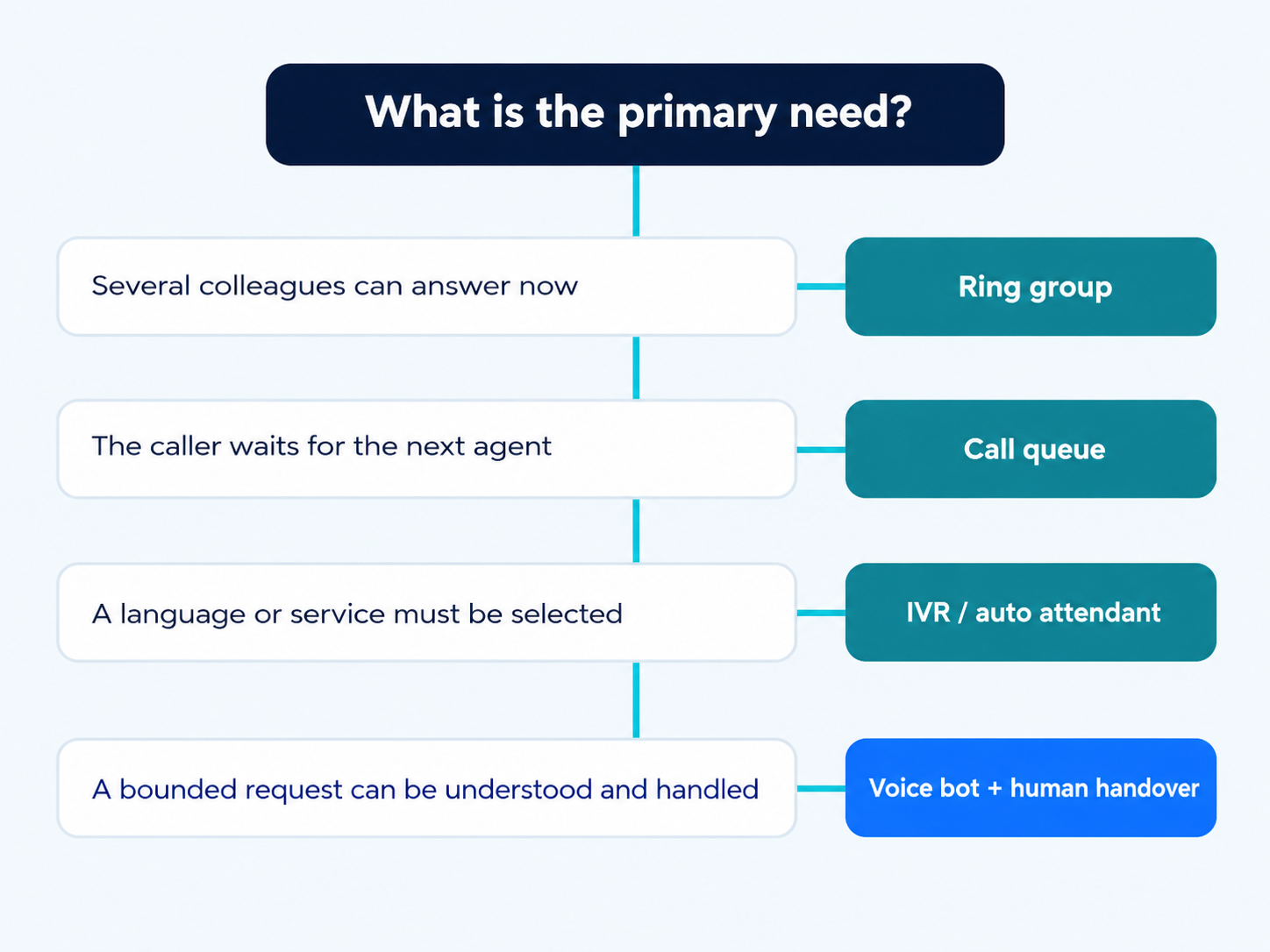
Start with the promise made to the caller. If they simply need to reach any available member of a small team, a call group is often sufficient. If they are happy to wait for the next agent, you need a queue. If they need to choose a language or service before being transferred, use an auto attendant. If their request can be understood, qualified or resolved automatically, consider a callbot, but always provide a clear human fallback.
A realistic architecture often combines several building blocks. An automated greeting can offer French, Dutch or English, route sales enquiries to a group, support requests to a queue, and out-of-hours calls to a message or on-call service. The callbot does not replace this architecture: it becomes a possible destination for a few well-defined intents. The criterion is therefore not how new the technology is, but how clear the journey is and whether the organisation has the capacity to operate it.
The GVISION VoIP solutions cover the telephony foundation. Before configuring anything, list the observed reasons for calls, responsible teams, opening hours and fallback solution.
A call group distributes a call to several people according to a simple rule: simultaneously, sequentially or by rotation. It is suitable when members have similar skills and can answer without lengthy qualification. Its strength is simplicity; its limitation becomes apparent when nobody answers, the team is busy or certain calls require specialised handling.
A call queue acts like a waiting room. It plays a message, can play music, routes the call to the next agent and applies exit rules in cases of saturation or excessive waiting time. The auto attendant, also known as an IVR, asks the caller to make a choice and routes the call according to the service, language, opening hours or urgency. Microsoft explicitly distinguishes the auto attendant, which directs calls, from the call queue, which keeps callers waiting and distributes calls. This distinction is documented in its official overview of auto attendants and call queues, updated on 31 August 2026.
The callbot adds a conversational layer. It can recognise an intent, answer a defined question, collect information or trigger an authorised action. This flexibility also increases requirements: knowledge source, authentication, logging, limits, privacy, monitoring and human handover. A simple interactive voice message is not automatically an intelligent agent, and a convincing demonstration does not yet prove production robustness.
Compare the waiting experience, complexity of the request, team availability and operational responsibility. No model is suitable for every context. A very small group can work well for a local on-call service; a queue is preferable for a service desk; an IVR is useful when destinations are stable; a callbot is justified when a limited set of repetitive requests can be handled reliably.
Costs are not provided here: they depend on licences, operators, numbers, integrations, volumes, languages, recordings, support and service level. Instead, compare the verifiable scope: number of simultaneous calls, channels, rules, reporting, administration, overflow scenarios and responsibilities. The appropriate choice for the requirement is the one that teams can test, explain and maintain.
| Criterion | Call group | Call queue | Auto attendant / IVR | Callbot |
|---|---|---|---|---|
| Primary role | Ring several extensions | Hold and distribute calls | Choose a destination | Understand and handle an intent |
| Experience | Ringing, then answer or exit | Announced waiting | Choice by keypad or voice | Guided dialogue |
| Dependency | Immediate availability | Connected agents and capacity | Exact call tree and schedules | Knowledge, data and control |
| Advantage | Simple to operate | Handles visible peaks | Filters early and by language | Automates targeted requests |
| Limitation | No actual waiting | Waiting without capacity remains a poor experience | Long or ambiguous menu | Errors, governance and recovery |
| Use cases | Small, multi-skilled team | Support, reception, customer service | Sites, services, languages, opening hours | Appointments, status, qualification |
| Best choice according to the need | Any colleague can answer | The next agent must answer | The choice determines the route | A bounded intent can be resolved |
Good routing starts with the reason for the call, not the internal organisation chart. The caller thinks “change an appointment”, “report a fault” or “speak to billing”; they do not know your departments or job titles. Identify the twenty most common reasons for calls using logs, tickets and reception feedback, then assign each one an owner and an expected response.
Group reasons together when the same team and urgency level apply. Separate them only if the choice genuinely changes the destination, handling or response time. A nine-option menu shifts the cognitive burden to the caller. A better design might ask for the language, offer three easy-to-understand categories, then use brief qualification by the agent. For critical situations, create a direct route that does not depend on a long automated journey.
The message must honestly explain what is happening: connection, waiting, callback or message deposit. This clarity reduces repeated hang-ups.
The distribution method should reflect the work. Simultaneous ringing reduces answer time for a small team, but interrupts everyone. Sequential ringing follows a fixed order and can overload the first people. Round-robin distributes opportunities; longest idle seeks to balance activity. Presence-based routing can exclude busy people, provided statuses are reliable and understood.
Microsoft documents attendant, serial, round robin and longest idle modes for Teams call queues, as well as presence-based routing in the official call queue configuration. These options do not choose for you. Test them with breaks, meetings, hybrid working, agents on mobile devices and members of multiple queues. A rule that looks fair on paper can create poor service if roles differ.
Define who joins or leaves a queue, who controls changes and how an unexpected absence is covered. Technology distributes calls; it does not create capacity.
Every destination must have an exit route before it goes live. Decide what happens when nobody is connected, when the queue reaches its limit, when waiting exceeds the chosen threshold and when the organisation is closed. Possible exits include another team, a provider, a callback, voicemail or an emergency message. Silence or an endless loop is never a strategy.
According to Microsoft documentation, the queue handles overflow and timeout exceptions, while the auto attendant handles business hours, closures and holidays. Configure opening hours at the level that actually directs the call. Check Belgian public holidays, site-specific closures, seasonal changes and the time zone. Do not forget half-days and on-call services.
Keep messages short: situation, available choice and next channel. Also test failure of the fallback destination.
Language should be offered early when the audience is genuinely multilingual, but without turning the reception into a tunnel. Use brief, equivalent wording, have each version reviewed by a local speaker and check the pronunciation of names, municipalities and industry terms. A literal translation can make an announcement longer or make a choice ambiguous.
Decide whether teams are separated by language or whether a shared group has declared language skills. The menu must not send a French-speaking caller to a queue where no agent can respond. For English, specify the available hours or teams rather than implying identical coverage. In public organisations, schools, healthcare or associations, add an alternative for people who cannot use a keypad or understand a rapid message.
Maintain consistency between the announcement, queue name, report and internal procedure. Text changes should follow an approval process.
A callbot is relevant when a request has a recognisable intent, accessible data and a safe action: confirming opening hours, qualifying an appointment, retrieving a status after authentication or collecting the details of an incident. It is less suited to emotional, ambiguous or urgent situations, or those requiring complex judgement. Start with a narrow scope and measure transfers, errors and abandonments.
The callbots and voice agents can complement an existing reception service, but their role must remain explicit. Inform the caller that they are interacting with an automated system when this may affect their expectations, limit the data requested and provide a simple command for reaching a human. Pass the intent, previously collected answers and reason for transfer to the agent to avoid repeating the conversation.
Microsoft also presents Teams Phone Agent as a conversational experience, but its planning page still lists it as a Frontier Public Preview since June 2026. Evaluate this preview separately.
Routing generates metadata: number, time, destination, waiting time, agent and outcome. A callbot can add a transcript, intent or entered data. The GDPR notably requires purpose limitation, data minimisation, accuracy, limited retention and security. Define the useful data, legal basis, access rights, retention period and caller information before enabling recordings or transcriptions.
Do not request sensitive data through an open menu without verified identity. Separate statistics from content, restrict reports and document the settings selected.
For a callbot that accesses a record or changes an appointment, apply proportionate authentication and confirm the action. The official GDPR text remains the reference; specific cases should be validated with the DPO.
Track answer rate, time to answer, abandonment, overflow, transfers, callbacks, repeat calls and final destination. For a menu, monitor invalid choices and returns to the beginning. For a callbot, measure recognised intents, confirmed resolutions, transfers, context handover and corrections. A metric should trigger a decision, not simply fill a dashboard.
Segment by time period, language, number, site and reason for the call. A daily average can hide a queue saturated on Monday morning. Compare demand with actual capacity, then adjust opening hours, staffing or priorities. Do not optimise for speed alone: a quick answer followed by three transfers is a poor experience. Add a qualitative review of calls or journeys, in compliance with information and access requirements.
Set thresholds based on your expected service level and a reference period. Document each change before modifying another one.
Build a test matrix covering opening and closing hours, each language, available or absent agents, an empty queue, saturation, timeout, withheld numbers, mobile devices, transfers, voicemail and failure of the fallback destination. Add public holidays and calendar changes. Each test must have an expected result, an owner and evidence.
Have people who did not design the journey make test calls. They will identify internal labels, overly long announcements and dead ends. Test from multiple operators and devices, listen to audio volume, measure delays and check what the agent sees. For the callbot, use accents, reasonable background noise, hesitations, synonyms, out-of-scope requests and refusals to provide data. The right response may be a quick transfer, not a persistent attempt to continue.
Pilot with one team before rolling out more widely. Keep the old route in place and document the rollback procedure.

A medical practice can use a short menu to distinguish emergencies, appointments and administration, followed by a queue for the reception team; clinical instructions remain human-led. A school can separate absences, admissions and reception, with opening hours adapted to school periods. A small-team non-profit organisation will often prefer a call group and well-managed voicemail to a complex queue without sufficient capacity.
A multi-site company can start with language and site, then route support to a shared queue and deliveries to the local reception team. A technical service can prioritise contracts or critical incidents only if the data is reliable. A retailer can use a callbot for opening hours and standard status enquiries, with transfer for complaints or advice. An administration should provide an accessible route and messages consistent with its other channels.
In all cases, appoint an owner for the journey to maintain opening hours, announcements, reports and tests.
Avoid overly long menus, choices that reflect the organisation chart, queues without overflow handling, undated announcements, forgotten calendars and transfers to unattended numbers. Do not make twenty people’s phones ring for every call. Do not keep a caller in a queue when nobody can connect. Do not add a callbot before defining its intents and human fallback.
Do not assume that presence is always accurate. Avoid reports without an owner and test saturation, absence and failure.
Clear voicemail with a reliable callback is better than a sophisticated journey that leads nowhere.
A group rings several people according to a rule; a queue keeps callers waiting and distributes them when an agent becomes available.
In practice, the terms often overlap. Here, they refer to an automated reception service that plays announcements, collects a choice and routes the call.
Yes. A menu can select the language and service, a queue can manage waiting, a group can cover a small team and a callbot can handle a few standard requests.
There is no universal number. Keep only the choices that genuinely change the destination and test whether callers understand them.
Only if the estimate is reliable. Otherwise, provide honest information, a callback or another route.
Not as a matter of principle. It can handle defined intents, but ambiguous, sensitive or urgent cases require a clear human handover.
Configure a dedicated calendar, a message and an out-of-hours destination, then test each date before the closure.

An operational comparison to align licensing, detection level, response capability and endpoint management, without confusing the tool with a security service.

A practical plan for designing two Entra emergency access accounts, choosing phishing-resistant authentication, managing Conditional Access exclusions and proving that the setup works.

Une méthode concrète pour isoler les visiteurs avec un VLAN, des règles pare-feu, l’isolation des clients et une checklist de validation.