



French
E-commerce · Digital accessibility · Belgium
E-commerce accessibility in Belgium: 12 tests for a usable purchasing journey in 2026
E-commerce accessibility in Belgium: a webshop may seem simple to the team managing it while remaining unusable with a keyboard, a screen reader or at high zoom. Since 28 June 2025, the European Accessibility Act has also strengthened obligations for many consumer-facing services. Here is how to test a real user journey, from product to payment, and fix the barriers that cause customers to abandon their orders.

Why the purchasing journey is the best starting point
The purchasing journey concentrates commercial value and the most costly barriers. A person may be able to read a product page but abandon the purchase if they cannot select a size, understand an address error or complete the payment. Accessibility must therefore be measured across a complete task, rather than a collection of isolated pages.
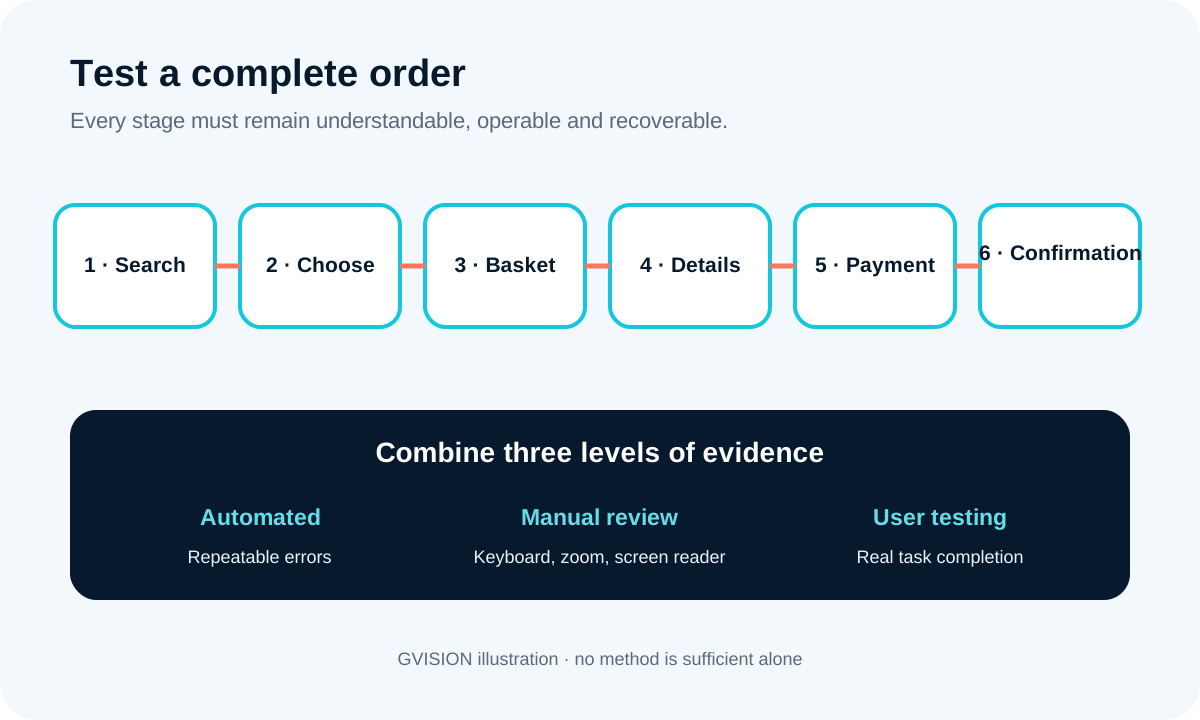
The critical journey runs from search to confirmation, including variants, basket, address, delivery and payment. A B2B portal may also include negotiated prices, approval or quotations. These stages depend on the CMS, e-commerce engine, payment provider, consent mechanism, ERP and third-party scripts.
This journey-based approach avoids a common mistake: fixing contrasts on the homepage while leaving a variant selector that cannot be operated with a keyboard. It also makes decisions easier: if a fix affects the shared form component, it improves sign-in, address, payment and contact forms at the same time. When creating or redesigning a site, the page website redesign shows how structure, responsive behaviour, content and pre-launch checks can be addressed through a single approach.
What the European Accessibility Act changes in Belgium
Since 28 June 2025, European accessibility requirements have notably applied to covered e-commerce services. La Directive (EU) 2019/882 harmonises requirements for several products and services sold in the Union. It also covers consumer banking services, certain transport services, e-books and electronic communications.
The term “e-commerce” is broader than a shop selling physical products. It covers a service provided remotely, at the individual request of a consumer, by electronic means, with a view to concluding a consumer contract. A paid booking, subscription or purchase of a service may therefore fall within scope depending on how it operates. Purely B2B situations and certain hybrid journeys require precise analysis.
Microenterprises providing services benefit from an exemption provided for by the directive: fewer than ten people and an annual turnover or total balance sheet not exceeding two million euros. This rule should not be simplified to mean that “all small businesses are exempt”. Other mechanisms exist, such as fundamental alteration or disproportionate burden, but they require a documented assessment and do not constitute an automatic exemption.
The transition period provided for until 28 June 2030 does not exempt all existing websites. It applies to defined situations, including certain contracts concluded before 28 June 2025. The European Commission summarises the categories concerned.
Defining a scope that reflects a real purchase
A good assessment starts with representative scenarios, devices and data states. Do not select only the easiest pages. Choose a simple product, a product with variants, a discount, an empty basket, a guest user, an existing account and at least one simulated payment failure in a safe environment.
Document the browser, operating system, screen, zoom level and assistive technology. Repeat tasks in FR/NL/EN: a label or button may break when the text is longer. Also check cookies, pop-ups, chat and hosted payment.
Published in July 2026, WCAG-EM 2.0 structures the scope, sample and documentation of an evaluation. For a shop, the sample should include complete purchasing processes.
The 12 essential tests for an accessible purchasing journey
These twelve tests cover the barriers that most often prevent purchases. They form an operational foundation without replacing all applicable criteria.
1. Complete the order using the keyboard only
Put the mouse away. Use Tab, Shift+Tab, Enter, Space and the arrow keys. Focus must follow a logical order, remain visible and reach every action. No panel, calendar, menu or modal should trap the keyboard. After closing a dialogue, focus must return to the element that opened it.
2. Check meaning and hierarchy
Navigate headings, regions and lists with a screen reader. An H1 describes the page; subsequent levels structure sections without arbitrary jumps. Navigation landmarks make it possible to reach the content, search, basket and footer without listening to the entire screen.
3. Understand every control without visual context
Fields have an associated label; buttons have an explicit name; standalone icons have an appropriate alternative. “Add to basket, model X shoes, size 42” is more useful than a series of buttons all announced as “Add”. The crossed-out price, promotion and availability must not depend on colour alone.
4. Select variants, quantities and options
Test sizes, colours, dates, subscriptions, accessories and configurators. The selected state must be exposed to assistive technologies. If one option disables another, the change is announced and explained. A colour image alone is not sufficient: provide a text name.
5. Use search, filters and sorting
Search should tolerate reasonable errors and announce the number of results. Filters have a name, a state and a means of resetting them. After application, focus should not return to the top of the page without explanation. On mobile, the filter drawer must remain operable with assistive technology.
6. Zoom to 200% and reflow at 400%
Content must remain readable without loss of information or permanent horizontal scrolling for ordinary text. Test sticky bars, basket tables, promotional codes and side-by-side buttons. A narrow browser window often reveals the same defects as high zoom.
7. Check contrast, focus and states
Measure the contrast of text, essential components and the focus indicator according to the chosen standard. Check normal, hover, focus, selected, error and disabled states. A pale grey placeholder never replaces a persistent label.
8. Trigger and fix all errors
Submit the empty form, an incomplete address, an invalid format and a declined payment method in the provider’s sandbox. The error must be announced, linked to the field, expressed in clear language and accompanied by a possible correction. Data that is already valid should remain preserved.
9. Manage time limits and authentication
A basket or session should not expire without warning or a reasonable option to extend it. Sign-in mechanisms should avoid imposing unnecessary cognitive challenges. One-time codes should provide correctly identified fields and allow pasting where security permits.
10. Validate third-party payment
Moving to a payment provider does not remove the obligation to provide an accessible journey. Test the iframe or redirect, strong authentication, return to the merchant and errors. Clearly identify what depends on the provider and retain evidence during updates.
11. Confirm the purchase in several ways
The confirmation page has a clear title, a textual order number and the next steps. The email contains the essentials in structured HTML; it does not rely on an image. The customer can retrieve the order, contact support and request a refund through an accessible journey.
12. Repeat testing with real content and languages
Long texts, compound names, Belgian addresses, accents, telephone number formats, VAT details and delivery methods produce cases that fake data can hide. Test FR, NL and EN as well as a high-value price, an unavailable product and a large basket. Accessibility must survive everyday content.
Automated, manual or user testing: what does each method measure?
The three methods are complementary and none is sufficient on its own. Automation quickly detects technical patterns, manual testing confirms behaviour, and users reveal the real difficulty of a task.
| Method | Advantages | Limitations | Best use |
|---|---|---|---|
| Automated scanner | Fast, repeatable and easy to integrate into development. | It does not understand intent, the genuinely useful order or whether a purchase was successfully completed. | Common regressions, calculable contrasts and missing attributes. |
| Expert manual review | Observes keyboard operation, semantics, zoom, announcements and states. | Depends on scope, time and the evaluator’s expertise. | Component and complete-scenario validation. |
| User testing | Shows real-world impact, strategies and misunderstandings. | A small panel does not cover all disabilities or all criteria. | Critical journeys, UX decisions and product priorities. |
| Best choice according to the need | Automate checks for every release, manually review every critical journey and organise user testing at key stages of the product. | ||

Prioritising fixes without blocking the roadmap
Fix first what prevents the transaction, then what is repeated across the design system. A critical issue prevents a user from completing a task without a workaround. A major issue makes the task very difficult or excludes an interaction method. Minor defects should remain scheduled, but must not become permanent technical debt.
For each finding, retain the step, component, conditions, expected and observed results, criterion and reproducible evidence. Assign an owner: content, design, development, provider or operations.
Local fixes are sometimes necessary before a campaign, but the lasting solution lies in the components. Fixing the button, field, modal and notification in the interface library prevents the defect from being reproduced on every screen. For a shop, ordering portal or configurator, the service custom web applications and configurators makes it possible to link these interface choices to business rules, payment and integrations rather than treating accessibility as a late-stage layer.
Finally, add checks to the definition of “done”: keyboard navigation, focus, accessible name, contrast, zoom, errors and testing of the relevant task. A short check with every release costs less than a complete rework after several months of changes.
Seven common errors in e-commerce projects
Failures are more often caused by the process than by a lack of tools. Here are the pitfalls to avoid:
- Displaying a score as proof of compliance. It only indicates what the tool can analyse on the pages it has scanned.
- Installing an overlay and considering the project finished. It does not necessarily fix the structure, keyboard operation or third-party components.
- Testing only the homepage. It represents neither variants, nor forms, nor payment.
- Blaming all defects on the payment provider. The merchant must at least select, test, document and monitor its dependencies.
- Writing “WCAG compliant” without defining the scope. Specify the version, target level, pages, method, date and limitations.
- Forgetting updates. A banner, plugin or campaign can reintroduce an obstacle within minutes.
- Failing to provide an accessible support channel. A blocked customer must be able to ask for help without using the same faulty component.
The standard WCAG 2.2 organises requirements into perceivable, operable, understandable and robust principles. It provides a testable basis without reducing European legal analysis to a score or an extension.
A realistic four-week action plan
Four weeks are enough to establish a reliable initial roadmap, not to promise universal compliance. Adapt the workload to the number of journeys, languages, integrations and frequency of changes.
Week 1: scope and secure critical journeys
Identify covered services with the legal, business and technical stakeholders. Map the journeys and providers. Briefly freezing high-risk components can prevent them from changing during testing. Create the scenarios, accounts, test payment methods and FR/NL/EN data.
Week 2: measure in several ways
Run the scanner on the main templates, then check the keyboard, zoom, structure and a screen reader. Repeat the purchasing journey on mobile. Classify findings by blockage, repetition and exposure. Immediately inform the team of any issue that prevents an order from being completed.
Week 3: fix components and their content
Start with focus, labels, error messages, modals, variants and payment. Fix the source component before its occurrences wherever possible. Have the texts reviewed in three languages and add automated tests to stabilised components.
Week 4: retest, document and organise monitoring
Verify fixes under the same conditions, record remaining limitations and publish the information required by the applicable framework. Schedule a check for every significant change, supplier monitoring and a feedback route for users. The expected result is a controlled list, not an improvised certificate.
FAQ on e-commerce accessibility in Belgium
Are all Belgian e-commerce websites covered by the EAA?
The scope depends on the service, audience and organisation. Consumer-facing e-commerce services are among the categories covered, while microenterprises providing services benefit from a defined exemption. Have borderline cases and applicable Belgian measures checked.
Does a microenterprise have to make its webshop accessible?
A potential legal exemption does not make accessibility unnecessary. It improves the user experience, reduces abandonment and prepares the business for growth. Also verify that both size conditions are met and that no other obligation applies.
Does WCAG 2.2 AA guarantee compliance with the EAA?
WCAG 2.2 AA is an excellent technical standard, but a claim of legal compliance requires consideration of the service scope, European requirements, relevant standards, documentation and national rules. Do not present a WCAG score as an automatic legal guarantee.
Is an accessibility plugin sufficient?
No. A plugin may help with a specific need, but it does not automatically fix poor HTML structure, an inconsistent focus order, an inaccessible third-party payment process or incomprehensible errors. Fix the product at source.
Which screen readers should be tested?
Choose representative combinations of your audience and platforms, then document them. A common test on Windows and another on mobile already provide complementary information. The aim is not to test every possible combination, but to cover critical journeys reproducibly.
Should the FR, NL and EN versions be tested separately?
Yes. The structure may be shared, but lengths, labels, error messages, language changes and marketing content differ. At a minimum, repeat every critical journey and sensitive component in all three versions.
How often should checks be repeated?
Automate checks for every release and manually repeat high-risk journeys after a significant change to the theme, checkout, payment or shared component. Add periodic reviews according to the publication schedule.
Turning tests into lasting improvement
The right objective is not to produce a report that sits unused, but to make the journey more reliable for every customer. GVISION can scope the scenarios, fix the design system, adapt the frontend and organise regression checks with your teams and providers. For a new build, redesign or purchasing journey that has become fragile, describe your project to the GVISION team in order to identify a proportionate first step.