



FrenchCybersecurity
Cybersecurity · Email · Belgium
SPF, DKIM and DMARC in Belgium: secure your email domain without blocking legitimate messages
SPF DKIM DMARC Belgium: a fake email sent using your organisation’s name can target a customer, supplier or colleague without ever entering your Microsoft 365 environment. Defence therefore starts in the public DNS. This guide explains how to combine SPF, DKIM and DMARC, and when to add MTA-STS, TLS-RPT, DANE and DNSSEC.

SPF DKIM DMARC Belgium: why email domain security is becoming a priority
A known domain is a digital identity: if it can be spoofed, the trust built by the organisation works to the attacker’s advantage. The fake message may request a bank account change, send a fake invoice, invite the recipient to log in to a phishing page or impersonate management. The attacker does not need access to the tenant to imitate the visible address.
Safeonweb@work, the service for organisations of the Centre for Cybersecurity Belgium, presents SPF, DKIM, DMARC and DNSSEC as complementary mechanisms against spoofing and phishing. Its recommendation of 2 September 2025 on securing DNS and email provides separate implementation guides for SPF, DKIM and DMARC. This Belgian source avoids reducing the subject to marketing deliverability alone.
The page GVISION’s cybersecurity places this protection within a broader framework: identities, endpoints, networks, data, awareness and response. This is important because DMARC blocks neither a message sent from a genuinely compromised mailbox nor a lookalike domain purchased by a fraudster.
SPF, DKIM, DMARC, DNSSEC, MTA-STS and DANE: what does each do?
SPF DKIM DMARC Belgium: the standards are not alternatives: they address different questions and reinforce each other when deployed together. SPF asks whether the server is authorised to send. DKIM asks whether a valid signature protects the message. DMARC asks whether one of these results is aligned with the visible domain. MTA-STS and DANE protect the path between servers.
| Mechanism | Question addressed | Advantage | Limitation | Best use according to the requirement |
|---|---|---|---|---|
| SPF | Is this IP address authorised for the envelope domain? | Inventories the authorised sending infrastructure. | Company device | Write policy and notice. Explain visibility, responsibilities, support, loss, removal, departure and updates. |
| DKIM | Is the cryptographic signature valid and is the signed content intact? | Better withstands forwarding when the message is not modified. | A valid signature is only useful to DMARC if the domain is aligned. | Signing by Microsoft 365 and third-party services. |
| DMARC | Does SPF or DKIM pass with alignment to the visible domain? | Processing policy and aggregate reports. | Does not prevent the use of a lookalike domain or sending from a compromised account. | Reduce direct domain spoofing. |
| DNSSEC | Is the DNS response authentic? | Adds a chain of trust to DNS data. | Purchase, logistics and personal use policy needed. | Protect DNS records and prepare for DANE. |
| MTA-STS + TLS-RPT | Must the sending server require TLS to the advertised MX records? | Deployment compatible without DNSSEC and reporting on TLS errors. | Depends on DNS and a policy published over HTTPS with a valid certificate. | Strengthen inbound transport security for a domain. |
| SMTP DANE | Does the mail server certificate match the authenticated TLSA data? | DNSSEC-based transport authentication. | DNSSEC is mandatory and operation is more demanding. | A well-managed DNSSEC chain and high requirements. |
Mobile reading
- Identity: SPF authorises, DKIM signs, DMARC aligns and enforces a policy.
- DNS: DNSSEC authenticates responses.
- Transport: MTA-STS or DANE requires verified TLS delivery; TLS-RPT reports failures.
- Choice: deploy SPF, DKIM and DMARC first; add transport security according to the architecture.
Alignment is the point that is often overlooked. Microsoft explains that SPF verifies the domain of the MAIL FROM and that DKIM signs with a domain specified in the signature; without DMARC, these domains can differ from the one displayed to the user. The Microsoft documentation on email authentication shows how DMARC links these results to the visible “From” field.
Start with sender inventory, not with a DNS record
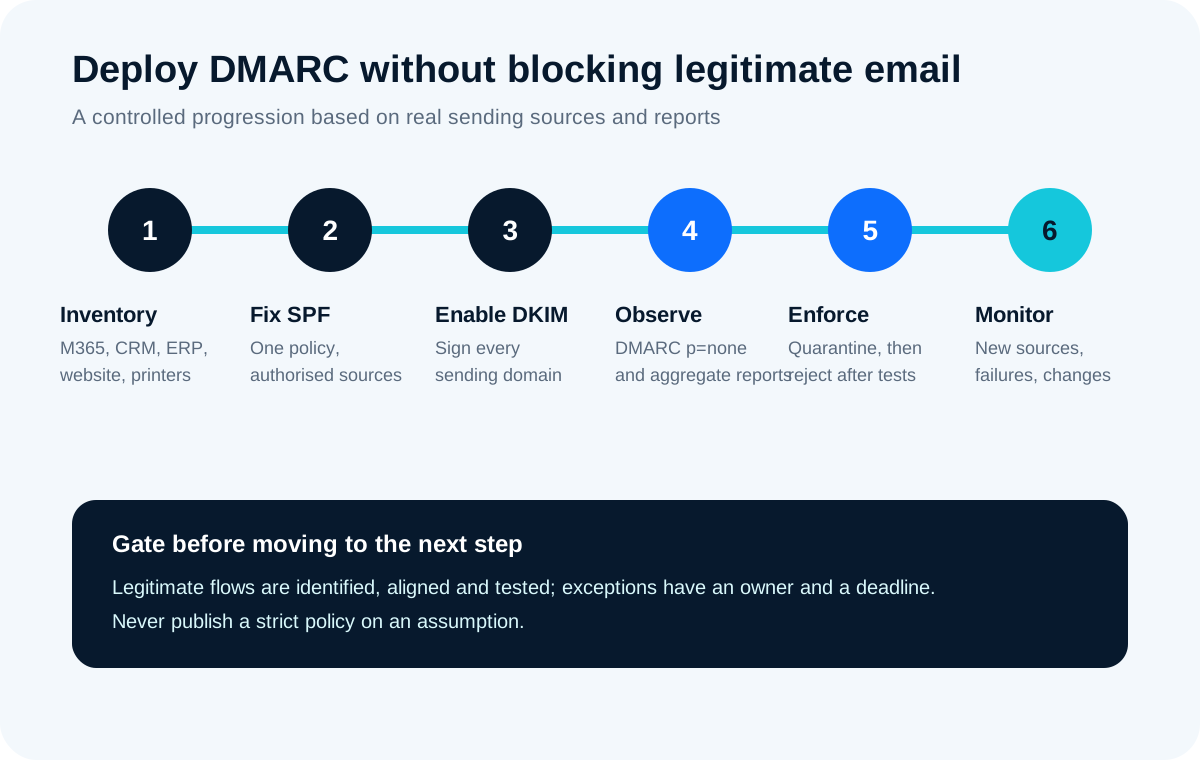
Deployment succeeds when every legitimate source is known, assigned to an owner and tested; DNS comes afterwards. An incomplete inventory produces two possible outcomes: a policy that is too weak and allows spoofing through, or a strict policy that blocks useful invoices, confirmations or alerts.
Create a matrix by domain and by flow
List the primary domain, secondary domains, former brands, defensive domains and subdomains. For each, document the visible address, envelope domain, DKIM domain, provider, business owner, approximate volume, usual recipients and criticality. DMARC reports will confirm the observations, but they do not replace discussions with finance, marketing, HR and operational teams.
Write policy and notice. Explain visibility, responsibilities, support, loss, removal, departure and updates.
- Exchange Online, SMTP servers, relays and hybrid connectors;
- CRM, ERP, electronic invoicing, payment platforms and signing services;
- newsletters, recruitment tools, surveys, ticketing and events;
- web applications, contact forms, monitoring and ticketing systems;
- scanners, multifunction printers, NAS devices, alarms and technical equipment;
- providers that actually send using your domain, rather than only on their own behalf.
Separate flows where useful
Domains that never send should receive an explicit policy. They do not need to authorise servers in SPF or publish DKIM keys. A strict DMARC policy reduces their appeal for spoofing. Nevertheless, document the intention: a domain that is “unused” today could be activated tomorrow by a forgotten project.
Configure SPF, DKIM and DMARC around Microsoft 365
In Microsoft 365, the correct order is SPF, DKIM on each custom domain, then progressive DMARC, with external testing of headers. Microsoft specifies that DKIM is not automatically signed with the custom domain until its configuration is enabled. Sending with the initial domain onmicrosoft.com follows a different logic.
1. Consolidate SPF
Write policy and notice. Explain visibility, responsibilities, support, loss, removal, departure and updates. v=spf1. Check the mechanisms includeCompany device Microsoft SPF procedure emphasises that SPF alone is not sufficient.
2. Enable DKIM on custom domains
Create the two CNAME records requested in the Microsoft Defender portal, wait for them to resolve, then enable signing. The values are specific to the tenant and domain: do not copy an example found in an article. Then send a message to an external mailbox and verify dkim=pass as well as the signing domain. Also plan DKIM for each third-party provider capable of signing with your domain.
3. Publish DMARC in monitoring mode
An initial policy can use p=none Write policy and notice. Explain visibility, responsibilities, support, loss, removal, departure and updates.

The service GVISION Microsoft 365 Purchase, logistics and personal use policy needed.
Move from p=none to quarantine and then reject without incidents
DMARC progression should be evidence-based: legitimate flows pass with alignment, unknown sources are assessed and a rollback procedure exists. Microsoft explicitly recommends a gradual approach towards p=reject to avoid rejecting good messages because of unintentional failures.
Mobile Application Management applies rules to work applications and business data without placing the whole endpoint under device management. Microsoft describes MAM for unenrolled devices as a way to combine application configuration and protection. On supported apps, policies can require an app PIN, restrict copying to personal apps, limit local storage and selectively remove organisational data.
Moving to quarantine allows compatible recipients to handle failures more severely, often by sending them to junk mail. The pct Company device reject setting requires useful flows to be under control. Also use sp to define the behaviour of subdomains when the policy needs to differ.
Maintain a change procedure
Any new tool that sends messages must undergo a review before being put into production: subdomain, addresses, DKIM, SPF, alignment, test recipients and owner. Without this entry point, the configuration deteriorates within a few months. DMARC reports must continue to be monitored after reject to detect a changed provider, an expired key, a new unauthorised source or a spoofing campaign.
MTA-STS or DANE: secure SMTP transport after identity
SPF, DKIM and DMARC authenticate the sender; MTA-STS and DANE aim to prevent a sending server from delivering the message to an unauthenticated destination or without reliable TLS. They therefore address another layer of risk.
SMTP often uses TLS opportunistically: encryption is used when both servers support it, but an attacker able to influence DNS or the negotiation may attempt redirection or downgrade. MTA-STS, defined by RFC 8461, publishes a policy over HTTPS specifying the expected MX servers and the TLS requirement. TLS-RPT, defined by RFC 8460, provides reports on negotiation or validation failures.
DANE for SMTP uses TLSA records authenticated by DNSSEC. Microsoft summarises the difference as follows: DANE requires DNSSEC, whereas MTA-STS relies on the certificate authority system. The documentation for Exchange Online on DANE and MTA-STS, updated on 21 July 2026, also explains why opportunistic TLS is insufficient against certain DNS resolution attacks.
Adapt the implementation to the organisation’s actual operating model
Size does not determine complexity: the number of domains, providers and business flows is more revealing. Write policy and notice. Explain visibility, responsibilities, support, loss, removal, departure and updates.
ASBL, school or public-sector organisation
Tools often multiply by project, academic year or grant. Maintain a register with an owner and end date. Disable the SPF authorisation and keys of a provider that has been replaced. Protect inactive domains and old variants. For mailing lists that modify the subject or body, check the impact on DKIM and consider ARC mechanisms when the forwarding chain is legitimate.
Multi-site group or large enterprise
Governance must be federated without losing central control. Assign subdomains by use case, automate DNS inventory, impose contractual requirements on suppliers and centralise reports. One team validates the standards; each entity remains responsible for its applications. Acquisitions require an inventory before modifying an inherited policy.
Website and forms
The web server should not arbitrarily spoof the visitor’s address in the “From” field. Use an address from your properly authenticated domain and place the requester’s address in Reply-To. This distinction avoids breaking DMARC while still allowing replies. For notifications hosted by a provider, prioritise aligned DKIM and a dedicated subdomain.
Errors that weaken or disrupt email
Most incidents result from an incomplete view of flows, misunderstood alignment or a policy published without monitoring. DNS syntax is rarely the only problem.
- Publishing multiple SPF records: a domain should have only one SPF policy. Multiple records create a permanent error.
- Exceeding DNS lookups: the
includeCompany device - Confusing pass with alignment: SPF or DKIM can pass on a third-party domain while DMARC fails against the visible domain.
- Moving directly to reject: forgotten printers, CRMs, forms or invoices become collateral victims.
- Leaving p=none indefinitely: the organisation collects reports but never asks recipients to block failures.
- Allowing too broadly: including a large platform may allow other customers of the provider to pass SPF; aligned DKIM reduces this dependency.
- Ignoring dormant domains: they remain attractive for spoofing even though a strict policy is often easy to implement.
- Using an allowlist as a permanent fix: Microsoft warns that certain allowlists can bypass authentication and filtering controls.
- Forgetting operational management: a key, connector or provider changes; without monitoring, today’s compliance becomes tomorrow’s incident.
SPF DKIM DMARC Belgium: checklist before a strict policy
A strict policy is ready when the organisation can prove who sends, how each flow authenticates and who responds to a failure. Use this list as a change control, not as a certification.
- All domains and subdomains are inventoried, including inactive domains.
- Each source has a business owner and a technical owner.
- Company device
- DKIM is enabled and verified for Microsoft 365 and important third-party platforms.
- The SPF or DKIM domain aligns with the “From” field for each critical flow.
- DMARC reports cover infrequent cycles: payroll, invoicing, campaigns and seasonal notifications.
- Forwarding, mailing lists and gateways have been tested.
- Subdomains and dormant domains have a documented policy.
- An alert channel, rollback procedure and owner are in place.
- Future changes to the CRM, ERP, website or provider go through an email review.
- MTA-STS or DANE is assessed separately according to the level of control over DNSSEC and connectors.
- The date, evidence and decision to move to
quarantineorrejectare retained.
For mobile BYOD using MAM, an access policy can require a protected app for Microsoft 365. Microsoft notes that app protection works only with compatible applications and that iOS and Android devices must register with Entra ID for specific controls. For enrolled devices, another policy may require compliance. Scope users, cloud apps, platforms and exceptions deliberately.
Does DMARC require both SPF and DKIM to pass?
Limitation
Can p=reject be published directly?
This is technically possible, but risky for an active domain. Microsoft recommends configuring SPF and DKIM, monitoring reports, correcting flows and then progressing towards quarantine and reject. A genuinely inactive domain can follow a shorter process after verification.
Does DMARC protect against all phishing emails?
Limitation
Why does SPF fail during forwarding?
The server that relays the message is generally not authorised in the SPF record of the original domain. DKIM can continue to pass if the signature and signed parts remain intact. ARC can preserve authentication results in certain legitimate forwarding chains.
Should a domain that sends no email be protected?
Yes. A dormant domain can be spoofed precisely because no legitimate flow needs to be preserved. Publish an appropriate explicit policy, verify that no forgotten service uses it and document the decision before any future change.
Do MTA-STS and DANE replace DMARC?
Limitation
How long should DMARC reports be monitored?
Write policy and notice. Explain visibility, responsibilities, support, loss, removal, departure and updates.
Turning DNS records into sustainable control
A reliable configuration links the application inventory, Microsoft 365 settings, DNS, reports and change procedure. GVISION can map flows, correct alignment, manage DMARC progression and document operations without presenting this work as an absolute guarantee against phishing.
To structure your primary domain, subdomains and sending services, discuss your email environment with GVISION.