



Odoo · Peppol · Belgium
Peppol Invoice Rejected in Odoo: Diagnosing and Handling Exceptions
An operational guide to distinguishing a technical rejection, data error and business refusal, then correcting it without creating a duplicate.

What does “rejected” actually mean?
The word “rejection” covers several states. A document may fail before reaching the access point, be rejected by a format rule, arrive technically but fail to enter the customer’s software, or be disputed after receipt for a commercial reason. These situations do not have the same evidence or correction. Before taking any action, determine which system produced the status and at what point in the process it applies.
Since 1 January 2026, Belgian VAT-registered businesses have been required to use structured electronic invoices for the relevant B2B transactions. The federal portal states that a PDF sent by email is not sufficient and that the exchange takes place through Peppol. This makes status interpretation operationally important: “sent” does not automatically mean “delivered”, and “delivered” means neither accounting validation nor agreement on the service.
Collect evidence before modifying Odoo
Start by freezing the facts. Record the internal number, electronic identifier, issuing company, recipient, access point or provider, sending date, exact status and complete message. Export the XML or available log without modifying it. A screenshot is useful, but the machine-readable text and timestamp allow more reliable investigation with the software vendor or provider.
Avoid deleting the invoice, changing several fields and then resending it. This reaction erases the cause and may create a duplicate if the first document was ultimately transmitted. In a multi-company organisation, also record the database, environment, log and user. Teams operating web applications and business tools can then link the exception to the correct business data rather than treating every incident as a generic Odoo fault.

Classify the exception into six families
Good classification reduces processing time. The first family concerns identification: Peppol participant not found, VAT number, identifier scheme or inconsistent address. The second covers mandatory fields and references. The third groups calculations, taxes, rounding and units. The fourth concerns a duplicate or lifecycle inconsistency. The fifth relates to transport, the access point or an outage. The sixth is a business refusal: unknown order, disputed price or unrecognised service.
The category determines the owner. Finance rarely fixes a network incident; IT does not decide whether a credit note is legally required; sales does not change a tax identifier without validation. Therefore, add category, severity, owner and deadline to the ticket. An unclear message can remain “to be qualified”, but it should not automatically become a “Peppol issue” without evidence.
Compare statuses, evidence and responses
The status must be read together with its supporting evidence. A validation rejection calls for document correction; a transport incident may require a controlled retry; a business dispute requires a person, not just a button. The table below serves as a framework because exact labels vary according to the Odoo version, localisation and provider.
Do not treat a positive notification as universal approval. Technical acceptance confirms passage through a particular stage of the network or validation process, while the recipient organisation may still apply its internal controls. Conversely, the absence of an update on screen does not establish that the document is lost: cross-check the Odoo log, provider portal and, if necessary, the recipient’s acknowledgement.
| Type | Evidence | Appropriate response | To avoid |
|---|---|---|---|
| Structural validation | Rule code, field or path | Correct the source data, then regenerate | Force a total or modify the XML |
| Recipient not found | Participant or identifier unresolved | Verify the entity and registration | Test random identifiers |
| Transport blocked | Provider log and timestamp | Escalate, then retry in a controlled manner | Create multiple numbers |
| Possible duplicate | Identifier already seen or ambiguous acknowledgement | Freeze the resend and confirm the first status | Resend automatically |
| Business refusal | Customer reason or order discrepancy | Have finance/procurement/sales decide | Classify it as an IT incident |
Structural validation
Evidence: Rule code, field or path
Appropriate response: Correct the source data, then regenerate
Avoid: Force a total or modify the XML
Recipient not found
Evidence: Participant or identifier unresolved
Appropriate response: Verify the entity and registration
Avoid: Test random identifiers
Transport blocked
Evidence: Provider log and timestamp
Appropriate response: Escalate, then retry in a controlled manner
Avoid: Create multiple numbers
Possible duplicate
Evidence: Identifier already seen or ambiguous acknowledgement
Appropriate response: Freeze the resend and confirm the first status
Avoid: Resend automatically
Business refusal
Evidence: Customer reason or order discrepancy
Appropriate response: Have finance/procurement/sales decide
Avoid: Classify it as an IT incident
Make master data reliable
Most lasting corrections are made in master data, not in the final XML. Check the legal name, company or VAT number, address, country, participant identifier, payment details and values required by the customer. Confirm who can modify these fields and according to which source. A one-off correction on an invoice must not conceal an incorrect partner record that will reproduce the rejection tomorrow.
For groups, associations with distinct activities or multi-site organisations, do not assume that one identifier covers all entities. Distinguish legal entity, establishment, delivery address, billing address and contact person. Document the format required by customers who mandate a purchase order or contract reference. Finally, test synchronisation with CRM, e-commerce or accounting imports: correct data in Odoo can be overwritten by an integration.
Understand validation rules
Peppol BIS Billing applies structural and arithmetic rules. A line must remain consistent, in particular, across quantity, price, discount and net amount; taxes and totals must reconcile according to the applicable rules. OpenPeppol documentation publishes these checks in a verifiable manner. The rejection message often contains a code and path pointing to the relevant data, even if it remains difficult for a finance user to read.
Do not manually correct the total to force acceptance. Look for the root cause: unusual unit, decimal price, discount, negative quantity, incorrect VAT category or rounding introduced by a connector. Reproduce the calculation using the source data and retain a minimal example. If the issue depends on a version or module, test the correction on a representative copy before production.
Correct and resend without creating a duplicate
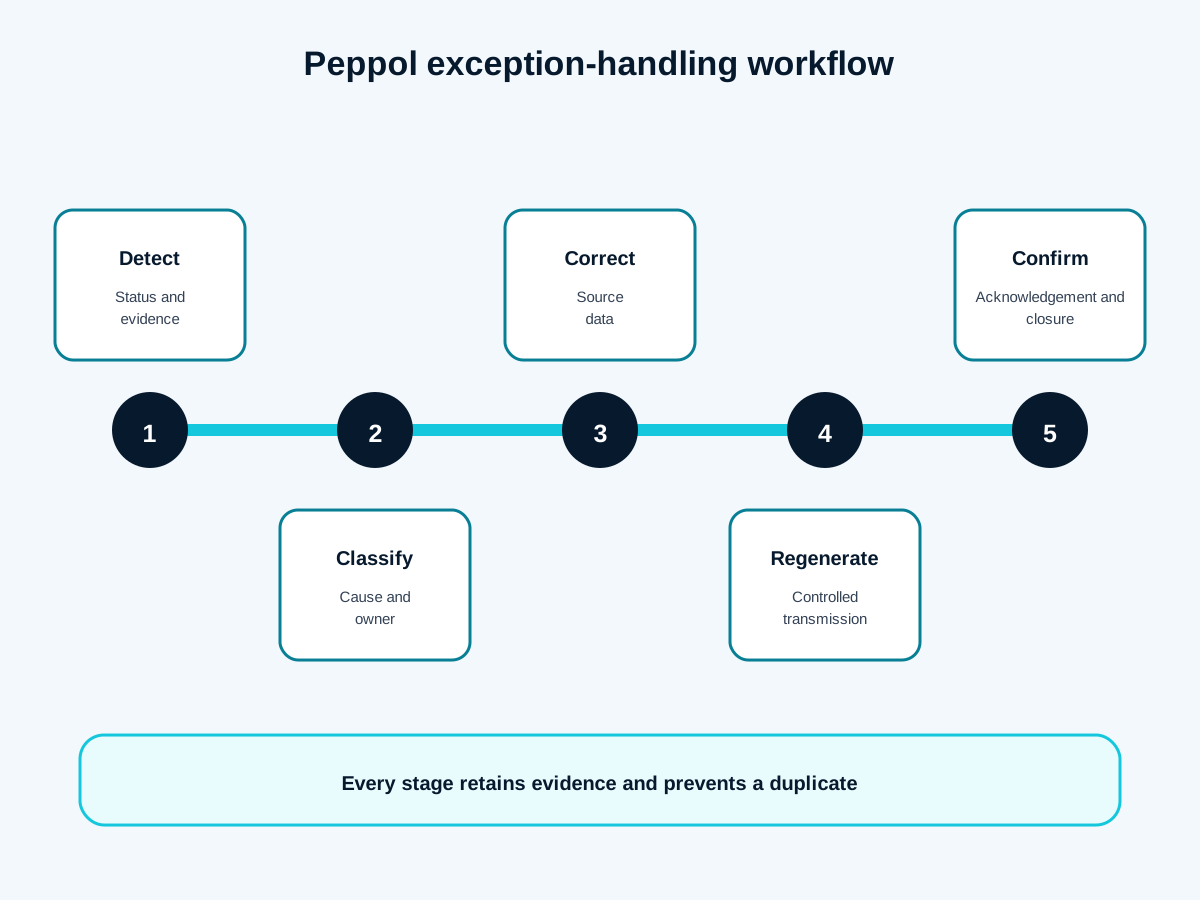
The safe sequence involves five decisions: confirm the status of the first submission, qualify the cause, correct the source, generate a new compliant document according to the chosen process, then check the acknowledgement. If the invoice was never delivered and remains editable according to your procedure, correcting and issuing a new one may be appropriate. If it has been received or posted, cancellation, a credit note or corrective document must be decided by the finance function.
Avoid parallel numbers created solely to “try”. Link every new submission to the incident and original document. Record in the ticket who confirmed the absence of a duplicate and which evidence closes the action. Screen labels vary: the runbook should describe expected outcomes, not a fragile sequence of clicks. GVISION also recommends four-eyes control for sensitive amounts or corrections to tax data.
Handle incoming exceptions as well
Received invoices can be technically valid while still failing in the internal process: unrecognised supplier, missing order, unknown cost centre or amount discrepancy. Separate Peppol validation from business reconciliation. The former checks structure and transmission; the latter decides whether the organisation can record, allocate and approve the expenditure.
Create an incoming exception queue with reason, owner and deadline. Finance manages accounting data, procurement the order, the requester the service and IT the integration. Do not place all problematic invoices in a personal mailbox. A shared queue or tracking board prevents an absence from blocking payment. The response to the supplier should cite a usable reference without unnecessarily exposing personal data.
Automate without hiding errors
Useful automation detects, routes and documents; it does not turn every error into an automatic resend. Trigger an alert when a status remains stuck, when the same code repeats or when the volume of exceptions exceeds a defined threshold. Enrich the ticket with the company, partner, document ID, likely category and evidence link. No secret or complete XML should be distributed through an overly broad channel.
An approach tobusiness process automation can synchronise Odoo, a ticketing tool and a management dashboard. GVISION favours explainable rules: every automated action has a condition, a log and an escalation path. Start with repetitive, low-risk cases, then measure false positives before automating a data correction or reissue.
Assign roles and escalation levels
A robust process names four roles. The business owner decides on the reality of the transaction. Finance validates the accounting and tax treatment. The application administrator controls configuration, data and integrations. The provider or access point intervenes when the evidence indicates a transport or technical compliance issue. For each error family, specify who analyses, who corrects, who approves and who informs the customer.
Also define priorities. An isolated invoice without an immediate deadline does not have the same impact as a block on all invoices at the end of a period. Use volume, value, deadline, customer and duplication risk. The escalation package should contain a minimal reproducible case, never simply “Peppol does not work”. This speeds up external support and avoids exchanges of contradictory screenshots.
Test before and after every change
Build a small scenario catalogue: simple invoice, multiple rates, discount, credit note, purchase order reference, affected foreign customer, partner not found and rounding edge value. The scenarios should reflect your real flows without using personal data from production. When the provider offers a test environment, verify what it actually simulates; a successful test does not guarantee registration of the real recipient.
After an Odoo, module or connector update, replay the critical scenarios. Compare the generated document, statuses and reconciliation. Record the version, date and result. Also test permissions: a user should see enough information to act without being able to modify tax data or resend an invoice outside their role.
Manage exceptions with a small set of indicators
Track the number of rejections per hundred documents, distribution by cause, median qualification time, resolution time, reopening rate and number of duplicates avoided or detected. These indicators are intended to improve data and processes, not to penalise teams. An overall rate can conceal the fact that one connector, customer or entity generates most of the incidents.
Review trends weekly at the beginning, then adjust the frequency. Recurring errors should lead to action on the root cause: input rule, pre-submission check, integration correction or training. Also maintain a list of statuses without a clear resolution path. It feeds documentation and requests to the provider. Do not publish a target timeframe without real support capacity and without distinguishing technical incidents from business decisions.
Implement the runbook in 30 days
In the first week, inventory statuses, available evidence, frequent partners and roles. In the second, create the cause taxonomy and ticket model. In the third, test five scenarios and document correction, resending and escalation. In the fourth, activate simple alerts, train finance and support, then measure the first exceptions. A short, used runbook is better than an exhaustive manual that nobody consults.
Common errors are known: resending before checking, modifying the XML instead of the source, confusing delivery with approval, sharing sensitive data through a public channel, closing without evidence, or automating a risky reissue. Review the process after every significant incident and each software change. On 7 April 2026, the federal portal announced the end of the general tolerance period; exceptional technical difficulties are reviewed individually, which reinforces the value of dated evidence.
Frequently asked questions
Is an invoice that is “sent” necessarily received?
No. Check the transport status and available acknowledgement; initiating a submission does not establish delivery.
Can you simply resend the same invoice?
Only after establishing the status of the first submission and the risk of duplication. The procedure also depends on whether accounting processing has already taken place.
Should you modify the XML directly?
No, not in normal operation. Correct the source data and let the application regenerate a traceable document.
Does a Peppol rejection mean that Odoo is down?
No. The cause may be partner data, a validation rule, a transport incident or a business requirement.
What should be retained in the ticket?
Identifiers, timestamps, exact status, code and message, environment, action, approval and final evidence.
When should a credit note be issued?
The decision depends on the legal and accounting status of the document. Finance or the accountant must approve it.
Can resending be automated?
Only for precisely defined, low-risk cases, with duplicate checking, logging and escalation.
Conclusion: Turn Rejection into a Controlled Process
A well-handled rejection becomes an improvement to data, controls or integration. The expected outcome is not merely a “green” invoice, but understandable evidence, an owner and prevention of recurrence. To turn this runbook into Odoo, ticketing and responsibility flows adapted to your organisation, you can scope your exception handling with GVISION.