



French
Business Applications · Belgium · 2026 Practical Guide
Migrating to Odoo with Peppol without interrupting invoicing in Belgium
Odoo Peppol Belgium migration: an electronic invoicing cutover must remain uninterrupted. An invoicing migration is no longer simply a matter of transferring customers and products. Since the introduction of mandatory structured electronic invoicing in Belgium, you must also preserve Peppol addressing, number continuity, VAT rules, attachments, statuses and the accountant’s workflow. Here is a controlled cutover method for self-employed professionals, companies, groups, ASBLs and Belgian organisations.

Why is an Odoo–Peppol migration sensitive in 2026?
Because the legal channel and business software are now closely linked. Since 1 January 2026, structured electronic invoices have been mandatory for most domestic B2B transactions between Belgian VAT-registered businesses. The official portal explains that these documents are exchanged via Peppol between applications; a PDF remains a readable representation, but not the expected structured flow.
An inadequately prepared migration can therefore create several disruptions at once: a document that cannot be validated, a customer that cannot be found, a Peppol registration still linked to the old provider, an invoice received in the wrong mailbox, an accounting duplicate or a missing proof of delivery. Treating these as a simple email incident slows down diagnosis.
The Peppol network is decentralised. The official Belgian website states that delays may occur between the sender’s and recipient’s service providers, their software and their internal processes. It does not guarantee instant delivery; when the delay exceeds one working day, the software provider must be able to trace the technical chain. An escalation procedure is therefore a project deliverable, not a detail to decide after an incident.
Odoo documents the creation of structured invoices, Peppol registration and Belgian features in version 19. Choosingan Odoo implementation adapted to Belgian processes does not, however, remove the need to validate your data, roles and specific cases. The ERP provides the mechanism; the organisation must define the correct way to use it.
What should you map before changing the configuration?
Follow an invoice from creation through to archiving. The inventory describes the systems, people and exceptions. An application list does not show who approves an invoice, how the accountant retrieves it, or where an error becomes stuck.
The outgoing flow
Document the origin of the invoice: order, contract, timesheet, subscription, delivery, till transaction or manual entry. Then note who checks the customer, VAT rate, purchase reference, due date and bank account. Finally, identify the current channel, when the legal number is assigned, the status considered as delivered and the follow-up procedure.
The incoming flow
Record the mailbox or journal receiving purchases, reconciliation rules, approver, cost centres and transmission to the accountant. A correctly configured Peppol receipt can still fail operationally if nobody monitors drafts, duplicates, invoices without purchase orders or disputed amounts.
Cases that do not follow the standard path
List credit notes, advance payments, recurring invoices, self-billing, international sales, public-sector customers, non-VAT-registered customers and corrections after validation. Add essential attachments: service reports, timesheets, minutes or contractual supporting documents. The Belgian obligation applies to transactions covered by the rule; your organisation will often retain several scenarios and must know which one to apply.
Hidden dependencies
Check bank exports, e-commerce, CRM, till, stock, payroll, consolidation and reporting connectors. Note any automations that use an internal identifier, journal name or status. A successful migration can break a dashboard or follow-up process if these dependencies are not inventoried.
How should you define the right Odoo and Peppol scope?
Deploy the smallest scope that covers a complete financial cycle. It must allow you to create, send, receive, correct, post and retrieve a document. A pilot limited to the invoice creation screen creates a false impression of readiness.
Decide whether Odoo becomes the primary accounting system, an invoicing tool connected to accounting software, or a business layer feeding another system. This decision determines where numbers, taxes, entries, payments and supporting documents are stored. Avoid having two “master” systems for the same object: when both can modify the customer or invoice, discrepancies are inevitable.
In a group, treat each legal entity as a separate control unit. Odoo supports multiple companies in a single database, with some data shared and other data kept separate. This flexibility requires permissions, journals, taxes, bank accounts and registrations to be correctly assigned. Test with a user who should only see one company; a global administrator will not reveal separation issues.
Also define the role of the Peppol provider. The Belgian portal describes access points as providers that connect organisations and public administrations to the network. If the company is already registered elsewhere, do not assume that a second activation will automatically replace the first. Request the migration procedure, deregistration responsibilities, effective date and handling of documents in transit.
Which data should be cleaned before the migration?
Clean identities first, then tax rules and finally catalogues. Master data errors are repeated on every invoice and are more costly to correct after the cutover.
Companies and contacts
- company number and VAT number in the designated fields, without confusing them with free text;
- legal name, country, billing address and communication language;
- Peppol ID or information allowing the software to find the participant;
- buyer reference, purchase order number or responsible cost centre where contractually required;
- operational contact for resolving a business rejection, separate from the general billing address.
Taxes, products and units
Validate VAT categories, exemptions, fiscal positions, rounding and accounting accounts with the finance manager or accounting firm. Check the units and line descriptions used in structured documents. An invoice may look correct visually while containing inconsistent structured data; the PDF preview is therefore not sufficient evidence.
Balances and history
Explicitly decide what will be migrated: active records, open invoices, unreconciled payments, complete history or read-only archives. For many organisations, importing balances and keeping the old system available for consultation is less risky than recreating years of entries. The decision must meet legal, accounting and operational requirements and be documented with the cut-off date.
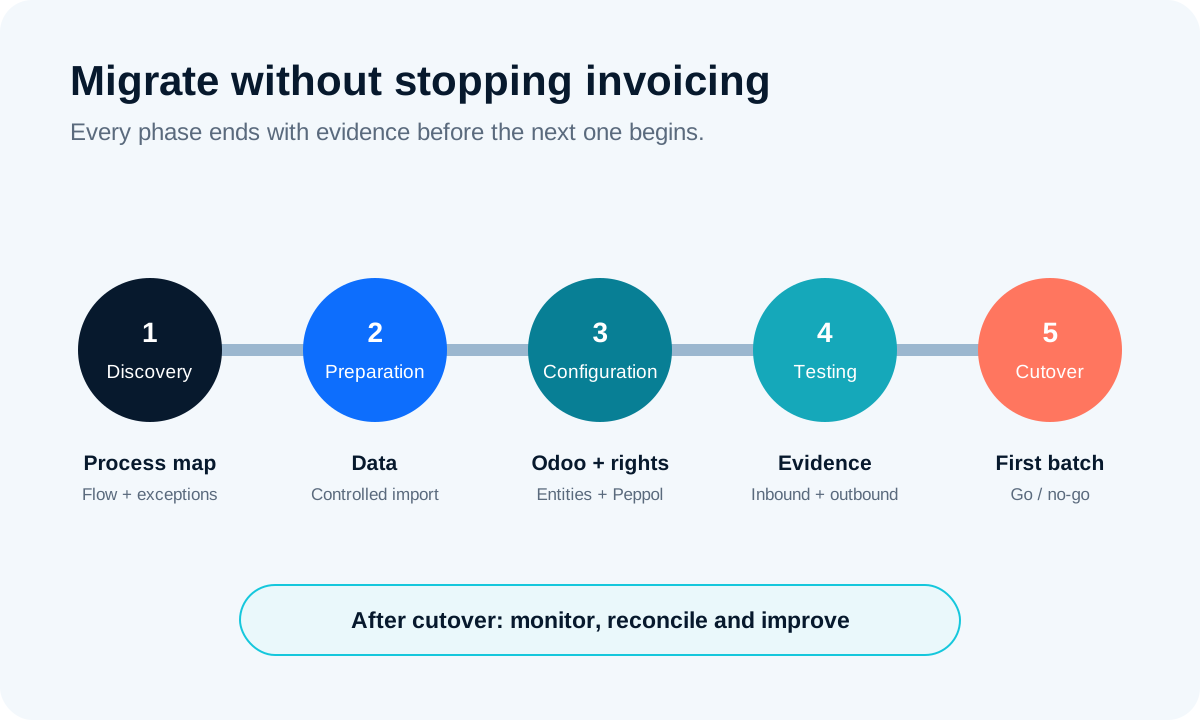
What are the five phases of an uninterrupted migration?
A reliable cutover moves from evidence to production. Each phase has a verifiable outcome and an exit criterion. Moving to the next stage based on an impression increases risk.
| Phase | Objective | Expected evidence | Advantage | Limitation / risk |
|---|---|---|---|---|
| 1. Discovery | Understand the current flow and exceptions | Mapping approved by finance, IT and the accountant | Reveals dependencies | May underestimate undocumented practices |
| 2. Preparation | Clean data and rules | Import report with no critical anomalies | Reduces recurring rejections | Requires business decisions |
| 3. Configuration | Configure companies, journals, taxes, permissions and Peppol | Configuration review and role separation | Stabilises the technical foundation | A correct configuration does not prove the complete flow |
| 4. Testing | Execute incoming and outgoing scenarios | Signed results, proof of receipt and closed issues | Turns assumptions into evidence | An incomplete sample leaves blind spots |
| 5. Cutover | Switch systems and monitor | Reconciliation of the first batch and active support | Limits disruption | Requires availability and rapid decisions |
| Best choice according to the need | Keep the five phases; only adjust their depth according to volume, number of entities and integrations. | |||
Mobile reading
- Discovery: Approved mapping.
- Preparation: Cleaned data and controlled import.
- Configuration: Companies, permissions, journals and channel configured.
- Tests: Incoming, outgoing and correction evidence.
- Cutover: First batch reconciled and enhanced support.
To link these steps to the ERP, CRM, sales or purchasing processes, an overview of business applications integrated by GVISION helps place each data item in the right system rather than multiplying synchronisations.
What should the test plan contain?
The plan must test real anonymised documents or specially created documents, in both directions. A successful test is not limited to the absence of an error message: it verifies structured content, delivery, integration and accounting treatment.
Minimum outgoing scenarios
- standard domestic invoice with a usual VAT category;
- multiple lines, discounts or charges, with totals and rounding checks;
- customer requesting a reference or purchase order number;
- credit note linked to an invoice;
- business attachment useful for processing;
- recipient not found or deliberately incorrect data to verify the error and escalation process.
Minimum incoming scenarios
Have a test invoice sent by a partner or through an environment intended for this purpose. Check the recipient company, journal, supplier, taxes, duplicate detection, readable document, approval workflow and export to accounting. Add an invoice without a purchase order if your organisation accepts this, as well as a document intended for another group entity to test isolation.
Evidence to retain
For each test, retain the scenario ID, date, company, expected result, observed status, evidence at the sender and recipient ends, issue and decision. Screenshots alone are fragile; also export available logs or technical references without exposing sensitive data.

How should you organise the cutover day?
Day one must be short, sequenced and reversible until no legal invoice has been sent. Plan a low-volume window, inform the teams and prohibit master data changes during the final copy.
- Close the current batch. Identify drafts, validated but unsent invoices, documents in transit and unprocessed purchases.
- Export the evidence. Retain balances, sequences, open lists, statuses and parameters required for reconciliation.
- Freeze changes. Set a time from which customers, products, taxes and accounts can no longer be changed in the old system.
- Import the delta. Load only data that is new or has changed since the dress rehearsal, then check the totals.
- Activate according to the procedure. Transfer or activate the Peppol registration at the agreed time with the provider or providers.
- Send a small batch. Start with known and available recipients to confirm receipt.
- Decide. The business owner authorises the full rollout only when the criteria have been met.
The rollback plan must specify the last point at which the old system can resume without duplicate numbering or duplicate sending. Once legal documents have been issued from the new system, “rolling back” often becomes an accounting correction process rather than a technical restoration. Decision-making authority must therefore be assigned to a named owner.
What should you monitor during the first few weeks?
Monitor volumes, delays, rejections and accounting discrepancies every day during the initial phase. Most migrations do not stabilise after a single test; they stabilise when the first real-world variations successfully pass through the flow.
- number of invoices created, sent, delivered, rejected and still being processed;
- purchases received by company and supplier, including duplicates;
- time between validation, issuance, receipt and posting;
- discrepancy between journals, balances, VAT, payments and accountant exports;
- issues by cause: data, parameter, integration, network, provider or procedure;
- user questions revealing a training need or an ambiguous rule.
Hold a 15-minute daily meeting during the hypercare period, with a single log and an owner for each issue. Close an issue only after reproduction, correction and retesting. A temporary manual workaround must have an expiry date; otherwise, it becomes a permanent parallel process.
Which errors most often compromise a migration?
The most dangerous errors are decisions that have not been made explicit. They result in two active systems, unclear responsibilities and late corrections.
Activating Peppol too early
Activation before testing can redirect purchases to an environment that nobody monitors. Set the effective date, mailboxes to monitor and support contact before activation.
Testing only the PDF
The PDF does not reveal all structured values. Compare the data imported by the recipient: references, taxes, totals, dates, bank account and company.
Importing the entire history without a need
A comprehensive migration increases delays and discrepancies. Define the operational value of each period. A reliable read-only archive may be preferable to an uncertain reconstruction.
Confusing compliance with a sound process
A technically valid invoice may be rejected by the buyer because of a missing reference or a commercial dispute. Document the handling of business rejections, credit notes and disputes.
Forgetting access rights and role separation
Test what the issuer, approver, accountant, administrator and auditor can see. In a multi-company database, verify restrictions using representative accounts.
Odoo Peppol Belgium migration: frequently asked questions
Is a PDF sent by email still sufficient for a Belgian B2B invoice?
For transactions covered by the Belgian obligation since 1 January 2026, the expected document is a structured electronic invoice exchanged via Peppol. A PDF may remain useful as a readable representation or attachment, but it does not replace the structured message. Check the exceptions with your tax adviser.
Do all historical invoices need to be migrated to Odoo?
Not necessarily. Determine what is required for continuity: balances, open documents, unreconciled payments and useful history. The old system can sometimes remain available in read-only mode for archiving. The method must be approved by finance and comply with retention obligations.
Can Peppol be tested before going live?
Odoo documents a demonstration mode and testing options depending on the configuration. Organise the tests with your integrator and provider so that you do not confuse the test environment with the production registration. The final evidence must include a controlled end-to-end exchange.
How much time should be allowed for the cutover?
The duration depends on the number of entities, data quality, integrations and tax scenarios. The technical window can be short, but preparation and testing take longer. Do not set the date based on a general estimate: use the results of the cutover rehearsal.
What should you do if an invoice is sent but not received?
Check the exact status, recipient ID, issuing company and software logs. Ask the recipient to check their system. The official Belgian website indicates that temporary delays are possible; beyond one working day, contact the software provider to identify where the process is blocked.
How should multiple companies be managed in Odoo?
Define companies, permissions, journals, taxes, accounts and responsibilities separately. Test issuance and receipt for each entity, as well as isolation using non-administrator users. Shared data should be deliberately selected, not inherited without control.
Who should approve the move to production?
A business owner, generally from finance or management, should accept the residual risks following input from IT, the accountant and the integrator. The criterion is not “the configuration is complete”, but “the critical scenarios have passed and support is ready”.
Odoo Peppol Belgium migration: making the cutover a controlled success
Migrating to Odoo is an opportunity to simplify data, eliminate duplicate entries and clarify the invoice-to-payment cycle. It becomes risky when Peppol registration, testing and responsibilities remain implicit. A five-phase plan, a rehearsal and a controlled first batch help protect continuity while improving the process.
GVISION can scope the flows, configure Odoo, prepare imports and support testing with finance and IT teams. To assess the scope and cutover window, plan a discussion about your migration project.