



Cloud telephony · 2026 decision guide
Teams Phone and Yeastar can replace a traditional PBX, but in different ways. The former puts voice within Microsoft 365. The latter retains a specialised PBX approach. The choice should be based on call flows, users and the expected level of continuity.

Teams Phone and Yeastar: what is the fundamental difference?
Teams Phone turns Microsoft Teams into a telephone system, while Yeastar remains a specialised PBX that can operate independently or integrate with Teams. This architectural difference affects the user experience, administration, endpoints, reception features and the allocation of responsibilities in the event of an incident.
With Teams Phone, telephony joins the environment where many employees chat, organise meetings and view their calendars. Users answer calls from the Teams application on a computer or mobile device, or from a certified phone. To connect to the public telephone network, the organisation chooses a PSTN option: Microsoft Calling Plan where available and appropriate, Operator Connect with a certified operator, Teams Phone Mobile or Direct Routing with an SBC and an operator. Microsoft describes these as distinct options, with different levels of control and complexity.
With Yeastar P-Series, the PBX remains at the heart of routing. It handles extensions, auto attendants, groups, queues, schedules and endpoints. Users can use Linkus, an IP phone, a DECT handset or, depending on the chosen integration, an application embedded in Teams. Yeastar documentation states that its P-Series integration can associate a Teams user with a SIP extension while retaining numbers, SIP devices and PBX features.
The choice is not simply “Microsoft versus Yeastar”. It is a decision between native Microsoft voice, a dedicated PBX or a setup combining both. The GVISION page dedicated to VoIP telephony for Belgian organisations presents these approaches without limiting them to a particular business size.
Teams Phone vs Yeastar: complete comparison
There is no universal winner: Teams Phone simplifies life for teams already using Microsoft 365, while Yeastar provides a more specialised PBX environment. The right choice depends primarily on the importance of digital collaboration compared with telephone handling.
| Criterion | Teams Phone | Yeastar P-Series |
|---|---|---|
| Core approach | Telephony integrated into Microsoft Teams. | Specialised PBX and unified communications. |
| User experience | Calls, meetings, chat, presence and contacts in Teams. | Linkus, web, mobile, IP/DECT phones and Teams integration depending on the setup. |
| Public network access | Calling Plan, Operator Connect, Teams Phone Mobile or Direct Routing. | SIP trunk and operator selected for the PBX. |
| Reception and routing | Auto attendant, queues and resource accounts configured in Teams. | IVR, queues, groups, schedules and Call Flow Designer in the PBX. |
| Endpoints | Teams clients and compatible/certified devices depending on the scenario. | Wide range of SIP phones, DECT devices, Linkus clients and mixed scenarios. |
| Integrations | Strong alignment with Microsoft 365, Entra and Teams. | CRM and business tool integrations, plus documented Teams integration. |
| Administration | Teams Admin Center, policies, numbers and resource accounts. | PBX console for extensions, trunks, routing, endpoints and reporting. |
| Costs | Teams Phone licences, PSTN option, operator, devices, project and support; pricing depends on the contract. | PBX licence/subscription, potential hosting, SIP trunk, devices, project and support; pricing depends on the quotation. |
| Typical advantage | A single everyday interface for Microsoft 365 employees. | Greater telephony depth and equipment flexibility. |
| Typical limitation | PSTN design and licence governance can become complex. | An additional platform must be administered and adopted. |
| Best choice according to the need | Hybrid and office-based teams already highly active in Teams. | Reception, sales, customer service, operational sites and mixed telephone estates. |
Quick read on mobile
Teams Phone: prioritise it when Teams is already the central work interface and the aim is to reduce application switching.
Yeastar: prioritise it when reception, queues, SIP/DECT devices, shared phones or routing rules determine the project.
Both: consider an integrated scenario if some profiles want Teams while others require PBX features or specialised endpoints.
When is Teams Phone the best choice?
Teams Phone is generally the most coherent choice when Microsoft Teams is already the daily communications platform for most users. It then reduces the gap between messaging, meetings and external calls, while giving IT a communications policy linked to Microsoft identities.
An organisation centred on Microsoft 365
Professional firms, headquarters, sales teams, national associations and service groups already accustomed to Teams can build on a familiar tool. Presence, contacts and calendars are all part of the same environment. This does not eliminate training, but it reduces the number of clients that need to be explained to office users.
Hybrid or mobile employees
A business number accessible from a computer and smartphone suits profiles that alternate between the office, home, travel and meetings. Policies, the client and identity follow the user. However, mobile notifications, headsets, call transfers and emergency calls must be validated: a promise of mobility never replaces testing on the networks actually used.
An already structured cloud governance model
Teams Phone is more compelling when the company already manages Entra ID, groups, licences and account lifecycles. Auto attendants and queues rely on resource accounts. Microsoft specifies that each must receive a Teams Phone Resource Account licence, even when it is provided at no cost.
When is Yeastar the best choice?
Yeastar is often better suited when telephony is a fully fledged operational process, with reception, queues, schedules, shared devices or business integrations. The PBX then becomes a specialised routing engine rather than a feature added to the collaboration tool.
A demanding reception or customer service operation
A reception team handles transfers, overflow, absences, multiple languages and sometimes multiple sites. A support or appointment-booking team wants to view queues, identify abandoned calls and adapt routing to schedules. These scenarios should be designed as call flows, with a business owner and a fallback solution.
A mixed endpoint estate
Schools, healthcare facilities, warehouses, shops, workshops or residential sites may combine fixed phones, DECT, common-area phones, smartphones and softphones. SIP flexibility and PBX management become important. However, each model, firmware version, feature and provisioning method must be checked; “SIP compatible” does not guarantee an identical experience.
Integrations with CRM or business applications
Yeastar documents integrations with several CRMs and a custom-model approach. The value is not in displaying more logos, but in triggering the right workflow: recognising the caller, opening their record, logging the activity, adding a note and avoiding duplicate data entry. Before deciding, choose two or three scenarios to demonstrate end to end.
The page GVISION Yeastar Cloud PBX details the clients, unified communications features and contact centre use cases offered within this ecosystem. Use it as a commercial starting point, then have the exact features of the quotation and selected edition confirmed.
Do you really have to choose between Teams Phone and Yeastar?
No: a hybrid scenario can give Teams to employees who want it while retaining Yeastar as the PBX core for advanced telephony requirements. However, this combination is only worthwhile if it solves a real problem; it should not become a free-for-all of licences and responsibilities.
Yeastar documentation presents two integration approaches that should be distinguished. The Linkus application can be embedded in Teams, allowing users to control their PBX extension from the Teams interface without a Teams Phone licence under this model. Other architectures rely on Direct Routing and an SBC. These setups do not have the same prerequisites, costs, features or support responsibilities.
A hybrid model can serve a headquarters using Teams and operational sites using a PBX. However, two clients, two voicemail systems and two histories without clear rules create more complexity than value.
The four questions to ask
- Which platform owns the number and controls inbound routing?
- Which client manages presence, voicemail and call history?
- Who diagnoses a degraded call between the LAN, operator, PBX, SBC and Microsoft?
- What is the fallback process if Teams, the PBX or the primary connection is unavailable?
What Belgian considerations should be included in the project?
In Belgium, the technical selection must include number portability, emergency call handling, caller ID and protection against spoofing. These are service and operator requirements, not boxes to tick after the migration.
Numbers and portability
Inventory main and direct numbers, legacy fax lines, intercoms, alarms, lifts and emergency lines. Check the contractual holder, address, portability schedule and rollback plan.
Emergency calls and location
VoIP mobility makes caller location more complex. Document sites, presented numbers, rules for remote workers and update responsibilities. Test procedures with the operator without making unauthorised emergency calls. The aim is for the technology to reflect operational reality.
Caller ID and anti-spoofing
IBPT notes that the Royal Decree of 12 May 2024 requires certain international calls displaying a Belgian number to be blocked, with an exception for legitimate uses. A call centre, employees abroad or infrastructure hosted outside Belgium must therefore validate number presentation with their operator rather than assume it will work everywhere.
Recording and personal data
If calls are recorded or transcribed, define the purpose, information provided, access, retention and security. A feature being available does not automatically mean it is permitted; involve the data protection officer where necessary.
How can you compare total cost without inventing a per-user price?
Compare a three-year total cost using the same assumptions, because an isolated licence price covers neither the operator, endpoints, migration nor support. Pricing varies according to country, edition, partner, volume and contract, so it must be verified when the quotation is prepared.
For Teams Phone, separate the existing Microsoft 365 licence, any Teams Phone add-on, PSTN connectivity, operator service, SBC or Direct Routing service, numbers, devices, project and operation. For Yeastar, separate the PBX edition and hosting, extensions, SIP trunk, options, endpoints, integration, project and support.
Add the cost of change: inventory, configuration, training, coexistence and start-up assistance. Only count demonstrable savings, such as a contract actually cancelled or measured management time.
Classify the model into four lines: recurring costs, one-off costs, operational risk and measurable value. This framework keeps offers comparable without turning an assumed saving into a certainty.
How can you migrate without losing calls?
A reliable migration follows eight steps: inventory, call flows, architecture, pilot, user preparation, portability, hypercare and measurement. Number porting is only the middle of the project.
- Take stock: contracts, numbers, trunks, devices, sites, queues, announcements, schedules and dependencies.
- Map the call flows: main number, direct number, overflow, closure, emergency, transfer and callback.
- Segment the profiles: reception, management, knowledge workers, field workers, shared phones, contact centre and administrators.
- Choose the architecture: native Teams, Yeastar, embedded integration or Direct Routing, with responsibilities documented.
- Drive: one site and varied profiles, including reception and a mobile user.
- Prepare: network, QoS where relevant, headsets, endpoints, documentation, licences and training.
- Port and monitor: controlled window, test numbers, reachable team and rollback plan.
- Measure: missed calls, abandonment, quality, tickets, adoption and satisfaction after two and then six weeks.
The pilot must include inbound and outbound calls, transfers, queues, schedules, voicemail, mobile, direct numbers and failure scenarios. A test between two internal extensions is not enough.
What mistakes should be avoided?
Failures rarely result from a lack of features; they come from untested assumptions about usage, the network and responsibilities. Here are the most common mistakes.
- Choosing based on habit: “we have Microsoft 365” or “we have always had a PBX” is not an analysis.
- Comparing two incomplete prices: a price excluding PSTN, trunk, support or migration is not comparable.
- Forgetting reception: the needs of a receptionist differ from those of an employee who makes three calls a day.
- Neglecting the network: Unstable Wi-Fi, double NAT, lack of monitoring or a single connection weaken both platforms.
- Assuming compatibility: test every headset, phone, DECT device, intercom and essential integration.
- Porting too early: the number should only be ported after routes and fallback procedures have been validated.
- Having too many owners: an incident should not become an endless exchange between the operator, integrator and vendor.
- Training only IT: reception, managers and mobile users need tailored scenarios.
What decision matrix should be used?
Weight the criteria according to your use cases and require evidence for every score. A matrix does not replace the pilot, but it prevents the most visible criterion from overshadowing the others.
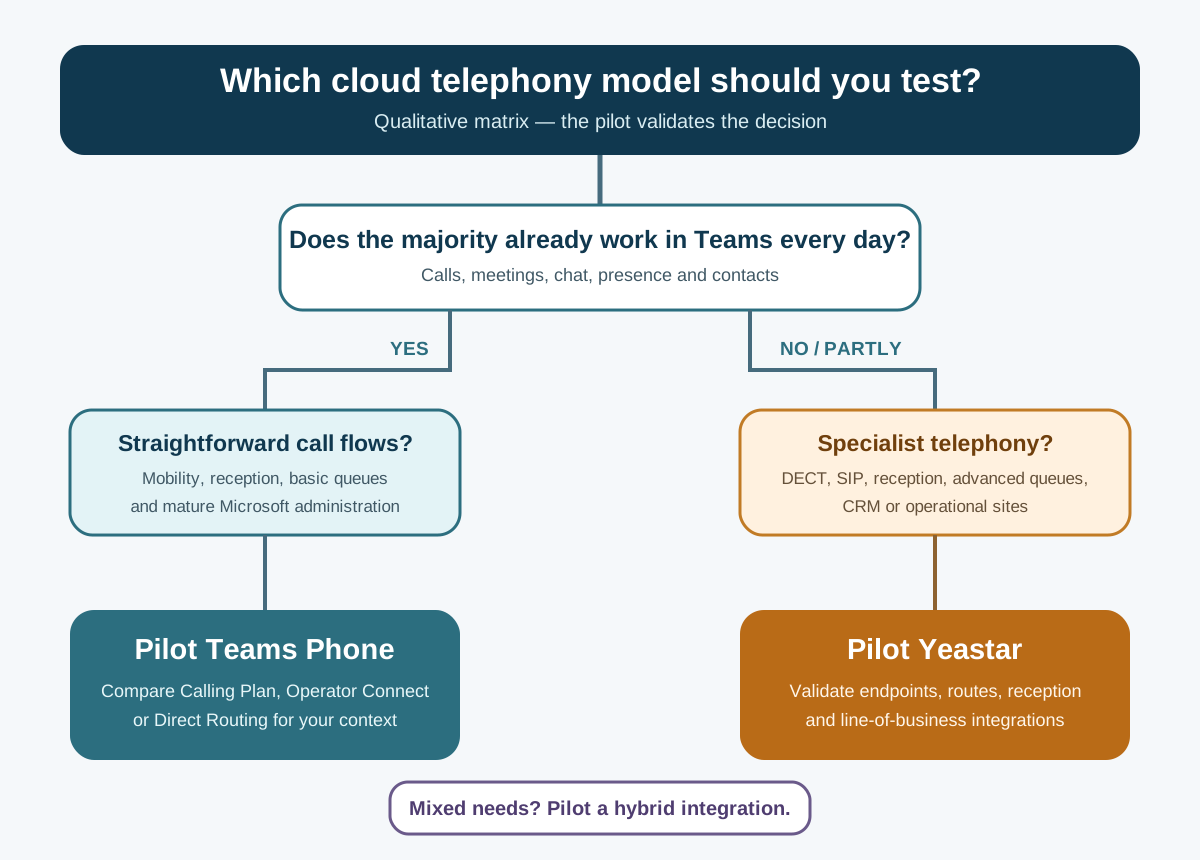 Qualitative matrix: start with the profiles and validate the selected solution through a pilot. GVISION illustration.
- Score the use of Teams, reception, mobility, endpoints, integrations, continuity and administration from 1 to 5.
- Score each architecture using a demonstration, documentation or test as evidence.
- Analyse exclusion criteria separately, then pilot the highest-scoring solution before number porting.
FAQ: Teams Phone or Yeastar in Belgium
Does Teams Phone completely replace a PBX?
Yes, Teams Phone can provide the functions of a cloud telephone system, including auto attendants and queues. However, PSTN connectivity, numbers, resource accounts, policies and continuity must be selected and configured. Some specialised environments may prefer to retain a PBX or use a hybrid integration.
Can Yeastar be used directly in Microsoft Teams?
Yes. Yeastar documents a P-Series integration that embeds Linkus in Teams and associates users with PBX extensions. Other setups use Direct Routing. Check the edition, licences, features and exact call path with the integrator before comparing costs.
Which solution is suitable for a multi-site organisation?
Both can be suitable. Teams Phone is coherent if sites already use Teams and shared Microsoft policies. Yeastar is attractive if sites combine reception areas, DECT, shared phones or local routing. Internet redundancy, numbers, emergency services and site-level support are decisive.
Do all desk phones need to be replaced?
Not necessarily. The choice depends on compatible devices, firmware, provisioning and usage. Some users may prefer a headset and softphone; others need an IP or DECT phone. Inventory and test critical models before planning to retain them.
Does Teams Phone include external calling?
Teams Phone provides the telephone system, but calls to the public network require a compatible PSTN option, such as Calling Plan, Operator Connect, Teams Phone Mobile or Direct Routing. Availability, numbers and terms depend on the country, operator and contract.
Which solution is the cheapest?
There is no reliable answer without a defined scope. Compare licences, operator, trunks, any SBC, endpoints, hosting, migration, integrations and support over three years. Use current Belgian quotations and the same user profiles.
How long should be allowed for the migration?
The duration varies according to the number of sites, numbers, devices, queues and integrations. A serious project allows time for inventory, piloting, portability and post-cutover support. The portability date should only be set after critical tests have been completed.
Conclusion: choose a call flow, not just a platform
Teams Phone is an excellent extension of a mature Microsoft 365 environment; Yeastar is a solid cloud PBX for organisations where specialised telephony is central to operations. Between the two, an integrated model can meet the needs of different user groups. The best architecture is the one that makes reception, everyday calls and continuity simpler to operate.
GVISION can map your profiles, check the network and endpoints, compare architectures and organise a pilot before number porting. To turn this comparison into a priced and testable Belgian scenario, present your telephony project to the GVISION team.